
Mazda CX-5 Service & Repair Manual: Cargo Compartment Light
Purpose
-
The cargo compartment light illuminates the cargo room interior when the liftgate is opened.
Function
-
When the liftgate is opened, illuminates by the cargo room light switch turning on.
Construction
-
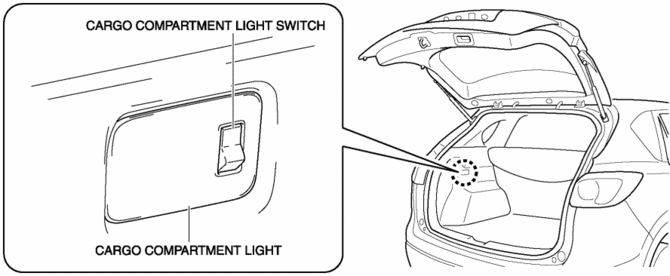
The cargo room light is installed to the trunk side trim.
Operation
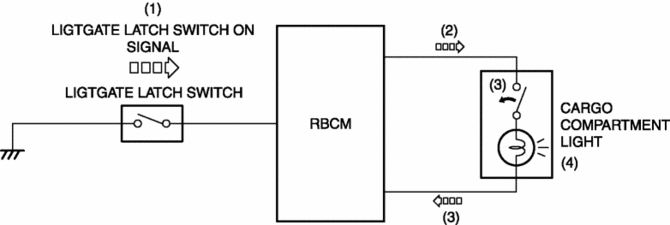
1. When the liftgate opens, the liftgate latch switch turns on and a liftgate light switch on signal is input to the rear body control module (RBCM).
2. When the rear body control module (RBCM) inputs the liftgate latch switch, electric current flows to the cargo room light.
3. When the cargo room light switch turns on, electric current flows to the cargo light bulb.
4. When electric current flows to the cargo room light bulb, the cargo room light bulb illuminates.
Fail-safe
-
Function not equipped.
 Auto Light System
Outline
The auto light system automatically turns the TNS and headlights on/off according
to the illumination level above and in front of the vehicle.
The auto light system is contro ...
 Cargo Compartment Light Bulb Removal/Installation
1. Disconnect the negative battery cable..
CAUTION:
Always disconnect the negative battery cable before performing the cargo
compartment light bulb removal. Otherwise, the circuit may be ...
Other materials:
Rear Door Speaker Inspection
1. Disconnect the negative battery cable..
2. Remove the rear door trim..
3. Disconnect the rear door speaker connector..
4. Verify that the resistance between the rear door speaker terminals is as indicated
in the table.
If not as indicated in the table, replace the rear door sp ...
Blind Spot Monitoring (Bsm) Control Module
Purpose
Controls the blind spot monitoring (BSM) system.
Function
The BSM control module emits microwaves to detect an oncoming vehicle's position
and speed information via the reflected microwaves.
The BSM system is controlled based on the detected vehicle positio ...
Awd Solenoid Inspection
1. Disconnect the negative battery cable.
2. Disconnect the AWD solenoid connector.
3. Measure resistance between AWD solenoid connector terminals A and B.
If the resistance is not within the specification, replace the coupling unit.
AWD solenoid resistance
2.2—2.7 oh ...
