
Mazda CX-5 Service & Repair Manual: Bumper Stiffener Lower Removal/Installation
1. Disconnect the negative battery cable..
2. Remove the following parts:
a. Seal board upper.
b. Front bumper.
c. Seal plate.
d. Front under cover No.1.
3. Remove bolts A.
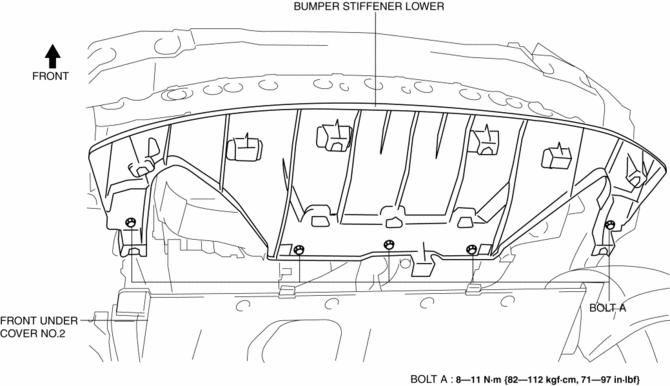
4. Pull the bumper stiffener lower in the direction of the arrow (1), (2) shown in the figure, detach hooks B.
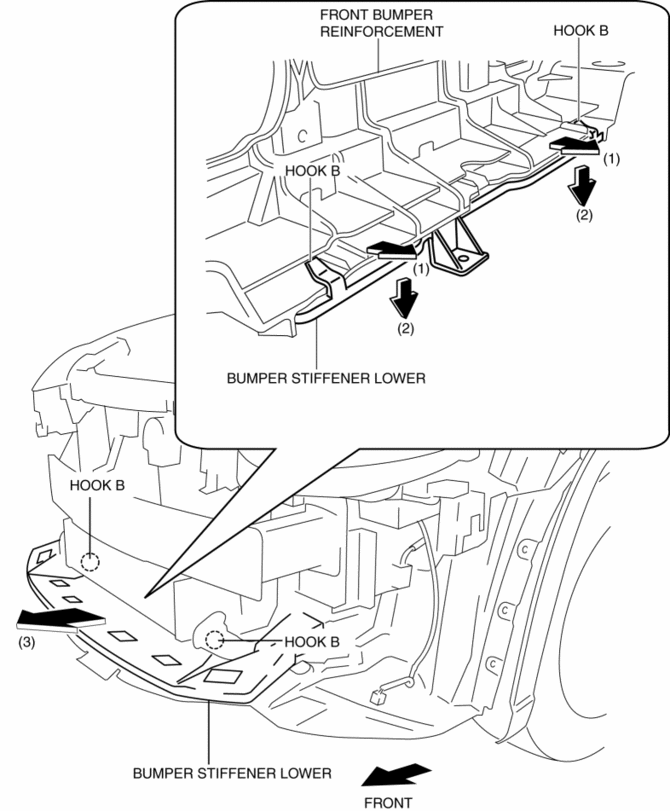
5. Remove the bumper stiffener lower in the direction of the arrow (3) shown in the figure.
6. Install in the reverse order of removal.
 Bumper Slider Removal/Installation
Front Bumper Slider
1. Disconnect the negative battery cable..
2. Remove the seal board upper..
3. Remove the front bumper..
4. Remove bolts A.
5. Pull the front bumper slider in the dire ...
 Center Under Cover Removal/Installation
1. Lift up the vehicle.
2. Remove the floor under cover..
3. Remove bolts.
2WD
AWD
4. Remove the center under cover.
5. Install in the reverse order of removal. ...
Other materials:
Sas Control Module Removal/Installation [Standard Deployment Control System]
WARNING:
Handling the SAS control module or air bag module improperly can accidentally
deploy the air bag modules and pre-tensioner seat belts, which may seriously
injure you. Read the air bag system service warnings and cautions before handling
the air bag module..
If the c ...
Lighting Control
Headlights
• Turn the headlight switch to turn the headlights,
other exterior lights and dashboard illumination on or off.
• A system malfunction or operation conditions
are indicated by a warning.
Refer to Warning/Indicator Lights 5.
NOTE
• If the light switch is left on, the
light ...
Rear Seat
Purpose, Function
The following two types of rear seats have been adopted.
6:4 split-type seat
4:2:4 split-type seat
The following functions have been adopted for the rear seat to protect passengers
during a collision or emergency braking.
...
