
Mazda CX-5 Service & Repair Manual: Back Up Light Switch Removal/Installation [C66 M R]
1. Disconnect the negative battery cable..
2. Remove the front under cover No.2..
3. Remove in the order indicated in the table.
4. Install in the reverse order of removal.
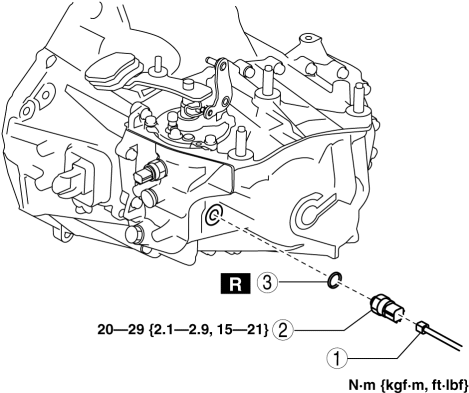
|
1 |
Back-up light switch connector |
|
2 |
Back-up light switch |
|
3 |
Gasket |
 Back Up Light Switch Inspection
1. Disconnect the negative battery cable..
2. Remove the front under cover No.2..
3. Remove the back-up light switch..
4. Verify that the continuity between the back-up light switch terminals is ...
 Bsm Indicator Light Does Not Flash While Under Bsm Indicator Light Flashing
Conditions (With Combination Switch Operation (Turn Signal Switch)) [Blind Spot
Monitoring (Bsm)]
Bsm Indicator Light Does Not Flash While Under Bsm Indicator Light Flashing
Conditions (With Combination Switch Operation (Turn Signal Switch)) [Blind Spot
Monitoring (Bsm)]
Description
BSM indicator light does not flash while under BSM indicator light-flashing
conditions (with combination switch operation (turn signal switch))
...
Other materials:
Oil Seal (Differential) Replacement [Fw6 A EL, Fw6 Ax EL]
Transaxle Case Side
1. Remove the front under cover No.2..
2. Drain the ATF..
3. Disconnect the drive shaft (LH) from the transaxle..
CAUTION:
The oil seal is easily damaged by the sharp edges of the drive shaft splines.
Do not let the splines contact the oil seal.
4. Remove ...
Rear Door Latch And Lock Actuator Inspection
The following actuator and switch are integrated with the rear door latch
and lock actuator.
From the actuator/switch name and operation in the following table, select
the actuator or switch to be inspected, and perform the inspection following
the inspection procedure des ...
Instrument Cluster
Outline
The instrument cluster centrally controls the speedometer, tachometer, odometer/tachometer,
fuel gauge, warning/indicator lights, trip computer, warning sounds and panel
lights.
Function
The instrument cluster displays the following information to notify the user
...
