
Mazda CX-5 Service & Repair Manual: After Service Precaution
WARNING:
-
Fuel line spills and leakage are dangerous. Fuel can ignite and cause serious injuries or death and damage. When installing the fuel hose, perform “Fuel Leakage Inspection” described below.
-
A person charged with static electricity could cause a fire or explosion, resulting in death or serious injury. Before performing work on the fuel system, discharge static electricity by touching the vehicle body.
Fuel Leakage Inspection
Using M-MDS
1. Connect the M-MDS to the DLC-2.
2. Switch the ignition to ON (engine off).
3. Using the simulation function “FP”, start the fuel pump..
4. Verify that there is no fuel leakage from the pressurized parts.
-
Standard
-
There shall be no leakage after 5 min.
5. In the case of fuel leakage, replace the following components and then recheck using the fuel leakage checking procedure.
-
If there is leakage, replace the fuel hoses and clips.
-
If there is damage on the seal on the fuel pipe side, replace the fuel pipe.
Without using M-MDS
1. Disconnect the negative battery cable..
2. Remove the fuel pump relay.
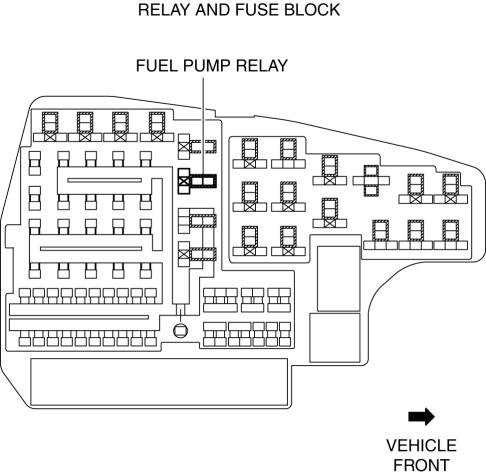
CAUTION:
-
Short the specified terminals because shorting the wrong terminal of the relay and fuse block may cause malfunctions.
3. Using a jumper wire, short fuel pump relay terminals C and D in the relay and fuse block.
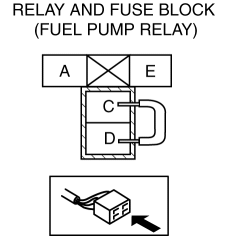
4. Connect the negative battery cable and operate the fuel pump..
5. Verify that there is no fuel leakage from the pressurized parts.
-
Standard
-
There shall be no leakage after 5 min.
6. In the case of fuel leakage, replace the following components and then recheck using the fuel leakage checking procedure.
-
If there is leakage, replace the fuel hoses and clips.
-
If there is damage on the seal on the fuel pipe side, replace the fuel pipe.
 Fuel
Fuel
...
 Before Service Precaution
WARNING:
Fuel vapor is hazardous. It can very easily ignite, causing serious injury
and damage. Always keep sparks and flames away from fuel.
Fuel line spills and leakage from the p ...
Other materials:
Front Fog Light
Purpose
By shining light in a wider area in front of the vehicle than the light from
the headlights, visibility during poor weather conditions, such as rain and
fog, has been improved. In addition, the visibility of the vehicle from on-coming
vehicles, pedestrians, and other people h ...
Auto Leveling Sensor
Purpose
Detects the vehicle height and outputs it to the AFS control module.
Function
Changes the detected vehicle height into a voltage value and outputs it to
the AFS control module.
Construction
Installed to the rear cross member.
Consists of link No. 1 ...
Differential Oil Temperature Sensor
Purpose, Function
The differential oil temperature sensor detects the rear differential oil
temperature based on the resistance of the thermistor, and inputs it to the
AWD CM.
Construction
The differential oil temperature sensor is installed in the rear differential
carr ...
