
Mazda CX-5 Service & Repair Manual: Accelerator Pedal, Kickdown Switch
Purpose, Function
-
The driver's intentions are transmitted to the PCM via the accelerator pedal.
-
Kickdown switch (ATX) (Applied VIN (assumed): JM3 KE2*E*D# 148107?)
-
If the accelerator pedal is depressed carelessly, kickdown control will be implemented based on the accelerator pedal being determined as fully open, and vehicle shock will occur. A kickdown switch has been adopted so that it can be determined that the accelerator pedal is fully open based on the driver’s intention of depressing the accelerator pedal for kickdown.
Construction
-
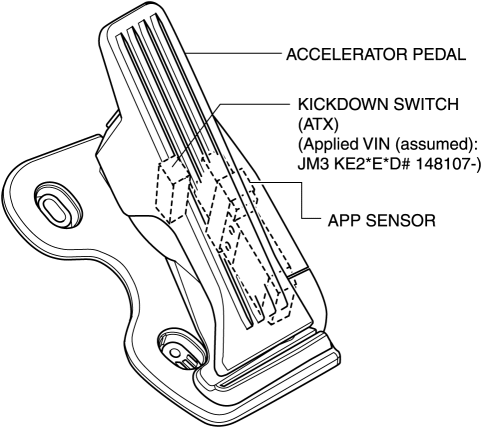
The accelerator pedal has a built-in APP sensor and kickdown switch (ATX).
-
For the APP sensor, refer to CONTROL SYSTEM..
Kickdown Switch (ATX) (Applied VIN (assumed): JM3 KE2*E*D# 148107?)
-
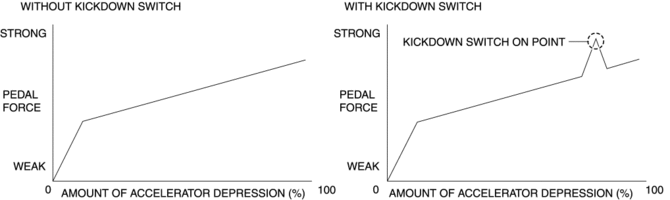
A load can be felt while the accelerator pedal is being depressed and when it is further depressed the kickdown switch turns on.
-
The driver can control the kickdown by knowing the amount of accelerator depression.
-
The kickdown switch is only a measure of the kickdown. An electrical signal is not transmitted by the kickdown switch turning on/off, and vehicle control is not affected.
 Accelerator Pedal Removal/Installation
1. Disconnect the negative battery cable..
2. Remove in the order indicated in the table.
1
APP sensor connector
2
Accelerator pedal
...
 Air Bag Module And Pre Tensioner Seat Belt Deployment Procedures [Standard Deployment
Control System]
Air Bag Module And Pre Tensioner Seat Belt Deployment Procedures [Standard Deployment
Control System]
WARNING:
A live (undeployed) air bag module or pre-tensioner seat belt may accidentally
operate (deploy) when it is disposed of and cause serious injury. Do not dispose
of a live (undepl ...
Other materials:
Map Light Bulb Removal/Installation
Front Map Light
1. Disconnect the negative battery cable..
2. To prevent scratches or damage, affix protective tape to the position shown
in the figure.
CAUTION:
If a flathead screwdriver is inserted into the gap between the front map
light and lens, the front map light could inter ...
Front Body Control Module (Fbcm) Configuration (Using Read/Write Function)
NOTE:
When performing configuration, it is necessary to read the vehicle specification
information from the front body control module (FBCM) before replacing it. Connect
the M-MDS to the vehicle and perform vehicle identification before removing
the front body control module (FBCM). ...
Keyless Antenna [Keyless Entry System]
Purpose
Outputs a request signal and specifies the remote transmitter location.
Function
The keyless antennas output request signals based on the signals from the
start stop unit.
Construction, Operation
Request signals are output by the keyless antenna installed ...
