
Mazda CX-5 Service & Repair Manual: A/C Unit Disassembly/Assembly
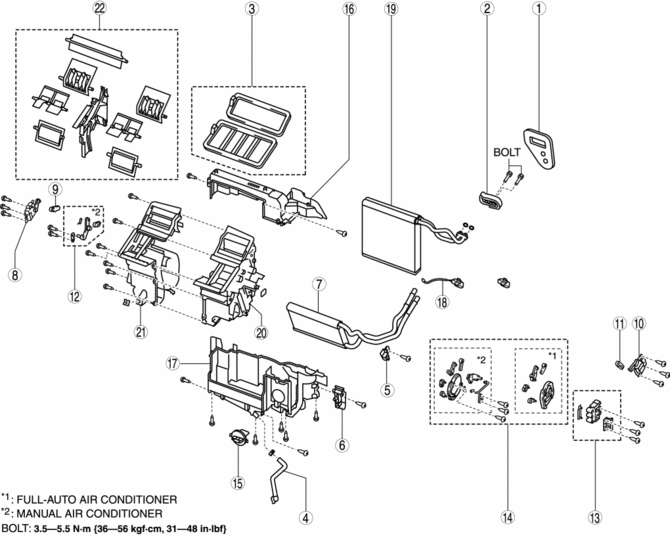
1. Disassemble in the order indicated in the table.
CAUTION:
-
If a non-specified grease is used, it may result in abnormal noise or improper operation of the links. Apply only the specified grease to each link.
2. Assemble in the reverse order of disassembly.
|
Step |
Part name |
Disassembly/assembly of main parts |
||
|
Heater core |
Evaporator temperature sensor |
Evaporator |
||
|
1 |
Polyurethane foam |
? |
? |
? |
|
2 |
Expansion valve |
? |
? |
? |
|
3 |
Adhesive polyurethane |
? |
? |
? |
|
4 |
Drain hose |
? |
? |
? |
|
5 |
Plate (1) |
X |
? |
? |
|
6 |
Plate (2) |
X |
? |
? |
|
7 |
Heater core |
X |
? |
? |
|
8 |
Driver-side air mix actuator (Full-auto air conditioner) |
? |
? |
? |
|
9 |
Driver-side air mix link (Full-auto air conditioner) |
? |
? |
? |
|
10 |
Passenger-side air mix actuator (Full-auto air conditioner) |
? |
? |
? |
|
11 |
Passenger-side air mix link (Full-auto air conditioner) |
? |
? |
? |
|
12 |
Air mix link (Manual air conditioner) |
? |
? |
? |
|
13 |
Airflow mode actuator (Full-auto air conditioner) |
? |
? |
? |
|
14 |
Airflow mode link set |
? |
? |
? |
|
15 |
Power MOS FET (Full-auto air conditioner) |
? |
? |
? |
|
Resistor (Manual air conditioner) |
? |
? |
? |
|
|
16 |
A/C case (1) |
? |
X |
X |
|
17 |
A/C case (2) |
? |
X |
X |
|
18 |
Evaporator temperature sensor. |
? |
X |
X |
|
19 |
Evaporator |
? |
? |
X |
|
20 |
A/C case (3) |
? |
? |
? |
|
21 |
A/C case (4) |
? |
? |
? |
|
22 |
Door damper |
? |
? |
? |
X: Applicable
?: Not applicable
Evaporator Temperature Sensor Assembly Note
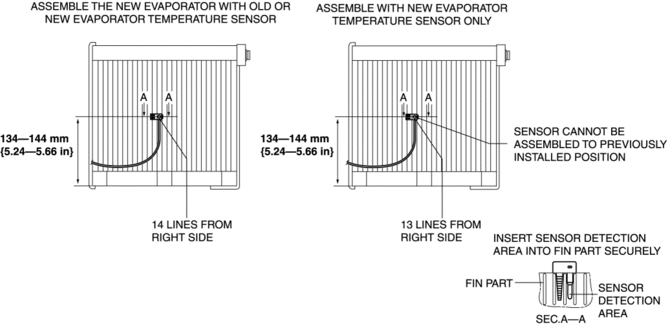
1. Assemble the evaporator temperature sensor as shown in the figure.
CAUTION:
-
When installing the evaporator temperature sensor without replacing the evaporator, assemble the evaporator temperature sensor with the installation position slid to the left of the previous position by 1 line. If the evaporator temperature sensor is assembled to the previously installed position, it may not function due to poor contact of the fin surface with the sensor detection area caused by fin deformation.
NOTE:
-
If an evaporator temperature sensor cannot be correctly positioned on the evaporator, replace the evaporator.
 A/C Unit
Outline
The A/C unit which integrates the cooling and heater units has been adopted.
Construction
The A/C unit consists of the following parts.
Operation
Air Mix Door Op ...
 A/C Unit Removal/Installation
1. Disconnect the negative battery cable..
2. Discharge the refrigerant..
3. Drain the engine coolant..
CAUTION:
If moisture or foreign material enters the refrigeration cycle, cooling a ...
Other materials:
Power Windows
The ignition must be switched ON for the power windows to operate.
WARNING
Make sure the opening is clear before closing a window:
Closing power windows are dangerous. A person's hands, head, or even neck could
be caught by the window and result in serious injury or even death. This warning ...
Fuel Gauge Sender Unit Removal/Installation [Awd]
WARNING:
Always keep sparks and flames away from fuel when servicing the fuel system.
Fuel can be easily ignited which could cause serious injury or death, and damage
to equipment.
Fuel line spills and leakage from the pressurized fuel system are dangerous.
Fuel can ignite a ...
Turbine/Input Shaft Speed Sensor, Output Shaft Speed Sensor [Fw6 A EL, Fw6 Ax
EL]
Purpose/Function
The turbine/input shaft speed sensor detects the rotation speed of the input
shaft (low clutch drum).
The output shaft speed sensor detects the rotation speed of the output shaft
(primary gear).
The turbine/input shaft speed sensor and output shaft speed ...
