
Mazda CX-5 Service & Repair Manual: Wiper Bracket Removal [Panel Replacement]
Symbol Mark

Installation Procedure
1. When installing new parts, measure and adjust the body as necessary to conform with standard dimensions.
2. Drill holes for the plug welding before installing the new parts.
3. After temporarily installing new parts, make sure the related parts fit properly.
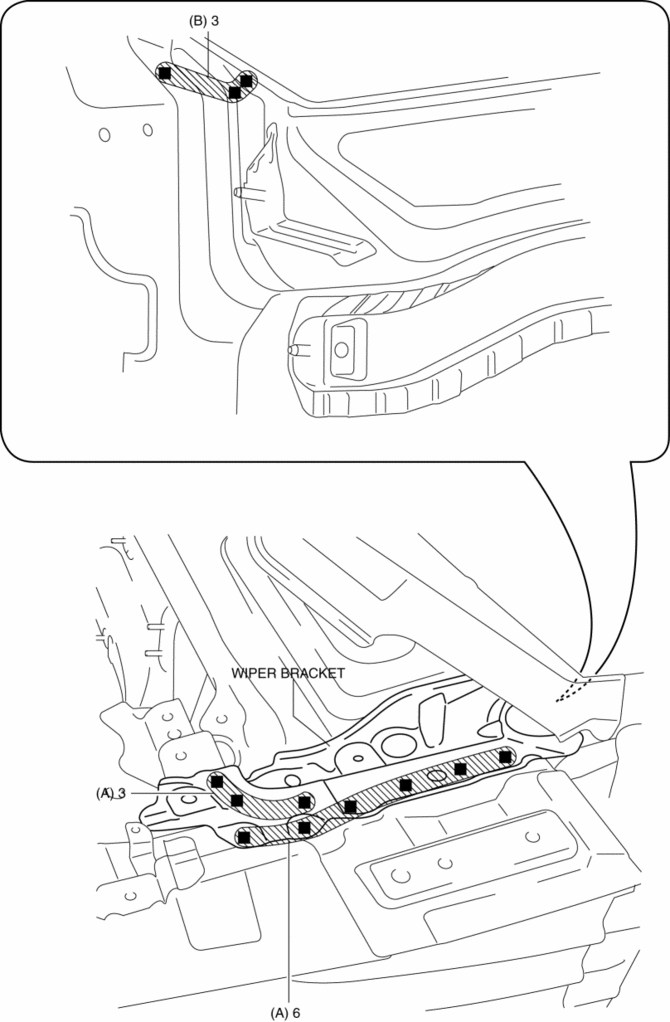
4. Plug weld the 9 locations indicated by (A) shown in the figure.
5. Plug weld the 3 locations indicated by (B) from the inside shown in the figure, then install the wiper bracket.
 Windshield Wiper System
Outline
Equipped with continuous (low/high), auto-stop, one-touch wiper, intermittent
wiper (without auto wiper system), auto wiper (with auto wiper system), and
synchronized washer and w ...
 Rain Sensor
Outline
The rain sensor detects the amount of rainfall and calculates the wiper operation
speed, and outputs a windshield wiper control signal to the front body control
module (FBCM) to p ...
Other materials:
Winter Driving
Carry emergency gear, including tire chains, window scraper, flares, a small
shovel, jumper cables, and a small bag of sand or salt.
Ask an Authorized Mazda Dealer to perform the following precautions: l Have the
proper ratio of antifreeze in the radiator.
• Inspect the battery and its cable ...
Service Publications
Service Publications
Factory-authorized Mazda service publications are available for owners who wish
to do some of their own maintenance and repair.
When requesting any of our publications through an Authorized Mazda Dealer, refer
to the chart below.
If they do not have what you need in stock ...
Brake Fluid Air Bleeding
CAUTION:
Brake fluid will damage painted surfaces. Be careful not to spill any on
painted surfaces. If it is spilled, wipe it off immediately.
NOTE:
Keep the fluid level in the brake fluid reserve tank at 3/4 full or more
during the air bleeding.
Begin air bleedin ...
