
Mazda CX-5 Service & Repair Manual: Supplier Identification Procedure [Audio]
NOTE:
-
The unit supplier can vary. When asking the supplier (service center) for repair or replacement, identify the supplier and fill in the Audio Repair Order Form using the following procedures.
Verification procedure using label or inscribed lettering
1. Disconnect the negative battery cable..
2. Remove the decoration panel..
3. Remove the audio unit..
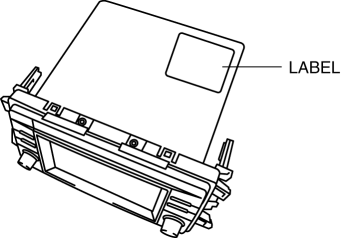
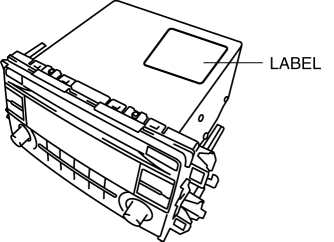
4. Verify the supplier name by referring to the label attached to the unit.
Audio unit (with color LCD)
Audio unit (without color LCD)
Verification procedure using on-board diagnostic assist function
Audio unit (with color LCD)
1. Switch the ignition to ACC or ON (engine off).
2. Verify that the audio is turned on. If the audio is turned off, press the POWER/VOLUME switch to turn it on.
3. Press the POWER/VOLUME switch and SEEK switch (up) simultaneously to launch the diagnostic assist function.
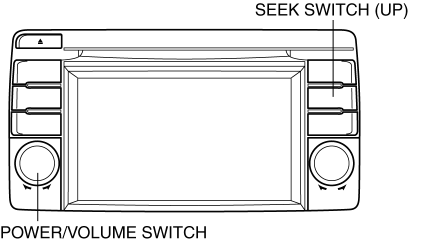
4. Verify that the launched diagnostic assist function is displayed on the screen.
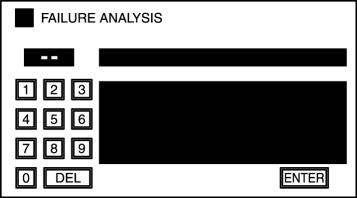
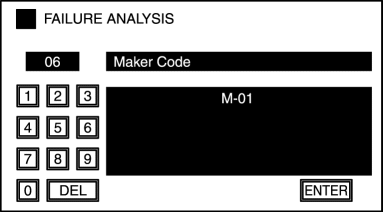
5. Input diagnostic assist code "06".
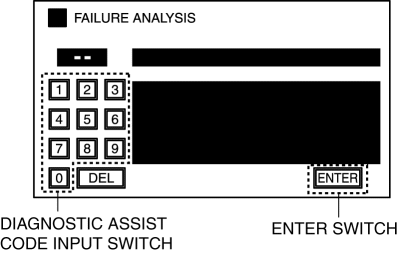
6. Select "ENTER switch".
7. Identify the supplier code by referring to the display.
|
Supplier code |
Supplier name |
|
M-01 |
SANYO Automedia |
|
M-02 |
Panasonic |
|
M-03 |
Clarion |
|
M-04 |
Pioneer |
|
M-05 |
VISTEON |
8. Press the POWER/VOLUME switch and return to the diagnostic assist screen.
9. Press the POWER/VOLUME switch and end the diagnostic assist function.
Audio unit (without color LCD)
1. Switch the ignition to ACC or ON (engine off).
2. Verify that the audio is turned on. If the audio is turned off, press the POWER/VOLUME switch to turn it on.
3. Press PRESET switch 5 for 3 s or more while simultaneously pressing the POWER/VOLUME switch to launch the supplier verification mode.
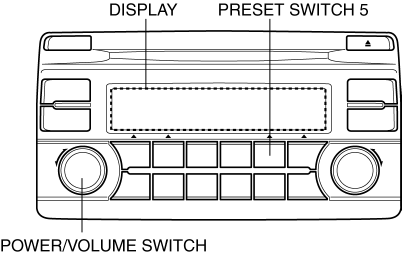
4. Identify the supplier code by referring to the audio display.

|
Supplier code |
Supplier name |
|
M-01 |
SANYO Automedia |
|
M-02 |
Panasonic |
|
M-03 |
Clarion |
|
M-04 |
Pioneer |
|
M-05 |
VISTEON |
5. Switch the ignition off (LOCK) to complete the manufacturer code verification mode.
 Speaker [Without Bose®]
Purpose
Converts the audio signal from the audio unit to sound.
Function
Full-range speakers, which can output wide-range sound from low to high frequency,
have been adopted.
...
 Tweeter Inspection
1. Disconnect the negative battery cable..
2. Remove the side speaker grille..
3. Remove the tweeter..
4. Verify that the resistance between the tweeter terminals is as indicated in
the table. ...
Other materials:
Crankshaft Position (CKP) Sensor Removal/Installation
CAUTION:
When foreign material such as an iron chip is on the CKP sensor, it can cause
abnormal output from the sensor because of flux turbulence and adversely affect
the engine control. Be sure there is no foreign material on the CKP sensor when
replacing.
Do not assemble t ...
Shift Lock System [Fw6 A EL, Fw6 Ax EL]
Purpose, Function
The shift-lock system operates when the ignition is switched to ON and the
brake pedal is not depressed, and inhibits the selector lever from being shifted
from the P position to other positions.
If the shift-lock cannot be released by the normal operation, it ...
Windshield Washer Nozzle Removal/Installation
1. Remove the following parts:
a. Windshield wiper arm and blade.
b. Cowl grille.
2. Disconnect the windshield washer hose from the windshield washer nozzle..
3. While pressing windshield washer nozzle tabs in the direction of the arrow
(1) shown in the figure, pull the windshield washer ...
