
Mazda CX-5 Service & Repair Manual: Roof Carrier Bracket Removal/Installation
1. Disconnect the negative battery cable..
2. Remove the following parts:
a. Sunroof seaming welt (with sunroof system).
b. A-pillar trim.
c. Front map light.
d. Sunvisor.
e. Front scuff plate.
f. Rear scuff plate.
g. B-pillar lower trim.
h. Adjust anchor cover.
i. Upper anchor installation bolt on the seat belt.
j. B-pillar upper trim.
k. Assist handle.
l. Trunk board.
m. Trunk end trim.
n. Trunk side trim.
o. D-pillar trim.
p. C-pillar trim.
q. Headliner.
3. Remove nuts.
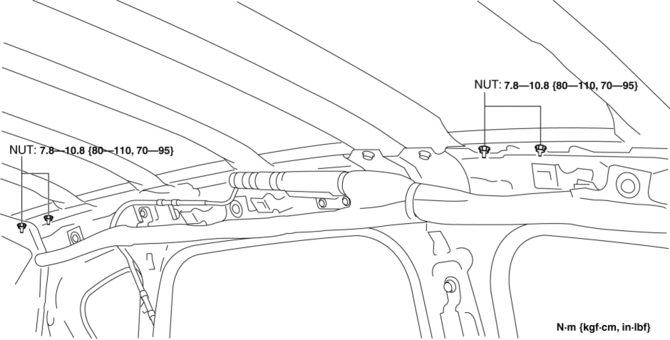
4. Remove the roof carrier brackets.
5. Install in the reverse order of removal.
NOTE:
-
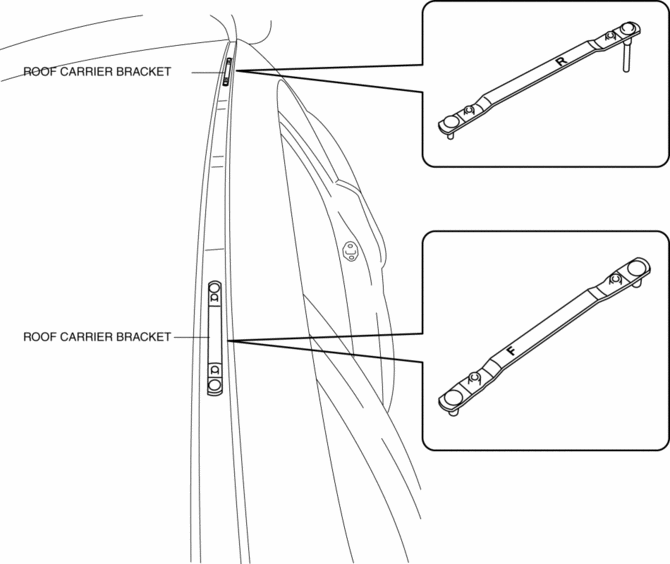
Install the roof carrier bracket so that the F on it faces vehicle front. (front side)
-
Install the roof carrier bracket so that the R on it faces vehicle rear. (rear side)
 Rear Differential Removal/Installation
WARNING:
When replacing the coupling component, read the special character string
before installing a new coupling component and write it to the AWD control module
after replacement. The ...
 Driveshafts
...
Other materials:
Electrical Fan Control
Outline
Through cooling of the radiator and condenser by operation of the cooling
fan according to vehicle conditions, engine reliability and cooling performance
have been improved.
Block Diagram
Operation
The PCM determines the demand airflow volume by the following c ...
Vacuum Pump Inspection
1. Pinch open the clamp using pliers and disconnect the vacuum hose from the
vacuum pump..
2. Install the vacuum gauge as shown in the figure, then check the vacuum.
3. Warn up the engine.
If the pressure is less than the specification, inspect for the following.
Malf ...
Clutch Pedal Removal/Installation [C66 M R]
CAUTION:
Secure the steering wheel using tape or a cable to prevent the steering shaft
from rotating after disconnecting the steering shaft. If the steering wheel
rotates after the steering shaft and the steering gear and linkage are disconnected,
the internal parts of the clock spr ...
