
Mazda CX-5 Service & Repair Manual: Rear Door Speaker Removal/Installation
Without Bose®
NOTE:
-
If the procedure is performed while holding the front door speaker cone, it could deform the cone causing a malfunction. Therefore, perform the procedure while holding any part other than the cone.
1. Disconnect the negative battery cable..
2. Remove the rear door trim..
3. Disconnect the connector.
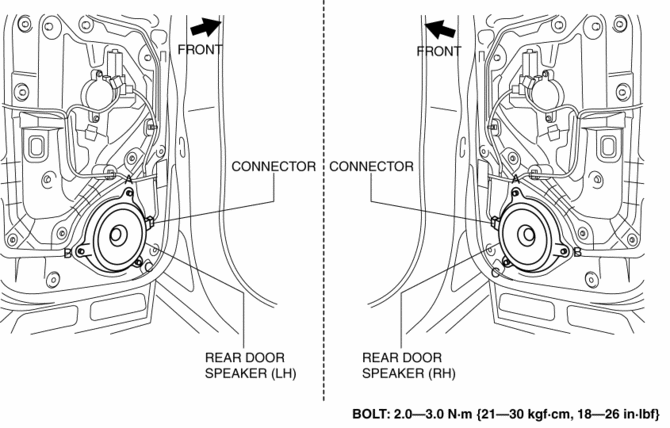
4. Remove the bolts in alphabetical order.
5. Pull the rear door speaker in the direction of the arrow shown in the figure and remove it while detaching the pins.
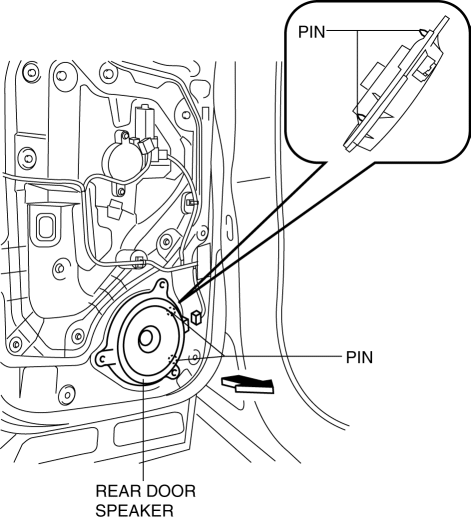
6. Install in the reverse order of removal.
With Bose®
1. Disconnect the negative battery cable..
2. Remove the rear door trim..
3. Disconnect the connector.
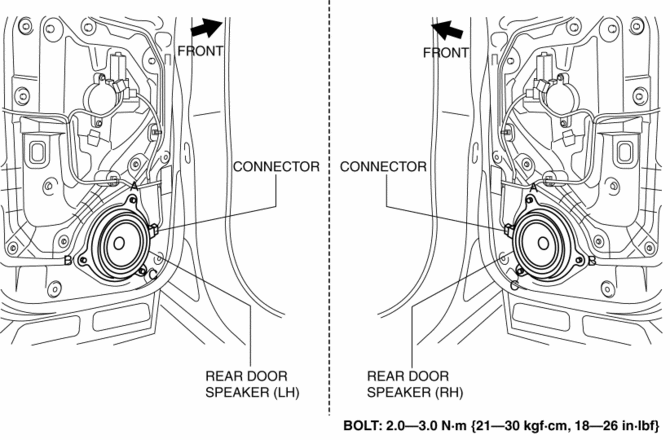
4. Remove the bolts in alphabetical order.
5. Pull the rear door speaker in the direction of the arrow shown in the figure and remove it while detaching the pins.
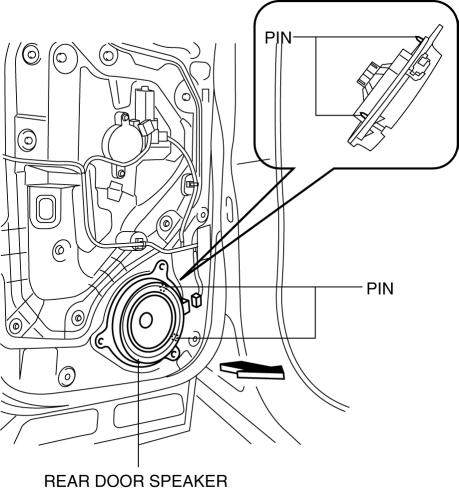
6. Install in the reverse order of removal.
 Rear Door Speaker Inspection
1. Disconnect the negative battery cable..
2. Remove the rear door trim..
3. Disconnect the rear door speaker connector..
4. Verify that the resistance between the rear door speaker terminals is ...
 Rear Mount Camera
Purpose, Function
The rear mount camera shoots the conditions at the rear of the vehicle in
color, and after converting the video signal, it outputs the signal to the audio
unit. (with co ...
Other materials:
Vanity Mirror Illumination Inspection
1. Disconnect the negative battery cable..
2. Remove the sunvisor..
3. Verify that the continuity between the vanity mirror illumination terminals
is as indicated in the table.
If not as indicated in the table, replace the sunvisor.
...
Vanity Mirror Illumination Inspection
1. Disconnect the negative battery cable..
2. Remove the sunvisor..
3. Verify that the continuity between the vanity mirror illumination terminals
is as indicated in the table.
If not as indicated in the table, replace the sunvisor.
...
Steering Gear And Linkage
Purpose/ Function
The rotational movement input from the intermediate shaft is converted to
a linear movement in the horizontal direction of the steering rack by the rack
and pinion mechanism, and then transmitted to the tires and wheels.
Construction
A size and weight-redu ...
