
Mazda CX-5 Service & Repair Manual: Lighting Systems
Outline
-
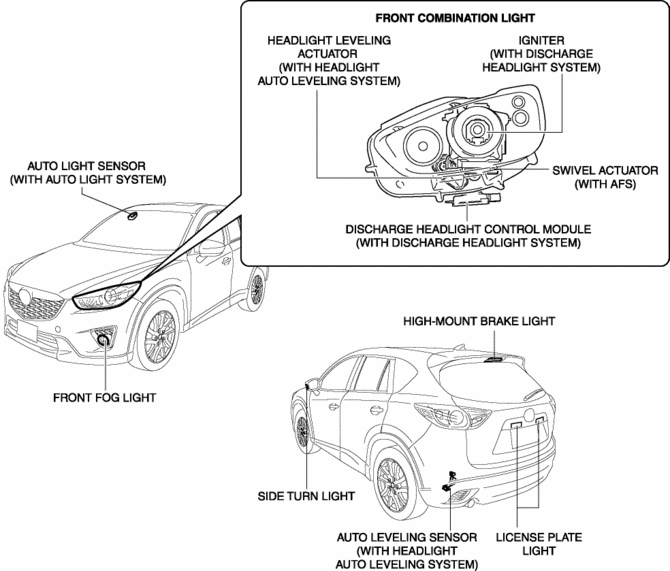
Front combination lights have been adopted with parts related to the front exterior lights grouped and housed together.
-
The following systems have been adopted to the headlights.
-
Discharge headlight system (with discharge headlight system)
-
Auto light system (with auto light system)
-
Adaptive front lighting system (AFS) (with AFS)
-
Headlight auto leveling system (with headlight auto leveling system)
-
Auto-light OFF system
-
Front fog lights have been adopted. (with front fog lights)
-
LED type side turn lights have been adopted.
-
LED type high-mount brake light has been adopted.
-
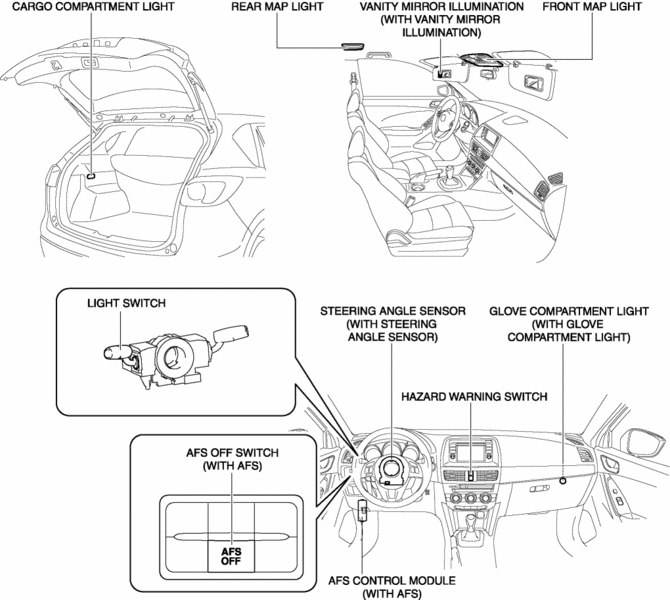
A room light control system has been adopted in which illumination time and illumination level of the interior lights change.
Specification
|
Item |
Spec (W) ? quantity |
||
|
Exterior |
Halogen type |
Headlight LO bulb |
55 ? 2 |
|
Headlight HI bulb |
60 ? 2 |
||
|
Discharge type |
Headlight HI/LO bulb |
35 ? 2 |
|
|
DRL bulb |
13 ? 2 |
||
|
Front turn light/parking light bulb |
27/8 ? 2 |
||
|
Front fog light bulb |
55 ? 2 |
||
|
Side turn light (LED) |
0.6 |
||
|
Rear turn light bulb |
21 ? 2 |
||
|
Brake/taillight bulb |
21/5 ? 2 |
||
|
Rear side marker light bulb |
5 ? 2 |
||
|
Back-up light bulb |
16 ? 2 |
||
|
Taillight bulb (Liftgate light) |
5 ? 2 |
||
|
High-mount brake light (LED) |
2.5 |
||
|
License plate light bulb |
5 ? 2 |
||
|
Interior |
Front map light bulb |
8 ? 2 |
|
|
Rear map light bulb |
8 ? 2 |
||
|
Cargo compartment light bulb |
5 ? 1 |
||
|
Vanity mirror illumination bulb |
2 ? 2 |
||
Structural view
Exterior
Interior
 Lighting System Personalization Features Setting Procedure
Turn Light System
There are two methods for personalizing the turn light system: One using
the M-MDS and the other using the audio unit (with color LCD). Refer to the
following and perfor ...
 Parking/Front Turn Light Bulb Removal/Installation
Halogen Type
1. Disconnect the negative battery cable..
2. Rotate the socket in the direction of the arrow (1) shown in the figure and
remove it from the front combination light in the direction ...
Other materials:
Roof Carrier Bracket Removal/Installation
1. Disconnect the negative battery cable..
2. Remove the following parts:
a. Sunroof seaming welt (with sunroof system).
b. A-pillar trim.
c. Front map light.
d. Sunvisor.
e. Front scuff plate.
f. Rear scuff plate.
g. B-pillar lower trim.
h. Adjust anchor cover.
i. Upper anchor i ...
Front Stabilizer Removal/Installation
CAUTION:
Performing the following procedures without first removing the front ABS
wheel-speed sensor may possibly cause an open circuit in the wiring harness
if it is pulled by mistake. Before performing the following procedures, disconnect
the front ABS wheel-speed sensor wiring ...
Keyless Entry System
This system uses the key buttons to remotely lock and unlock the doors and the
liftgate.
The system can start the engine without having to take the key out of your purse
or pocket.
It can also help you signal for attention.
Operating the theft-deterrent system is also possible on theft-deterr ...
