
Mazda CX-5 Service & Repair Manual: Fuel Gauge Sender Unit Inspection [Awd]
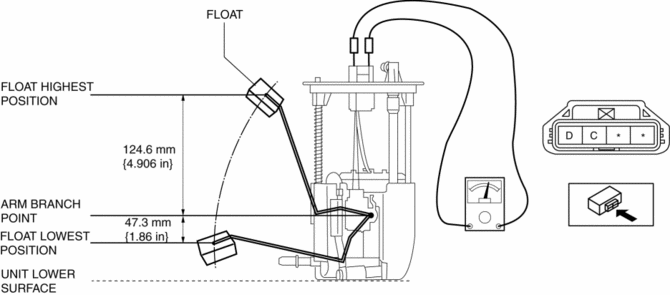
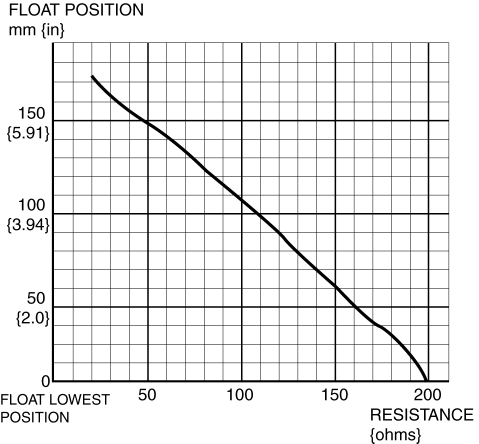
Fuel gauge sender unit (main)
NOTE:
-
For the fuel gauge sender unit removal/installation, refer to the fuel pump removal/installation because the fuel gauge sender unit is integrated with the fuel pump..
1. Verify that the resistance at fuel gauge sender unit (main) terminals D and C is as indicated in the table according to the height of the float.
-
If not as indicated in the table, replace the fuel gauge sender unit (main).
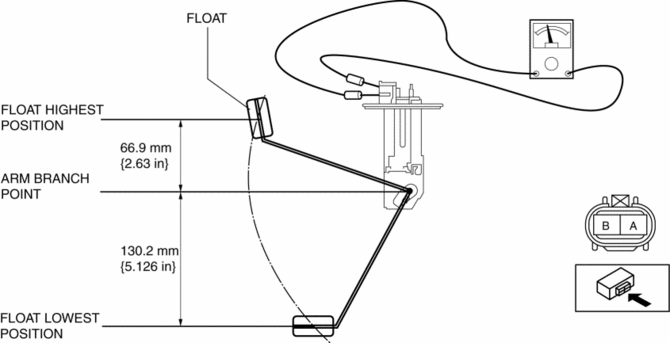
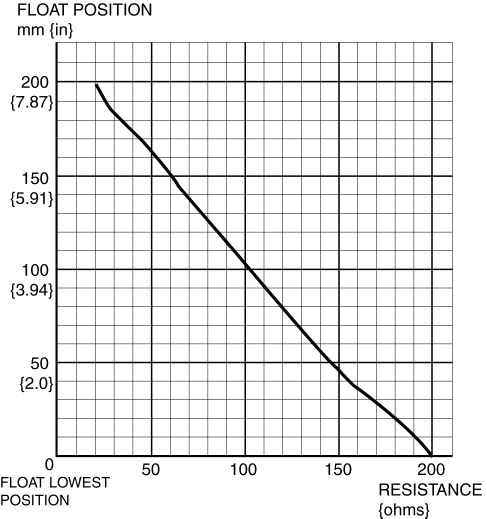
Fuel gauge sender unit (sub)
1. Remove the fuel gauge sender unit (sub)..
2. Verify that the resistance at fuel gauge sender unit (sub) terminals B and A is as indicated in the table according to the height of the float.
-
If not as indicated in the table, replace the fuel gauge sender unit (sub).
 Fuel Gauge Sender Unit Inspection [2 Wd]
NOTE:
For the fuel gauge sender unit removal/installation, refer to the fuel pump
removal/installation because the fuel gauge sender unit is integrated with the
fuel pump..
1. Veri ...
 Fuel Gauge Sender Unit Removal/Installation [2 Wd]
WARNING:
Always keep sparks and flames away from fuel when servicing the fuel system.
Fuel can be easily ignited which could cause serious injury or death, and damage
to equipment.
...
Other materials:
Money-Saving Suggestions
How you operate your Mazda determines how far it will travel on a tank of fuel.
Use these suggestions to help save money on fuel and repairs.
• Avoid long warm-ups. Once the engine
runs smoothly, begin driving.
• Avoid fast starts.
• Keep the engine tuned. Follow the maintenance
sched ...
Oil Control Valve (OCV)
Purpose, Function
The OCV switches the oil passage to the hydraulic variable valve timing actuator
to control the opening/closing period of the exhaust valve.
Construction
The OCV is installed to the exhaust camshaft cap (No.1).
The OCV consists of a spool valve wh ...
Tire Maintenance
Improper or inadequate vehicle maintenance can cause tires to wear abnormally.
Here are some important maintenance points:
Tire Inflation Pressure
Inspect all tire pressure monthly (including the spare) when the tires are cold.
Maintain recommended pressures for the best ride, top handling, an ...
