
Mazda CX-5 Service & Repair Manual: Front Door Speaker Removal/Installation
Without Bose®
NOTE:
-
If the procedure is performed while holding the front door speaker cone, it could deform the cone causing a malfunction. Therefore, perform the procedure while holding any part other than the cone.
1. Disconnect the negative battery cable..
2. Remove the following parts:
a. Inner garnish.
b. Front door trim.
3. Disconnect the connector.
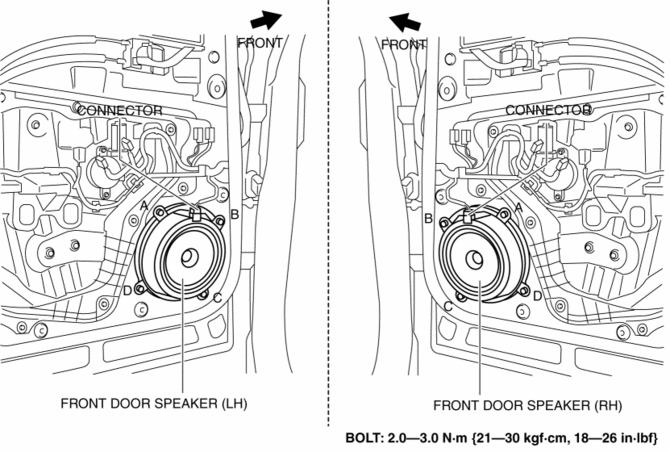
4. Remove the bolts in alphabetical order.
5. Pull the front door speaker in the direction of the arrow shown in the figure and remove it while detaching the pins.
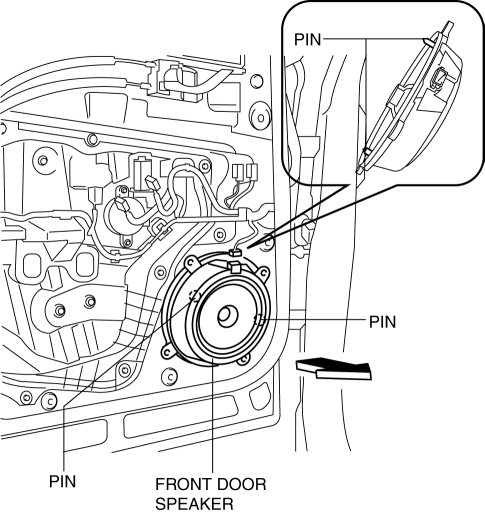
6. Install in the reverse order of removal.
With Bose®
1. Disconnect the negative battery cable..
2. Remove the following parts:
a. Inner garnish.
b. Front door trim.
3. Disconnect the connector.
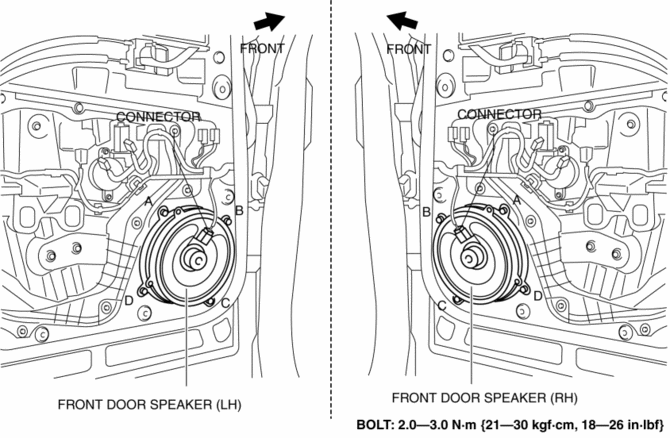
4. Remove the bolts in alphabetical order.
5. Pull the front door speaker in the direction of the arrow shown in the figure and remove it while detaching the pins.
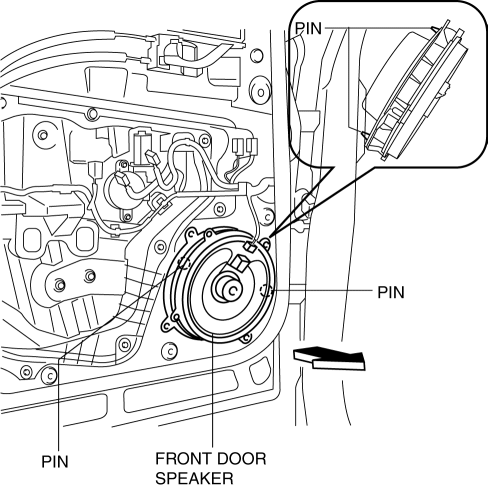
6. Remove the screws.
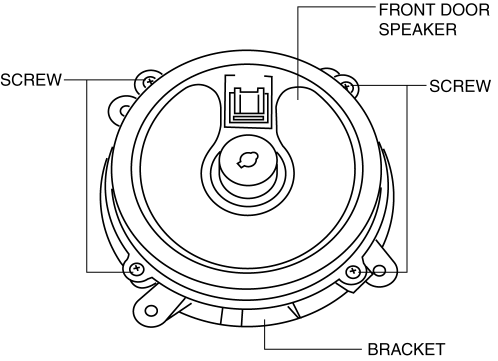
7. Remove the front door speaker from the bracket.
8. Install in the reverse order of removal.
 Front Door Speaker Inspection
1. Disconnect the negative battery cable..
2. Remove the following parts:
a. Inner garnish.
b. Front door trim.
3. Disconnect the front door speaker connector..
4. Verify that the resistance ...
 Glass Antenna
Purpose, Function
The RDS (Radio Data System) converts radio broadcast waves to electric signals
and sends the signals to the audio unit.
Construction
An antenna with excellent ...
Other materials:
Customer Assistance (Mexico)
Your complete and permanent satisfaction is our business. We are here to serve
you. All Authorized Mazda Dealers have the knowledge and the tools to keep your
Mazda vehicle in top condition.
If you have any questions or recommendations for improvement regarding the service
of your Mazda vehic ...
Remote Handle Lever Removal/Installation
1. Disconnect the negative battery cable..
2. Remove the following parts:
a. Trunk board.
b. Trunk end trim.
c. Rear scuff plate.
d. Trunk side trim.
3. Disconnect the remote cable on the remote handle lever side from the remote
cable on the rear seat side.
4. Remove the remote c ...
PCM
Purpose/Function
High-level driveability and lower fuel consumption have been realized by
controlling the appropriate engine conditions (fuel injection/ignition timing)
according to operation conditions.
Controls each output part based on the signal from each input part.
...
