
Mazda CX-5 Service & Repair Manual: Front Door Latch And Lock Actuator Removal/Installation
1. Perform the front door glass preparation..
2. Disconnect the negative battery cable..
3. Remove the following parts:
a. Inner garnish.
b. Front door trim.
c. Inner handle.
d. Front door glass.
e. Front door module panel.
f. Front door key cylinder.
4. Remove the door lock knob cable and inner handle cable from the clip.
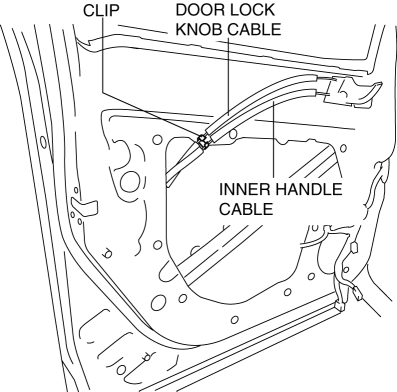
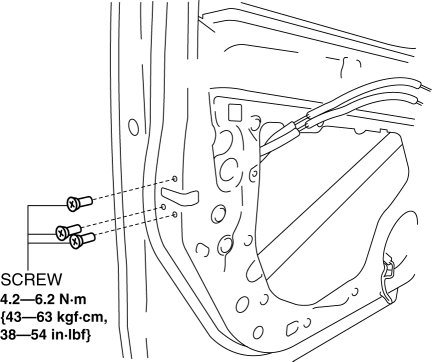
5. Remove the screws.
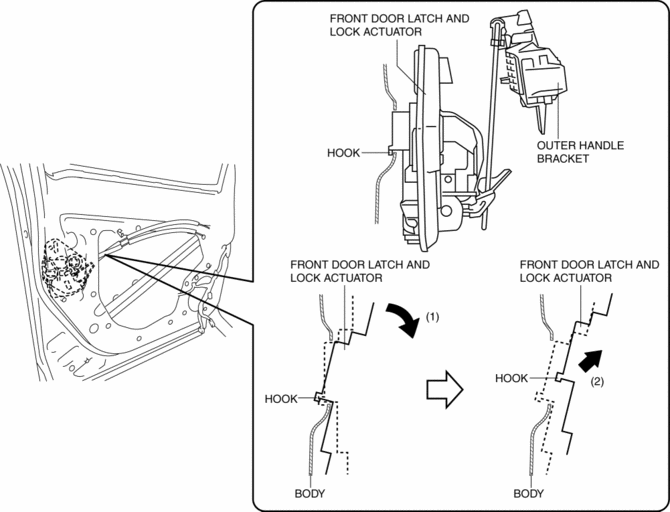
6. Tilt the front door latch and lock actuator in the direction of arrow (1) shown in the figure and lift it in the direction of arrow (2) to detach the hook of the front door latch and lock actuator.
7. Move the front door latch and lock actuator down in the direction of arrow (3) shown in the figure to remove the rod from the rod holder.
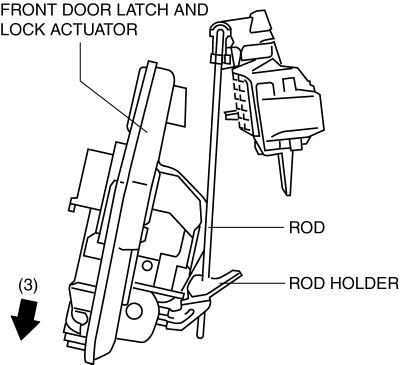
8. Remove the front door latch and lock actuator.
9. Install in the reverse order of removal.
 Front Door Latch And Lock Actuator Inspection
The following actuator and switches are integrated with the front door latch
and lock actuator.
From the actuator/switch name and operation in the following table, select
the a ...
 Front Door Latch Switch
Purpose, Function
Switches on/off in conjunction with the latch lever rotation, and detects
the front door open/closed condition by the voltage which is changed by the
rear body control m ...
Other materials:
Transmission/Transaxle Features
Clutch and Manual Transaxle [C66M-R]
A newly developed, C6-type manual transaxle (SKYACTIV-MT) with 6 forward
gears and 1 reverse gear has been adopted.
Automatic Transaxle [FW6A-EL, FW6AX-EL]
A newly developed, FW6A(X)-EL-type electronically controlled automatic transaxle
...
Rear Side Frame Installation [Panel Replacement]
Symbol Mark
Installation Procedure
1. When installing new parts, measure and adjust the body as necessary to conform
with standard dimensions.
2. Drill holes for the plug welding before installing the new parts.
3. After temporarily installing new parts, make sure the related parts fit p ...
Engine Oil Replacement
WARNING:
Hot engines and engine oil can cause severe burns. Turn off the engine and
wait until it and the engine oil have cooled.
A vehicle that is lifted but not securely supported on safety stands is dangerous.
It can slip or fall, causing death or serious injury. Never work ...
