
Mazda CX-5 Service & Repair Manual: Front Crossmember Removal/Installation
CAUTION:
-
Performing the following procedures without first removing the front ABS wheel-speed sensor may possibly cause an open circuit in the wiring harness if it is pulled by mistake. Before performing the following procedures, disconnect the front ABS wheel-speed sensor wiring harness (axle side) and fix the wiring harness to an appropriate place where it will not be pulled by mistake while servicing the vehicle.
-
Secure the steering wheel using tape or a cable to prevent the steering shaft from rotating after disconnecting the steering shaft. If the steering wheel rotates after the steering shaft and the steering gear and linkage are disconnected, the internal parts of the clock spring could be damaged.
1. Remove the joint cover..
2. Disconnect the intermediate shaft from the steering gear and linkage..
3. Disconnect the front ABS wheel-speed sensor wiring harness installed to the steering knuckle and set it aside..
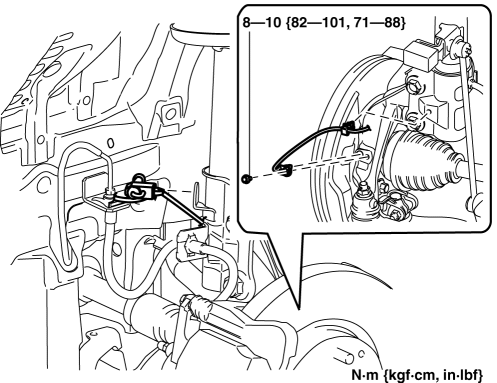
4. Remove the front under cover No.2..
5. Remove the front under cover No.1..
6. Remove the splash shield..
7. Set the front mudguard away from the front crossmember and front bumper..
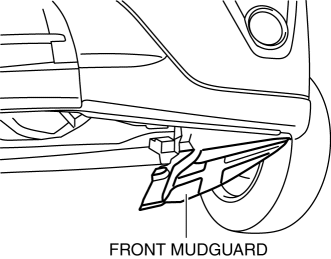
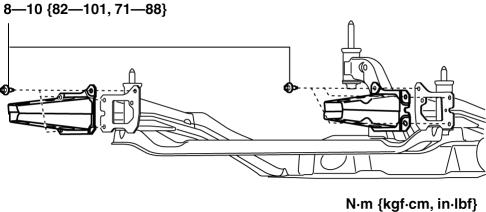
8. Disconnect the front crossmember extension.
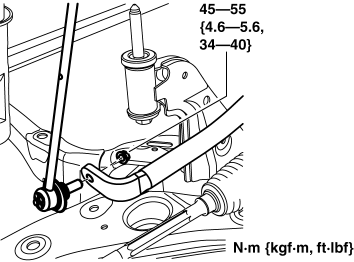
9. Disconnect the front stabilizer control link (front stabilizer side)..
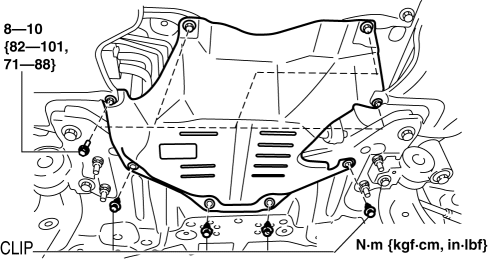
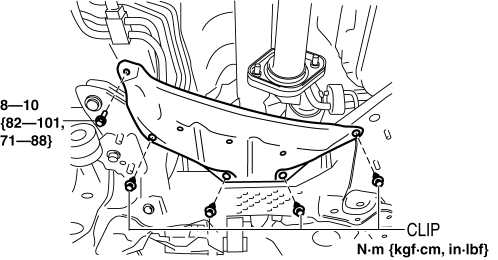
10. Remove the front crossmember insulator.
2WD
AWD
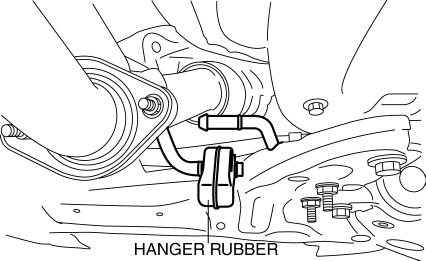
11. Disconnect the hanger rubber from the front crossmember and set it aside.
12. Remove the bracket plate (No.1). (2WD)
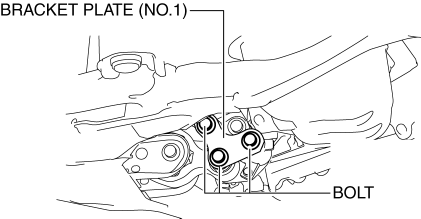
13. Remove the bracket plate. (AWD)
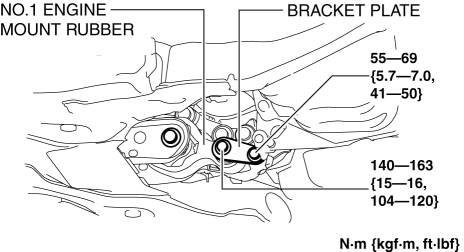
14. Remove the tie-rod end locknut.
-
Tightening torque
-
47—59 N·m {4.8—6.0 kgf·m, 35—43 ft·lbf}
15. Detach the tie-rod end from the steering knuckle using the SST
.
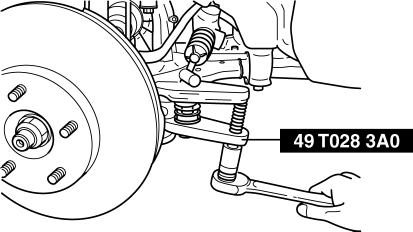
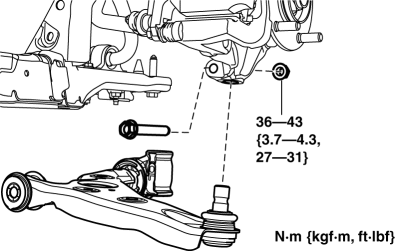
16. Disconnect the front lower arm ball joint.
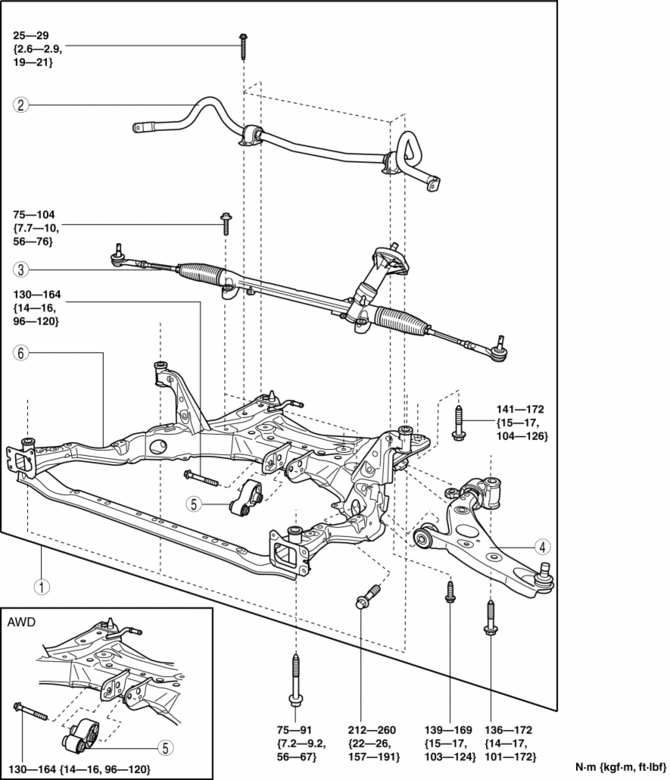
17. Remove in the order indicated in the table.
18. Install in the reverse order of removal.
19. Inspect the wheel alignment and adjust it if necessary..
|
1 |
Front crossmember component (See Front Crossmember Component Removal Note.) (See No. 1 Engine Mount Rubber and Front Crossmember Component Installation Note.) |
|
2 |
Front stabilizer (See FRONT STABILIZER REMOVAL/INSTALLATION.) |
|
3 |
Steering gear and linkage (See STEERING GEAR AND LINKAGE REMOVAL/INSTALLATION.) |
|
4 |
Front lower arm (See FRONT LOWER ARM REMOVAL/INSTALLATION.) |
|
5 |
No.1 engine mount rubber (See ENGINE MOUNT DISASSEMBLY/ASSEMBLY [SKYACTIV-G 2.0].) (See No. 1 Engine Mount Rubber and Front Crossmember Component Installation Note.) |
|
6 |
Front crossmember |
Front Crossmember Component Removal Note
WARNING:
-
Removing the crossmember is dangerous. The crossmember component could fall and cause serious injury or death. Verify that the jack securely supports the crossmember component.
1. Support the front crossmember component using a jack.
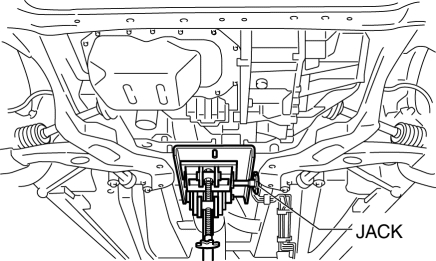
2. Remove the front crossmember installation bolts.
3. Remove the front crossmember, front stabilizer, front lower arm, and steering gear and linkage as a single unit.
No. 1 Engine Mount Rubber and Front Crossmember Component Installation Note
2WD
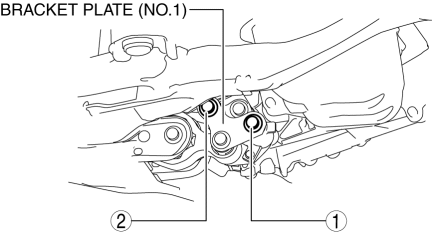
1. Temporarily install the bracket plate (No.1) and No.1 engine mount rubber.
2. Tighten the bracket plate (No.1) installation bolts in the order shown in the figure.
|
No. |
Tightening torque |
|
1 |
84—98 N·m {8.6—9.9 kgf·m, 62—72 ft·lbf} |
|
2 |
84—98 N·m {8.6—9.9 kgf·m, 62—72 ft·lbf} |
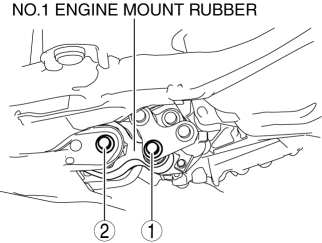
3. Tighten the No.1 engine mount rubber installation bolts in the order shown in the figure..
|
No. |
Tightening torque |
|
1 |
140—163 N·m {15—16 kgf·m, 104—120 ft·lbf} |
|
2 |
130—164 N·m {14—16 kgf·m, 96—120 ft·lbf} |
AWD
1. Temporarily install the No.1 engine mount rubber and bracket plate.
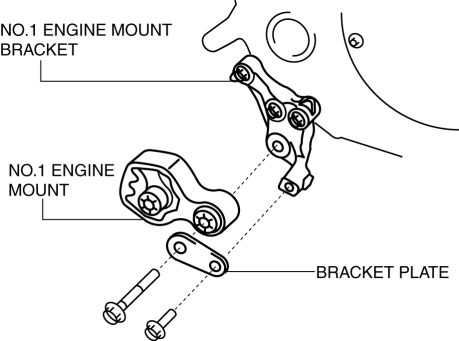
2. Tighten the No.1 engine mount rubber and bracket plate installation bolts.
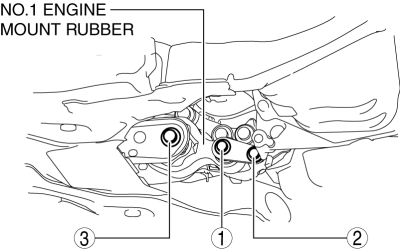
|
No. |
Tightening torque |
|
1 |
140—163 N·m {15—16 kgf·m, 104—120 ft·lbf} |
|
2 |
55—69 N·m {5.7—7.0 kgf·m, 41—50 ft·lbf} |
|
3 |
130—164 N·m {14—16 kgf·m, 96—120 ft·lbf} |
 Front Body Straight Line Dimensions (2) [Dimensions]
Point symbol
Designation
Hole diameter or bolt or nut size mm {in}
A
Roof seamless location
-
...
 Front Frame (Rear) Installation [Panel Replacement]
Symbol Mark
Installation Procedure
1. When installing new parts, measure and adjust the body as necessary to conform
with standard dimensions.
2. Drill holes for the plug welding before inst ...
Other materials:
Cylinder Head Cover
Purpose, Function
The cylinder head cover prevents foreign material penetration and engine
oil spatter.
The oil baffle plate reduces engine oil consumption by separating the engine
oil from the blow-by gas.
Construction
The lightweight cylinder head cover is made of ...
Exhaust Manifold
Purpose, Function
By lengthening the exhaust passage, the transmission of exhaust pressure
waves to other cylinders can be delayed, and the amount of gas exhausted from
a cylinder and forced back inside the combustion chamber is reduced By reducing
the residual gas, the temperature i ...
Front Seat Adjuster Unit Removal/Installation
WARNING:
Handling a side air bag improperly can accidentally operate (deploy) the
air bag, which may seriously injure you. Read the service warnings/cautions
in the Workshop Manual before handling the front seat (side air bag integrated)..
If the sliding mechanisms on both side ...
