
Mazda CX-5 Service & Repair Manual: Front ABS Wheel Speed Sensor Inspection
Sensor Output Value Inspection
CAUTION:
-
Resistance inspection using other testers may cause damage to the ABS wheel-speed sensor internal circuit. Be sure to use the M-MDS to inspect the ABS wheel-speed sensor.
1. Switch the ignition to off.
2. Connect the M-MDS to the DLC-2.
3. Select the following PIDs using the M-MDS:
-
WSPD_SEN_LF (LF wheel-speed sensor)
-
WSPD_SEN_RF (RF wheel-speed sensor)
4. Start the engine and drive the vehicle.
5. Verify that the display of the M-MDS shows the same value as the speedometer.
-
If there is any malfunction, replace the ABS wheel-speed sensor.
Installation Visual Inspection
1. Inspect for the following:
-
If there is any malfunction, replace the part.
a. Excessive play of the ABS wheel-speed sensor
b. Deformation of the ABS wheel-speed sensor
c. Deformation or damage of the ABS sensor rotor
Clearance Inspection
Preparation prior to inspection
1. Remove the ABS wheel-speed sensor..
2. Remove the wheel hub and steering knuckle as a single unit..
3. Install the ABS wheel-speed sensor to the removed wheel hub, steering knuckle component, and tighten to the specified torque.
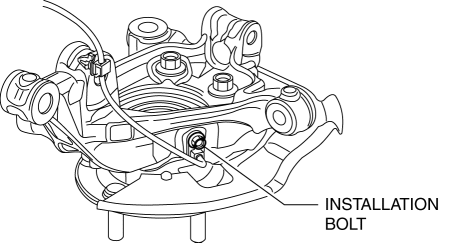
-
Tightening torque
-
8—10 N·m {82—101 kgf·cm, 71—88 in·lbf}
Clearance Inspection
1. Measure the gap between the ABS sensor rotor and ABS wheel-speed sensor using a feeler gauge.
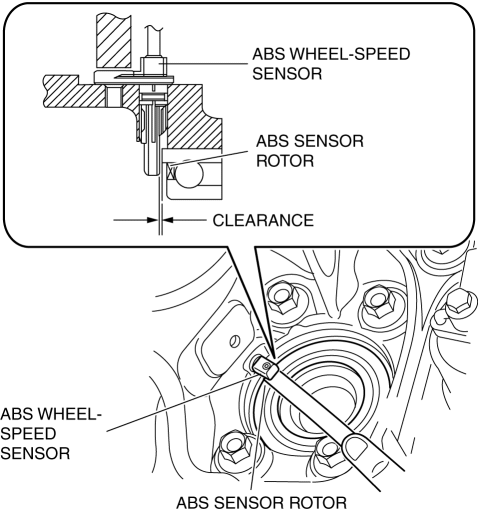
-
If not within the specification, verify the following items and repair or replace if necessary.
-
Is there deformation or damage to the ABS sensor rotor?
-
Is there deformation or damage to the ABS wheel speed sensor?
-
Is there foreign material adhering?
-
Clearance
-
0.87—1.53 mm {0.035—0.060 in}
Servicing after inspection
1. Remove the ABS wheel-speed sensor from the wheel hub, steering knuckle component.
2. Install the wheel hub, steering knuckle component..
3. Install the ABS wheel-speed sensor..
4. Inspect the front wheel alignment..
 Brake System/ABS Warning Light
Purpose/Function
The brake system/ABS warning light is built into the instrument cluster.
If a malfunction is detected in the system with the parking brake released,
the warning light ill ...
 Front ABS Wheel Speed Sensor Removal/Installation
1. Remove the mudguard..
2. Remove in the order indicated in the table.
3. Install in the reverse order of removal.
4. After installation, verify that there is no twisting in the front ABS wheel ...
Other materials:
DSC Control
Outline
While a vehicle normally turns safely in response to steering operation,
there are instances when the limits of tire lateral grip is surpassed due to
road surface conditions or vehicle speed, and the influence of evasive steering
to avoid an accident or similar situations.
...
Windshield Removal
1. Disconnect the negative battery cable..
2. Remove the following parts:
a. Windshield wiper arm and blade.
b. Cowl grille.
c. Rain sensor (with auto light/wiper system).
d. Auto-dimming mirror (with auto-dimming mirror).
e. Rearview mirror (without auto-dimming mirror).
f. A-pillar t ...
General Procedures (Brake)
Wheel and Tire Installation
1. When installing the wheels and tires, tighten the wheel nuts in a criss-cross
pattern to the following tightening torque.
Tightening torque
108—147 N·m {12—14 Kgf·m, 80—108 ft·lbf}
Brake Lines Disconnection
1. If any brake line has been ...
