
Mazda CX-5 Service & Repair Manual: Disc Pad (Front) Replacement
1. Remove in the order indicated in the table.
2. Install in the reverse order of removal.
3. After installation, depress the brake pedal a few times, rotate the wheel by hand, and verify that the brake does not drag.
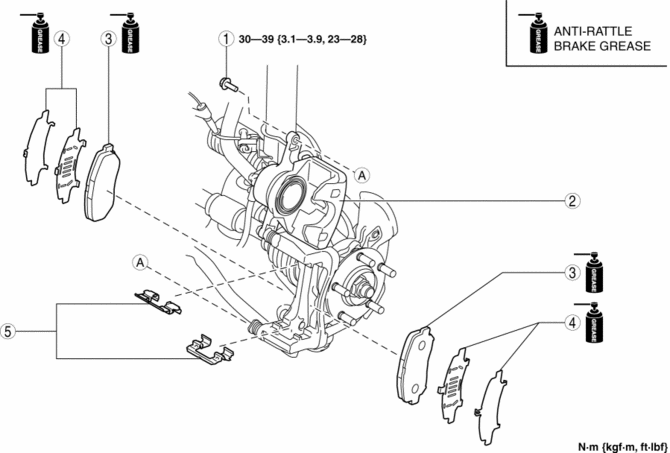
|
1 |
Bolt |
|
2 |
Caliper |
|
3 |
Disc pad (See Disc Pad Installation Note.) |
|
4 |
Shim |
|
5 |
Guide plate |
Disc Pad Installation Note
1. Clean the exposed area of the piston.
2. Push the piston in using the commercially available disc brake expand tool.
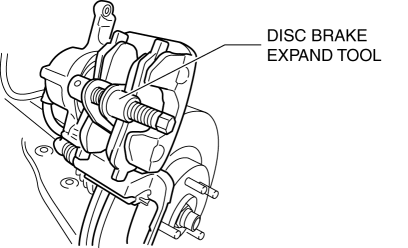
3. Install the disc pads to the mounting support.
 Conventional Brake System
Outline
A brake pedal with an intrusion minimizing mechanism has been adopted. As
a result, driver safety has been improved.
A small diameter long-stroke type master cylinder has bee ...
 Disc Pad (Rear) Replacement
1. Remove in the order indicated in the table.
2. Install in the reverse order of removal.
3. After installation, pump the brake pedal a few times and inspect the following:
The disc pad ...
Other materials:
Scheduled Maintenance (U.S.A., Canada, and Puerto Rico)
Follow Schedule 1 if the vehicle is operated mainly where none of the following
conditions apply.
• Repeated short-distance driving
• Driving in dusty conditions
• Driving with extended use of brakes
• Driving in areas where salt or other corrosive
materials are used
• Driving on ...
Brake Pedal Inspection
Pedal Height Inspection
1. Measure the distance from the center of the upper surface of the pedal pad
to the insulator and verify that it is as specified.
If not within the specification, inspect the following items and repair or
replace the applicable part if there is any malfunct ...
Tire Labeling
Federal law requires tire manufacturers to place standardized information on
the sidewall of all tires. This information identifies and describes the fundamental
characteristics of the tire and also provides a tire identification number for safety
standard certification and in case of a recall ...
