
Mazda CX-5 Service & Repair Manual: Cargo Compartment Light Removal/Installation
1. Disconnect the negative battery cable..
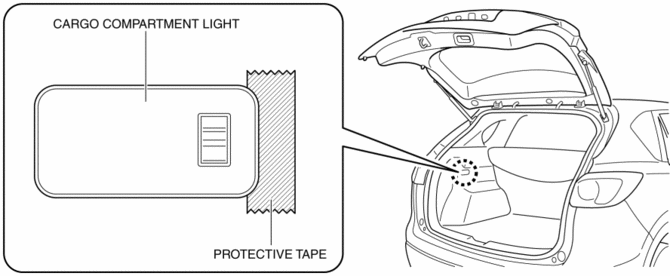
2. To prevent scratches or damage, affix protective tape to the position shown in the figure.
CAUTION:
-
If a flathead screwdriver is inserted into the gap between the cargo compartment light and trunk side trim, the trunk side trim could interfere with the flathead screwdriver and be damaged. When removing the cargo compartment light from the trunk side trim, perform the procedure after affixing protective tape to the trunk side trim.
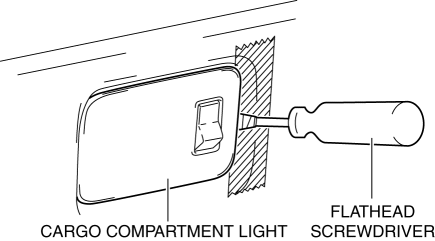
3. Insert a tape-wrapped flathead screwdriver into the gap between the cargo compartment light and trunk side trim shown in the figure.
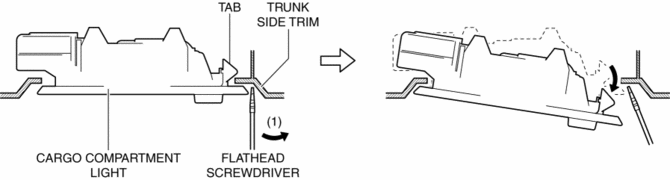
4. Move the flathead screwdriver in the direction of the arrow (1) shown in the figure, pull out the cargo compartment light from the trunk side trim, and detach the cargo compartment light tab and trunk side trim.
5. Remove the cargo compartment light.
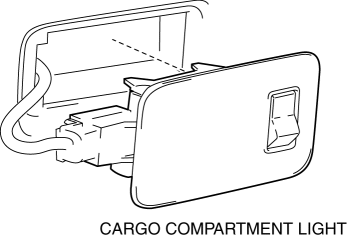
6. Disconnect the connector.
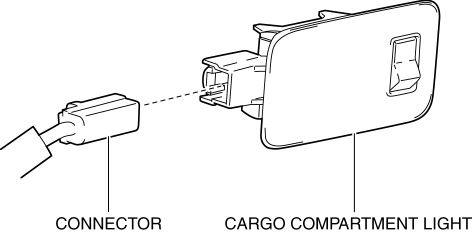
7. Install in the reverse order of removal.
 Cargo Compartment Light Inspection
1. Disconnect the negative battery cable..
2. Remove the cargo compartment light..
3. Verify that the continuity between the cargo compartment light terminals is
as indicated in the table.
...
 Lighting System Personalization
A personalization function has been adopted with which settings for each
function can be changed.
The following settings for the auto light system and interior light control
system ...
Other materials:
Oil Shower Pipe
Outline
Mechanical resistance loss has been reduced through structural changes to
achieve optimum fuel economy. An oil shower pipe has been adopted as a part
of this structural change.
Purpose, Function
The oil shower pipe injects engine oil to lubricate the contact points ...
Light Switch Removal/Installation
NOTE:
When removing the light switch, it is necessary to rotate the steering wheel.
If the ignition is switched off from ON (engine on) with the driver's door closed,
the steering wheel is locked. Therefore, perform the procedure in Steps 1 to
3 so that the steering wheel is not ...
Camshaft Position (CMP) Sensor
Purpose/Function
Detects the camshaft speed as basic information for mainly determining the
fuel injection timing and ignition timing.
Detects the camshaft speed and inputs it to the PCM as a CMP signal.
Construction
Intake CMP sensor
Installed on the cylinder head.
...
