
Mazda CX-5 Service & Repair Manual: Antenna Feeder No.2 Inspection
1. Disconnect the negative battery cable..
2. Remove the following parts:
a. A-pillar trim (RH).
b. Trunk board.
c. Trunk end trim (RH).
d. Rear scuff plate (RH).
e. Trunk side trim (RH).
3. Disconnect antenna feeder No.1.
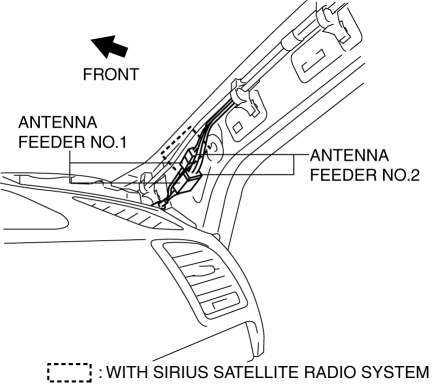
4. Disconnect antenna feeder No.3.
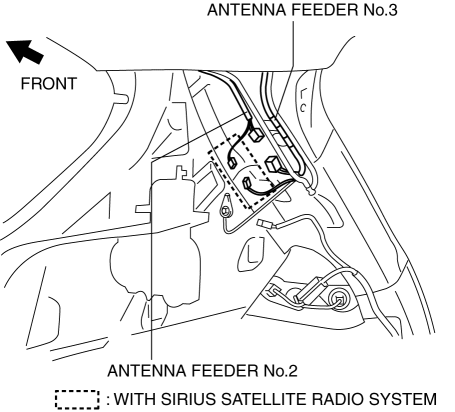
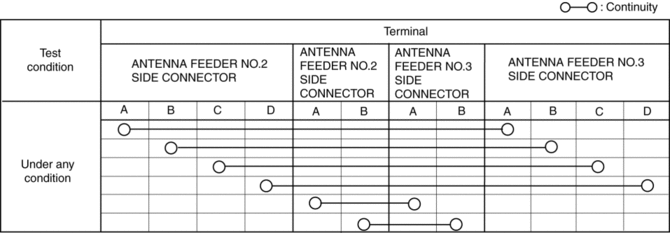
5. Verify that the continuity between antenna feeder No.2 terminals is as indicated in the table.
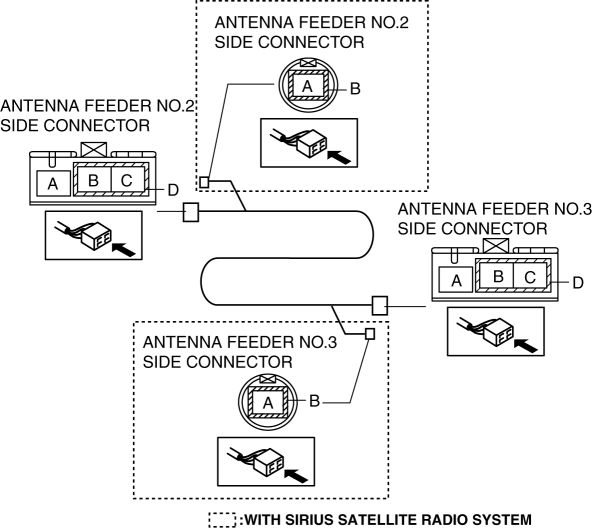
-
If not as indicated in the table, replace antenna feeder No.2.
 Antenna Feeder No.1 Removal/Installation
With audio system
1. Disconnect the negative battery cable..
2. Remove the following parts:
a. Side speaker grille (RH).
b. Tweeter (RH).
c. A-pillar trim.
d. Passenger-side front scuff pla ...
 Antenna Feeder No.2 Removal/Installation
Removal
1. Disconnect the negative battery cable..
2. Remove the following parts:
a. Sunroof seaming welt (with sunroof system).
b. A-pillar trim.
c. Front map light.
d. Sunvisor.
e. Fron ...
Other materials:
Cruise Main Indicator Light (Amber)
Purpose/Function
Illuminates while the cruise control system is in standby mode to inform
the driver that the cruise control system is on standby.
Construction
Built into the instrument cluster.
Operation
Illuminates while the cruise control system is on sta ...
Identification Number Locations
Vehicle Identification Number (VIN)
If the VIN plate is adhered to the dashboard, it is located in the position
shown in the figure.
Engine Type/Number
SKYACTIV-G 2.0
SKYACTIV-G 2.5
...
Timing Chain, Chain Tensioner
Purpose, Function
Timing chain
The timing chain transmits the rotation force of the crankshaft to the camshaft
to perform the rotation timing of the crankshaft and camshaft.
Chain tensioner
The chain tensioner constantly maintains the timing chain tension and the
timing ch ...
