
Mazda CX-5 Owners Manual: How to Use This Manual
We want to help you get the most driving pleasure from your vehicle. Your owner's manual, when read from cover to cover, can do that in many ways.
Illustrations complement the words of the manual to best explain how to enjoy your Mazda. By reading your manual, you can find out about the features, important safety information, and driving under various road conditions.
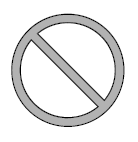
The symbol below in this manual means “Do not do this” or “Do not let this happen”.
Index
: A good place to start is the Index, an alphabetical listing of all information in your manual.
You'll find several WARNINGs, CAUTIONs, and NOTEs in the manual.
WARNING
A WARNING indicates a situation in which serious injury or death could result if the warning is ignored.
CAUTION
A CAUTION indicates a situation in which bodily injury or damage to your vehicle, or both, could result if the caution is ignored.
NOTE
A NOTE provides information and sometimes suggests how to make better use of your vehicle.
The symbol below, located on some parts of the vehicle, indicates that this manual contains information related to the part.
Please refer to the manual for a detailed explanation.


 Pictorial Index
Interior, exterior views and part identification of your Mazda. ...
Other materials:
Clutch Fluid Replacement/Air Bleeding [C66 M R]
CAUTION:
Do not allow clutch fluid to get on a painted surface. Clutch fluid contains
properties which can dissolve the paint. If clutch fluid gets on a painted surface,
wash it off with water immediately and wipe the area off completely.
Do not mix different types of clutch fl ...
Hood Latch Switch Inspection
1. Disconnect the negative battery cable..
2. Remove the front bumper..
3. Disconnect the hood latch switch connector..
4. Verify that the continuity is as indicated in the table.
NOTE:
Inspect the continuity when the hood is open and closed.
If the operation as i ...
Wheel Hub, Steering Knuckle Removal/Installation
CAUTION:
Performing the following procedures without first removing the ABS wheel-speed
sensor may possibly cause an open circuit in the wiring harness if it is pulled
by mistake. Before performing the following procedures, disconnect the ABS wheel-speed
sensor connector (axle sid ...
