
Mazda CX-5 Service & Repair Manual: Resistor [Manual Air Conditioner]
Purpose
-
The resistor controls the blower motor rotation speed.
Function
-
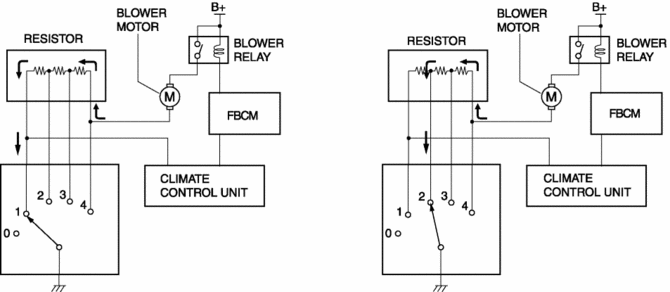
The resistor controls the supply voltage to the blower motor according to the fan switch operation, and adjusts the fan rotation speed (airflow volume).
Construction
-
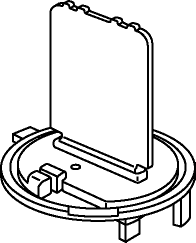
The resistor is installed to the A/C unit.
-
A thin, card-type resistor has been adopted for weight reduction.
Operation
1. When the fan switch speed is set at 1, the resistor internal resistance increases and the blower motor applied voltage decreases. Therefore, the blower motor rotation speed decreases.
2. The resistor internal resistance decreases as the voltage applied to the blower motor by the fan switch increases in speed to 2, 3, and 4. Therefore, the blower motor rotation speed increases.
Fail-safe
-
Function not equipped.
 Resistor Removal/Installation [Manual Air Conditioner]
NOTE:
When removing the resistor, perform the procedure in the posture shown in
the figure.
1. Disconnect the negative battery cable..
2. Remove the dashboard under cover..
...
 Solar Radiation Sensor Inspection [Full Auto Air Conditioner]
1. Shine a fluorescent light or expose the solar radiation sensor to natural
sunlight.
2. Connect the positive (+) lead to terminals B, C and negative (-) lead to terminal
A of the solar radiati ...
Other materials:
Front Shock Absorber Disposal
WARNING:
Whenever drilling into a front shock absorber, wear protective eye wear.
The gas in the front shock absorber is pressurized, and could spray metal chips
into the eyes and face when drilling.
1. Place the shock absorber on a level surface or with the piston pointing d ...
Rear Parking Brake Cable Removal/Installation
1. Remove the front console box..
2. Remove the shift lever knob. (MTX).
3. Remove the shift panel..
4. Remove the upper panel..
5. Remove the rear console..
6. Loosen the adjusting nut.
7. Remove the floor under cover No.2..
8. Remove in the order indicated in the table.
9. Install ...
Hydraulic Pressure Control System Outline [Fw6 A EL, Fw6 Ax EL]
Outline
The hydraulic control mechanism consists of an oil cooler which maintains
the hydraulic pressure at the optimum temperature, a control valve body and
each shift valve which perform adjustment and circuit switching of the hydraulic
pressure based on the control content calcula ...
