
Mazda CX-5 Service & Repair Manual: Power Window Main Switch
Purpose
-
Remote control of door glass open/close and power outer mirror adjustment are possible with occupant seated in the cabin.
Function
Power window main switch
-
Manual
-
When the power window main switch is operated for manual open/close operation, it sends a manual open/close signal to the P/W CM (power window control module).
-
Auto
-
When the power window main switch is operated for auto open/close operation, it sends an auto open/close signal to the P/W CM.
-
Power cut
-
When the power-cut switch is pressed, it disables the operation of the power window subswitches for the front and rear passenger seats.
Power outer mirror switch
-
Up-down/left-right adjustment
-
The power outer mirror switch switches the contact point according to the switch operation. As a result, the circuit to the up-down/left-right adjustment motor is switched.
-
Left/right selection
-
The power outer mirror switch is used to select the side on which adjustment of the power outer mirror glass is desired.
Construction
-
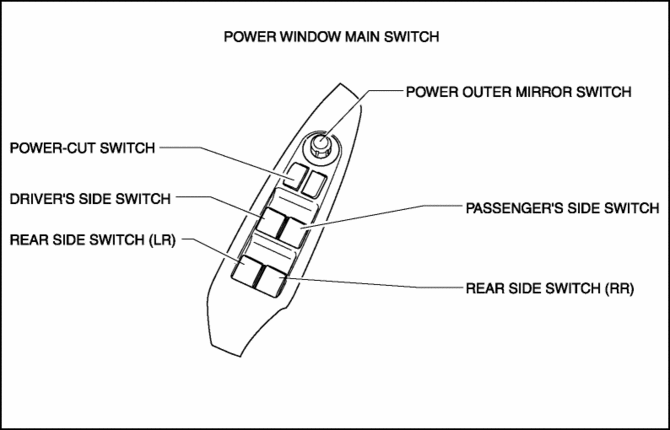
The power window main switch consists of the following parts:
-
Driver's side switch
-
Passenger's side switch
-
Rear side switch (LR)
-
Rear side switch (RR)
-
Power-cut switch
-
Power outer mirror switch
-
Up/down/left/right adjustment
-
Left/right selection
-
The power window main switch has a built-in P/W CM (power window control module), and controls the auto reverse pinch protection, IG OFF timer, and IG OFF timer cancel functions.
Operation
Power window main switch
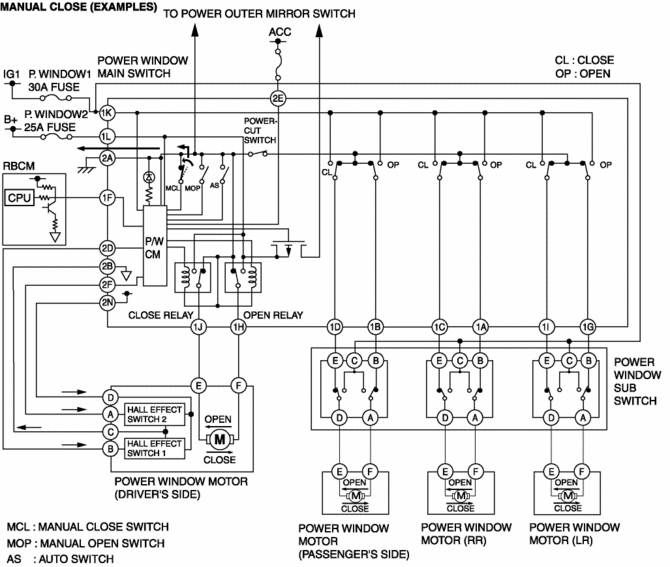
1. Contact points for door glass opening/closing can be changed by operating the power window main switch. The P/W CM monitors the operation conditions of the driver's side switch and power window motor.
Power-cut switch
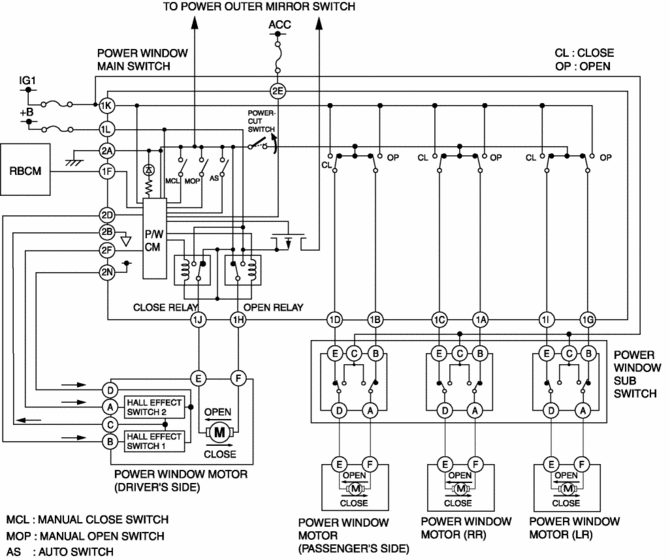
1. The power window main switch turns off when the power-cut switch is operated for lock operation.
Power outer mirror switch
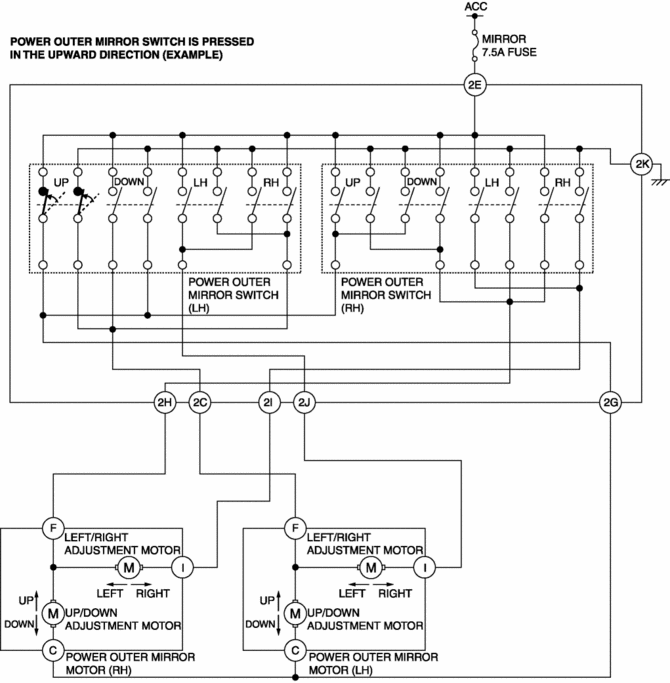
1. Up/down/left/right contact points for the power outer mirror can be switched by operating the power outer mirror switch.
Fail-safe
-
Function not equipped
 Glass/Windows/Mirrors
Outline
The following glass has been adopted.
Windshield
Front door glass
Rear door glass
Rear door quarter glass
Quarter window glass
...
 Power Window Main Switch Inspection
1. Disconnect the negative battery cable..
2. Remove the following parts:
a. Inner garnish. (driver's side).
b. Front door trim. (driver's side).
c. Power window main switch.
3. Conn ...
Other materials:
Accelerator Pedal Position (App) Sensor Inspection
Voltage Inspection
NOTE:
Because the APP sensor is integrated in the accelerator pedal, replacing
the APP sensor includes replacement of the accelerator pedal.
1. Connect the M-MDS to the DLC?2.
2. Switch the ignition ON (engine off or on).
3. Verify that the APP sensor output ...
Antenna Feeder No.2 Removal/Installation
Removal
1. Disconnect the negative battery cable..
2. Remove the following parts:
a. Sunroof seaming welt (with sunroof system).
b. A-pillar trim.
c. Front map light.
d. Sunvisor.
e. Front scuff plate.
f. Rear scuff plate.
g. B-pillar lower trim.
h. Adjust anchor cover.
i. Upper ...
Tire Pressure Warning Alarm
Purpose
The tire pressure warning alarm warns the user that a tire pressure has decreased
or notifies the user that the tire pressure warning alarm has been reset.
Function
If the instrument cluster receives a tire pressure warning alarm request
signal sent from the D ...
