
Mazda CX-5 Service & Repair Manual: Keyless Antenna Removal/Installation
With Advanced Keyless Entry System
Vehicle interior, front
1. Disconnect the negative battery cable..
2. Remove the following parts:
a. Decoration panel.
b. Shift lever knob (MTX).
c. Front console box.
d. Shift panel.
e. Upper panel.
f. Rear console.
g. Side wall.
h. Front console.
3. Disconnect the connector from the keyless antenna.
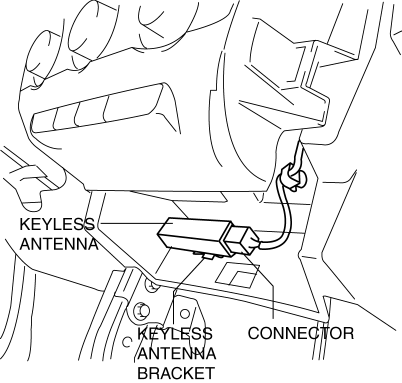
CAUTION:
-
Disconnect the connector while holding the keyless antenna, otherwise the keyless antenna bracket could be damaged.
4. While pressing the keyless antenna bracket tab in the direction of arrow (1) shown in the figure, press it in the direction of arrow (2) to detach the keyless antenna bracket tab from the instrument panel.
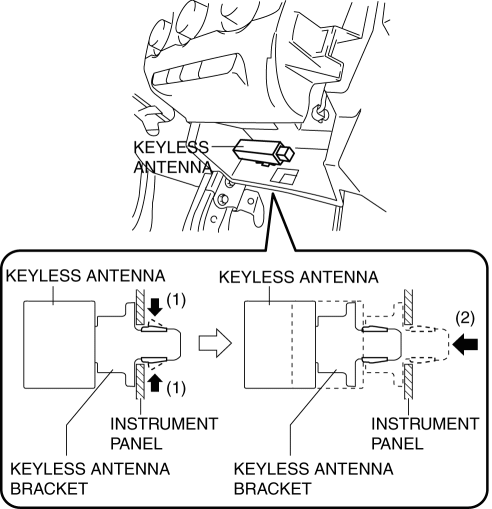
5. Remove the keyless antenna from the instrument panel.
6. Insert a tape-wrapped flathead screwdriver into the position shown in the figure.
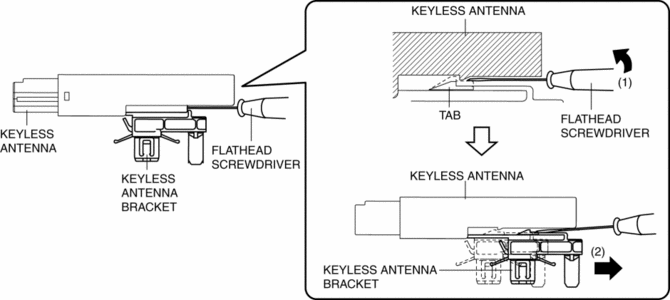
7. Move the tape-wrapped flathead screwdriver in the direction of arrow (1) shown in the figure to press the keyless antenna bracket tab, and pull it in the direction of arrow (2) to detach the keyless antenna bracket from the keyless antenna.
8. Remove the keyless antenna bracket from the keyless antenna.
9. Install in the reverse order of removal.
Vehicle interior, rear
1. Disconnect the negative battery cable..
2. Remove the trunk board..
3. Disconnect the connector from the keyless antenna.
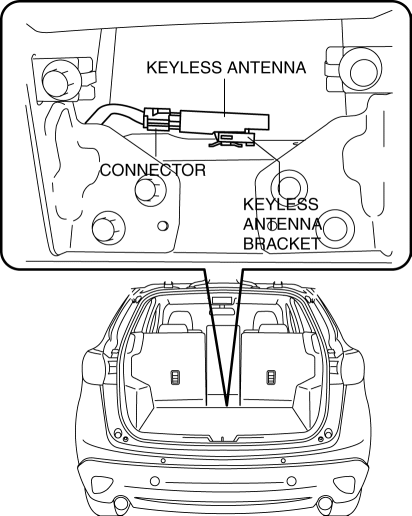
CAUTION:
-
Disconnect the connector while holding the keyless antenna, otherwise the keyless antenna bracket could be damaged.
4. While pressing the keyless antenna bracket tab in the direction of arrow (1) shown in the figure, press it in the direction of arrow (2) to detach the keyless antenna bracket tab from the body.
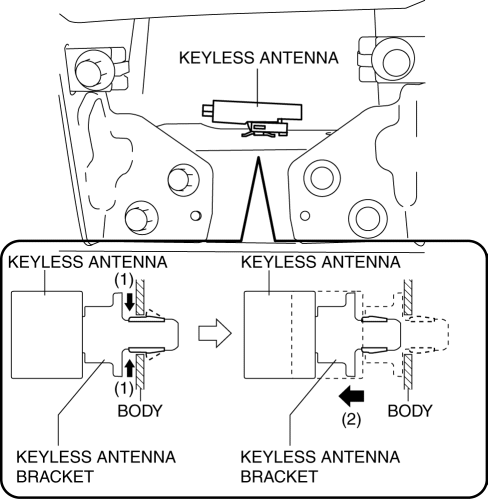
5. Remove the keyless antenna from the body.
6. Insert a tape-wrapped flathead screwdriver into the position shown in the figure.
7. Move the tape-wrapped flathead screwdriver in the direction of arrow (1) shown in the figure to press the keyless antenna bracket tab, and pull it in the direction of arrow (2) to detach the keyless antenna bracket from the keyless antenna.
8. Remove the keyless antenna bracket from the keyless antenna.
9. Install in the reverse order of removal.
Vehicle exterior, rear
1. Disconnect the negative battery cable..
2. Disconnect the connector from the keyless antenna.
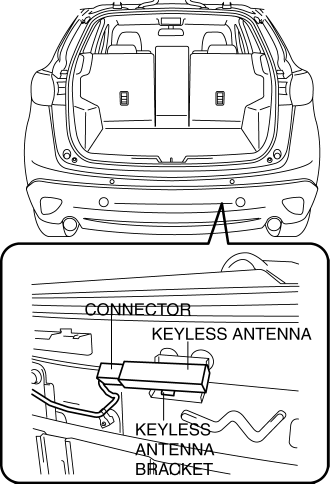
CAUTION:
-
Disconnect the connector while holding the keyless antenna, otherwise the keyless antenna bracket could be damaged.
3. While pressing the keyless antenna bracket tab in the direction of arrow (1) shown in the figure, press it in the direction of arrow (2) to detach the keyless antenna bracket tab from the bracket.
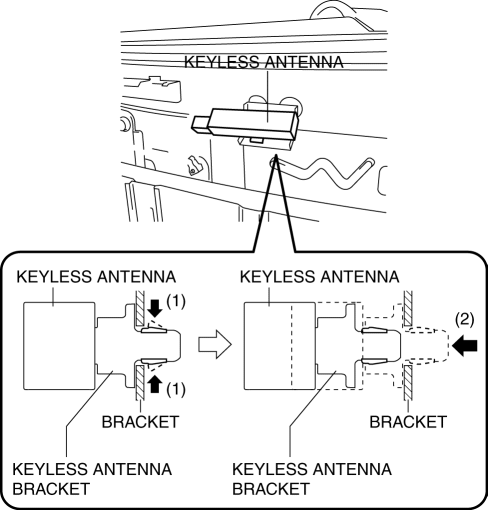
4. Remove the keyless antenna from the bracket.
5. Insert a tape-wrapped flathead screwdriver into the position shown in the figure.
6. Move the tape-wrapped flathead screwdriver in the direction of arrow (1) shown in the figure to press the keyless antenna bracket tab, and pull it in the direction of arrow (2) to detach the keyless antenna bracket from the keyless antenna.
7. Remove the keyless antenna bracket from the keyless antenna.
8. Install in the reverse order of removal.
Vehicle exterior, driver's side/passenger's side
NOTE:
-
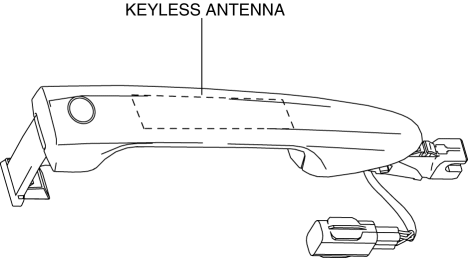
The keyless antenna (vehicle exterior, driver's side/passenger's side) cannot be removed as a single unit because it is built into the front outer handle. To replace the keyless antenna (vehicle exterior, driver's side/passenger's side), replace the front outer handle..
With Keyless Entry System
Vehicle interior, center
1. Disconnect the negative battery cable..
2. Remove the following parts:
a. Decoration panel.
b. Shift lever knob (MTX).
c. Front console box.
d. Shift panel.
e. Upper panel.
f. Rear console.
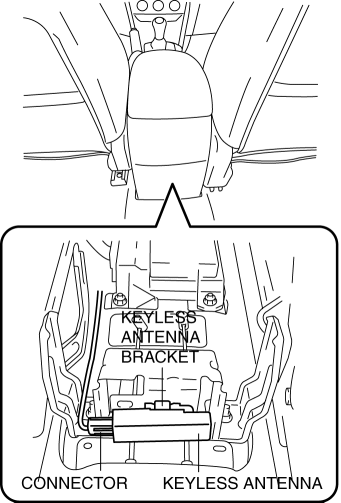
3. Disconnect the connector from the keyless antenna.
CAUTION:
-
Disconnect the connector while holding the keyless antenna, otherwise the keyless antenna bracket could be damaged.
4. While pressing the keyless antenna bracket tab in the direction of arrow (1) shown in the figure, press it in the direction of arrow (2) to detach the keyless antenna bracket tab from the bracket.
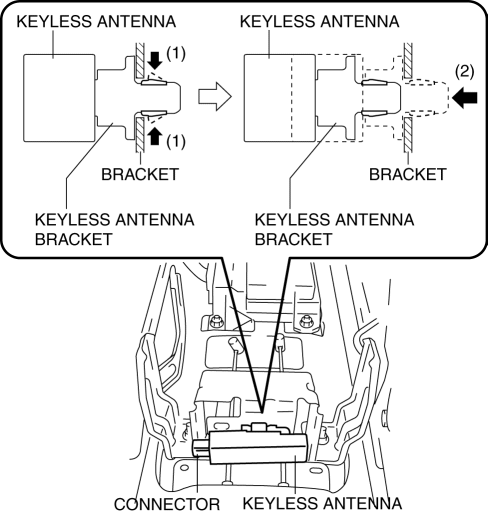
5. Remove the keyless antenna from the bracket.
6. Insert a tape-wrapped flathead screwdriver into the position shown in the figure.
7. Move the tape-wrapped flathead screwdriver in the direction of arrow (1) shown in the figure to press the keyless antenna bracket tab, and pull it in the direction of arrow (2) to detach the keyless antenna bracket from the keyless antenna.
8. Remove the keyless antenna bracket from the keyless antenna.
9. Install in the reverse order of removal.
 Installation Of Radio System
The control modules and control unit have been designed with sufficient attention
to radio wave disturbances from the outside. However, observe the following precautions
when installing the radio ...
 Keyless Antenna [Advanced Keyless Entry System]
Purpose
Outputs a request signal and specifies the remote transmitter location.
Function
The keyless antenna outputs request signals to the inside and outside of
the vehicle bas ...
Other materials:
Discharge Headlight Control Module
Purpose
Converts DC voltage from the battery to AC voltage and outputs the stabilized
voltage to the discharge headlight.
Function
The discharge headlight control module controls the voltage from the battery
to illuminate the discharge headlight.
The discharge headl ...
Ambient Temperature Sensor [Manual Air Conditioner]
Purpose
The ambient temperature sensor detects the ambient temperature.
Function
The ambient temperature sensor converts the detected temperature to an electric
signal.
Construction
A thermistor-type ambient temperature sensor has been adopted.
The ambient ...
Bluetooth® Hands-Free
Making a Call
Phonebook Usage
Make a call by saying the contact name in the downloaded phonebook.
Telephone calls can be made by saying the name of a person whose phone number
has been registered in Bluetooth® Hands-Free in advance. Refer to Import contact
(Download Phonebook).
1. Press the ...
