
Mazda CX-5 Service & Repair Manual: Vanity Mirror Illumination Bulb Removal/Installation
1. Disconnect the negative battery cable..
2. Insert a tape-wrapped flathead screwdriver into the service hole in the position shown in the figure.
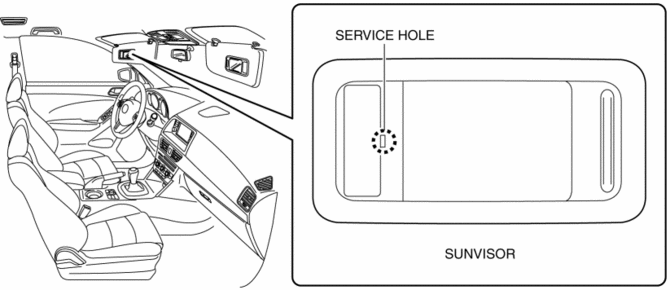
3. Move a flathead screwdriver in the direction of the arrow (1) shown in the figure and detach the lens tab and sunvisor.
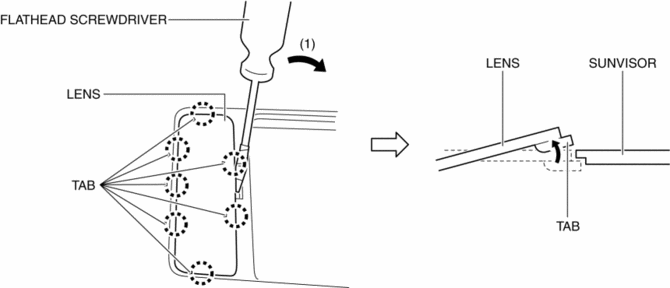
4. Detach all the lens tab and sunvisor and remove the lens from the sunvisor.
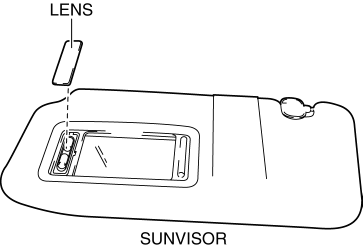
5. Remove the vanity mirror illumination bulb.
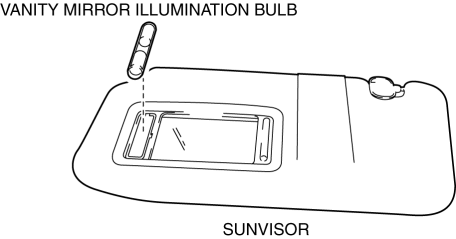
6. Install in the reverse order of removal.
 Rearview Mirror Removal/Installation
1. Remove the screw.
2. Pull the rearview mirror in the direction of the arrow (1) shown in the figure
3. Install in the reverse order of removal. ...
 Vanity Mirror Illumination Inspection
1. Disconnect the negative battery cable..
2. Remove the sunvisor..
3. Verify that the continuity between the vanity mirror illumination terminals
is as indicated in the table.
I ...
Other materials:
Power Steering Malfunction Indicator Light
Purpose
The power steering malfunction indicator light warns the driver that there
is a malfunction with the electric power steering (EPS) system.
Function
If there is a malfunction in the EPS system, the power steering malfunction
indicator light illuminates.
If th ...
Canister Vent (Cv) Solenoid Valve Inspection
U.S.A. And CANADA
Airflow inspection
1. Disconnect the negative battery cable..
2. Remove the CV solenoid valve..
3. Inspect airflow between the ports under the following conditions.
Measured condition
Continuity between A—B
When volta ...
Supplemental Restraint System (SRS) Precautions
The front and side supplemental restraint systems (SRS) include up to 6 air bags.
Please verify which kinds of air bags are equipped on your vehicle by locating the
“SRS AIRBAG” location indicators. These indicators are visible in the area where
the air bags are installed.
The air bags ar ...
