
Mazda CX-5 Service & Repair Manual: Tcs Off Switch, Tcs Off Indicator Light
Purpose/Function
-
The TCS OFF switch, located on the dashboard, allows for optionally enabling/disabling the TCS control at driver discretion.
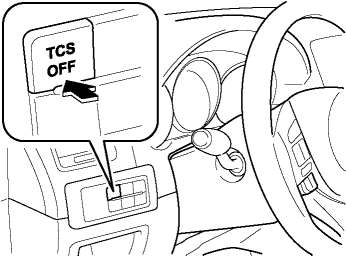
-
The TCS OFF indicator light, built into the instrument cluster, informs the driver that TCS control has been disabled by operation of the TCS OFF switch.
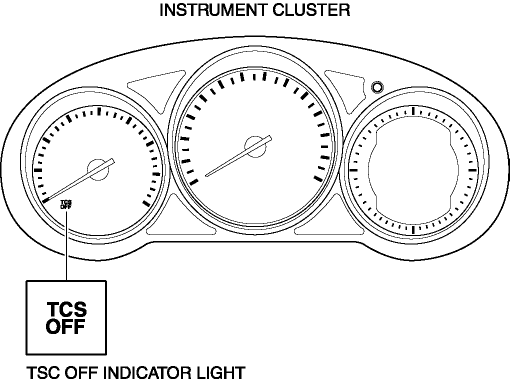
Operation
-
When the DSC system and CAN lines are functionally normally, the TCS OFF indicator light illuminates for approx. 3.0 s when the ignition is switched to ON to check the light function.
-
When the TCS OFF switch is pressed to disable TCS control, the TCS OFF indicator light illuminates.
NOTE:
-
To inhibit the TCS control, continue to press the TCS OFF switch until the TCS OFF indicator light illuminates.
-
The TCS OFF indicator light illumination and TCS/DSC/roll over mitigation (ROM) control conditions while operating the TCS OFF switch are as indicated in the table.
|
TCS OFF indicator light illumination conditions |
TCS control conditions |
DSC control conditions |
Roll over mitigation (ROM) control conditions |
||
|
Brake control |
Engine control |
||||
|
TCS ON |
Not illuminated |
Permitted |
Permitted |
Permitted |
Permitted |
|
TCS OFF |
Illuminated |
Permitted |
Inhibited |
Permitted |
Permitted |
Fail-safe
|
DTC No. |
Fail-safe function |
|
C0089:64 |
|
 Tcs Off Switch Removal/Installation
NOTE:
The TCS OFF switch is integrated with the cluster switch.
Refer to SWITCH PANEL REMOVAL/INSTALLATION to remove the cluster switch.
1. Remove the cluster switch from the swi ...
 Tcs/DSC Indicator Light
Purpose/Function
The TCS/DSC indicator light, built into the instrument cluster, informs the
driver of the following vehicle conditions.
TCS is operating. (Drive wheel is slippi ...
Other materials:
Seat Weight Sensor Control Module Removal/Installation [Two Step Deployment
Control System]
CAUTION:
When the seat weight sensor control module is replaced with a new one, perform
the seat weight sensor calibration using the M?MDS..
1. Switch the ignition to off.
2. Disconnect the negative battery cable and wait for 1 min or more..
3. Disconnect the connectors.
...
Bluetooth® Hands-Free
Making a Call
Phonebook Usage
Make a call by saying the contact name in the downloaded phonebook.
Telephone calls can be made by saying the name of a person whose phone number
has been registered in Bluetooth® Hands-Free in advance. Refer to Import contact
(Download Phonebook).
1. Press the ...
Turbine/Input Shaft Speed Sensor, Output Shaft Speed Sensor [Fw6 A EL, Fw6 Ax
EL]
Purpose/Function
The turbine/input shaft speed sensor detects the rotation speed of the input
shaft (low clutch drum).
The output shaft speed sensor detects the rotation speed of the output shaft
(primary gear).
The turbine/input shaft speed sensor and output shaft speed ...
