
Mazda CX-5 Service & Repair Manual: Sirius Satellite Radio Unit Removal/Installation
CAUTION:
-
The audio unit communicates with the SIRIUS satellite radio unit and records the presence/non-presence of the SIRIUS satellite radio unit when the ignition is switched to ACC or ON (engine off or on) after connecting the negative battery cable.
-
If the commander switch is installed with the negative battery cable connected when the audio unit records that there is no SIRIUS satellite radio unit, the SIRIUS satellite radio unit does not operate.
-
For the SIRIUS satellite radio unit installation/removal, disconnect the negative battery cable, switch the ignition to ACC or ON (engine off or on) after the servicing is completed, and the audio unit records the presence/non-presence of the SIRIUS satellite radio unit.
1. Disconnect the negative battery cable..
2. Remove the glove compartment..
3. Disconnect the connector.
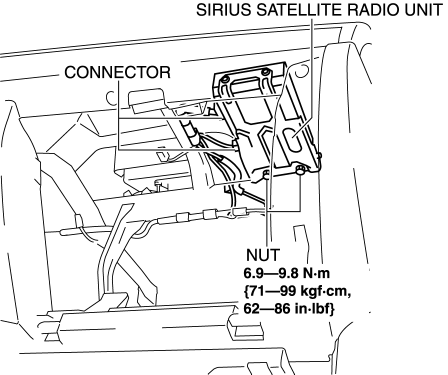
4. Remove the nuts.
5. Remove the SIRIUS satellite radio unit.
6. Install in the reverse order of removal.
 Sirius Satellite Radio Unit
Purpose
Satellite radio programming can be listened to.
Function
The voltage signal sent from the center roof antenna (SIRIUS satellite radio
antenna) is output to the audio uni ...
 Speaker Grille Removal/Installation
Center Speaker Grille
1. Insert a tape-wrapped flathead screwdriver into shown in the figure and remove
hooks A in the direction of arrow (1).
2. Take the shaded area shown in the figure, and ...
Other materials:
Fuel Pump Unit
Purpose, Function
Supplies fuel in the fuel tank to the high pressure fuel pump.
Based on the control signal from the PCM, the fuel pump operates by the operation
of the fuel pump relay and the fuel pump control module.
Construction
2WD
The fuel pump unit is installed ...
Headlight Leveling Actuator
Purpose, Function
The headlight leveling actuator drives the motor based on the target optical
axis voltage, which is input from the AFS control module, to change the optical
axis of the headlights.
Construction
Built into the front combination lights.
Consists of ...
Bumper Stiffener Lower Removal/Installation
1. Disconnect the negative battery cable..
2. Remove the following parts:
a. Seal board upper.
b. Front bumper.
c. Seal plate.
d. Front under cover No.1.
3. Remove bolts A.
4. Pull the bumper stiffener lower in the direction of the arrow (1), (2) shown
in the figure, detach hooks ...
