
Mazda CX-5 Service & Repair Manual: Rear Seat Cushion Trim Removal/Installation
CAUTION:
-
When removing or putting in the rear seat cushion, contact with the surrounding areas of the vehicle could cause scratches and damage. When removing or putting in the rear seat cushion, always use two or more persons to perform the work and be careful not to scratch or damage the rear seat cushion and the surrounding area of the vehicle.
-
When performing the procedure with a rear seat cushion removed from the vehicle, perform the procedure on a clean cloth so as not to damage or soil the seat.
6:4 Split Type
1. Remove the rear seat cushion.
2. Slide hooks A in the order of (1), (2) shown in the figure to detach it from the rear seat cushion pad.
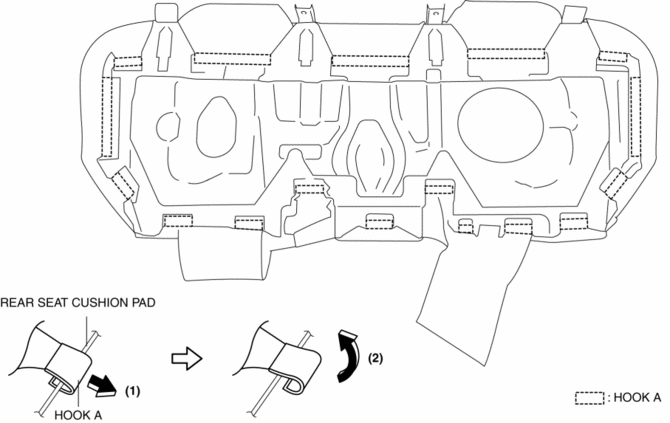
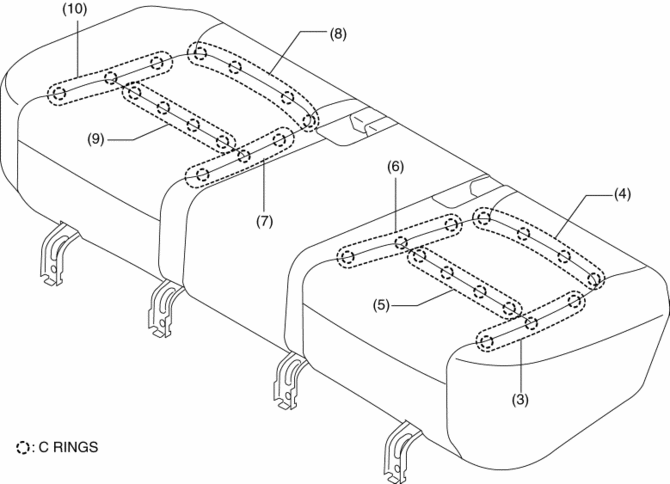
3. Partially peal back the rear seat cushion trim from the rear seat cushion pad, remove C rings in the order of (3), (4), (5), (6), (7), (8), (9), (10) shown in the figure,
CAUTION:
-
If a damaged C rings are reused, it may not be possible to install the rear seat cushion trim and rear seat cushion pad correctly. When removing and installing C rings, be careful not to damage them.
-
If a C rings are damaged, replace the C rings with a new one.
4. Install in the reverse order of removal.
4:2:4 Split Type
1. Remove the trunk board..
2. Remove the rear seat..
3. Slide hooks A in the order of (1), (2) shown in the figure to detach it from the rear seat cushion pad.
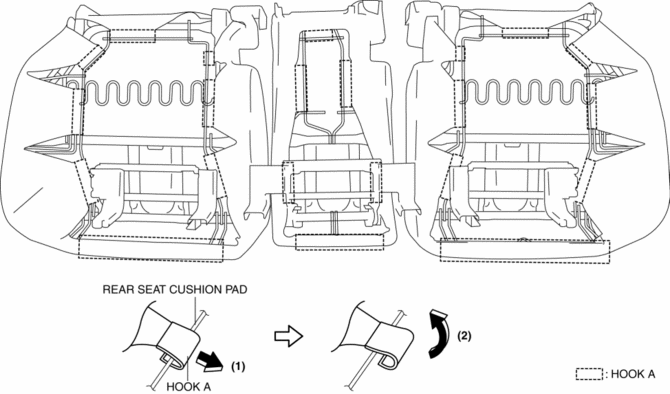
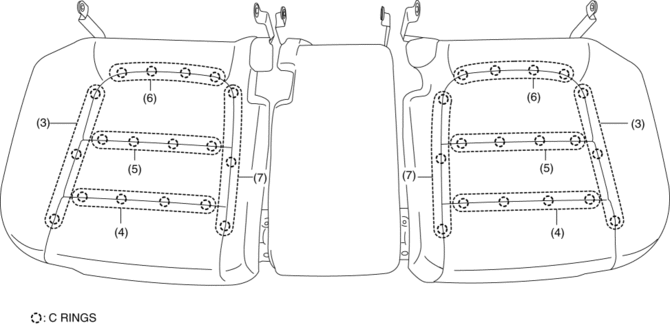
4. Partially peal back the rear seat cushion trim from the rear seat cushion pad, remove C rings in the order of (3), (4), (5), (6), (7) shown in the figure,
CAUTION:
-
If a damaged C rings are reused, it may not be possible to install the rear seat cushion trim and rear seat cushion pad correctly. When removing and installing C rings, be careful not to damage them.
-
If a C rings are damaged, replace the C rings with a new one.
5. Install in the reverse order of removal.
 Rear Seat Cushion Removal/Installation
CAUTION:
When removing or putting in the rear seat cushion, contact with the surrounding
areas of the vehicle could cause scratches and damage. When removing or putting
in the rear seat ...
 Rear Seat Removal/Installation
CAUTION:
When removing or putting in the rear seat, contact with the surrounding areas
of the vehicle could cause scratches and damage. When removing or putting in
the rear seat, always ...
Other materials:
Registering Your Vehicle in A Foreign Country (Except United States and Canada)
Registering your vehicle in a foreign country may be problematic depending on
whether it meets the specific emission and safety standards of the country in which
the vehicle will be driven. Consequently, your vehicle may require modifications
at personal expense in order to meet the regulation ...
Hood Latch Switch
Purpose
Detects the open/closed condition of the hood.
Function
The hood latch switch is utilized in the theft-deterrent system control.
For the theft-deterrent system, refer to (see THEFT-DETERRENT SYSTEM.).
Construction
Built into the hood latch ...
Driving on Uneven Road
Your vehicle's suspension and underbody can be damaged if driven on rough/uneven
roads or over speed bumps at excessive speeds. Use care and reduce speed when traveling
on rough/uneven roads or over speed bumps.
Use care not to damage the vehicle's underbody, bumpers or muffler(s) when ...
