
Mazda CX-5 Service & Repair Manual: Rear Seat Back Trim Removal/Installation
6:4 Split Type
1. Remove the trunk board..
2. Remove the rear seat back..
3. Remove the headrest.
4. Remove the rear seat back frame..
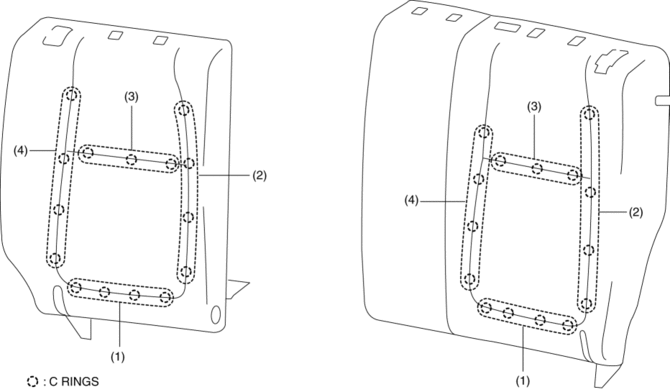
5. Remove the C rings in the order of (1), (2), (3), and (4) shown in the figure, and remove the rear seat back trim from the rear seat back pad.
CAUTION:
-
If a damaged C rings are reused, it may not be possible to install the rear seat back trim and rear seat back pad correctly. When removing and installing C rings, be careful not to damage them.
-
If a C rings are damaged, replace the C rings with a new one.
6. Install in the reverse order of removal.
4:2:4 Split Type
1. Remove the trunk board..
2. Remove the rear seat..
3. Remove the rear seat back..
4. Remove the headrest.
5. Remove the rear seat back frame..
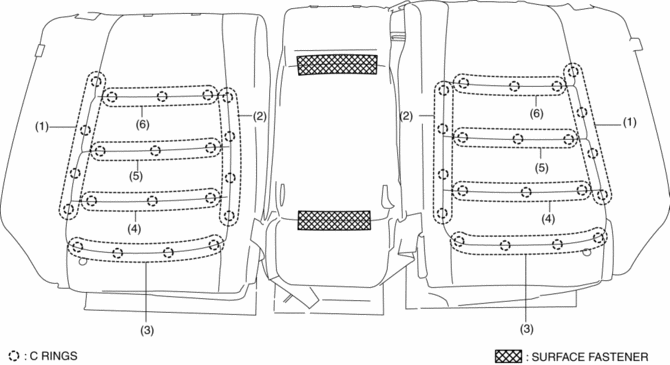
6. Partially peal back the rear seat back trim from the rear seat back pad, remove C rings in the order of (1), (2), (3), (4), (5), (6) shown in the figure. (LH/RH)
CAUTION:
-
If a damaged C rings are reused, it may not be possible to install the rear seat back trim and rear seat back pad correctly. When removing and installing C rings, be careful not to damage them.
-
If a C rings are damaged, replace the C rings with a new one.
7. Remove the surface fasteners while peeling back the rear seat back trim, and remove the rear seat back trim from the rear seat back pad. (CENTER)
8. Install in the reverse order of removal.
 Rear Seat Back Striker Removal/Installation
1. Disconnect the negative battery cable..
2. Press the push knob to fold the rear seat back.
3. Remove the following parts:
a. Trunk board.
b. Trunk end trim.
c. Rear scuff plate.
d. Trun ...
 Rear Seat Center Armrest Removal/Installation
1. Operate the push knob (RH) and lower the rear seat back (RH).
2. Remove screw A.
3. Remove the rear seat center armrest hinge cover (RH) in the direction of the
arrow (1) shown in the fig ...
Other materials:
Front Crossmember Removal/Installation
CAUTION:
Performing the following procedures without first removing the front ABS
wheel-speed sensor may possibly cause an open circuit in the wiring harness
if it is pulled by mistake. Before performing the following procedures, disconnect
the front ABS wheel-speed sensor wiring ha ...
Precaution
Intermittent Concern Troubleshooting
Vibration method
If a malfunction occurs or becomes worse while driving on a rough road or
when the engine is vibrating, perform the following steps.
NOTE:
There are several reasons why vehicle or engine vibration could cause an
electr ...
Rear Wiper System
Outline
Equipped with continuous, auto-stop, intermittent wiper, and synchronized
washer and wiper operation.
The front body control module (FBCM) performs rear wiper and washer system
fail-safe..
Structural View
System Wiring Diagram
Operation
Continuous operat ...
