
Mazda CX-5 Service & Repair Manual: Rear Mount Camera Inspection
1. Disconnect the negative battery cable..
2. Remove the following parts:
a. Liftgate upper trim.
b. Liftgate side trim.
c. Liftgate lower trim.
d. Liftgate garnish.
e. Rear mount camera.
3. Prepare four dry cell batteries (1.5 V)
4. Connect the four dry cell batteries in a series.
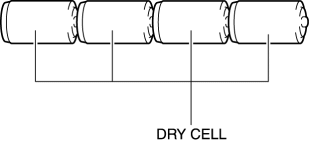
5. Connect the positive pole of the dry cell battery to rear mount camera terminal A, and the negative pole to terminal D.
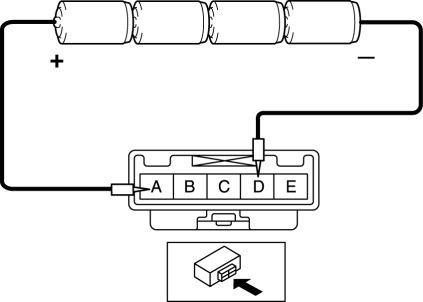
6. With the cell batteries being connected, measure the waveform between rear mount camera terminal C and body ground.
7. Verify that the waveform is displayed as shown in the figure.
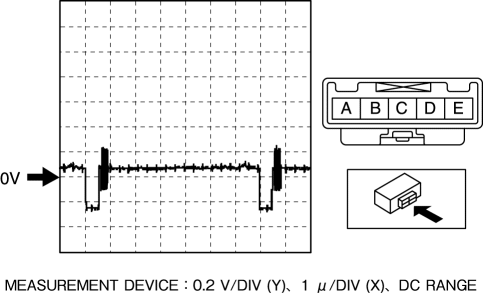
8. If the voltage is not as shown in the figure, replace the rear mount camera.
 Rear Mount Camera
Purpose, Function
The rear mount camera shoots the conditions at the rear of the vehicle in
color, and after converting the video signal, it outputs the signal to the audio
unit. (with co ...
 Rear Mount Camera Removal/Installation
CAUTION:
The audio unit communicates with the rear mount camera and records the presence/non-presence
of the rear mount camera when the ignition is switched to ACC or ON (engine
off or o ...
Other materials:
Rain Sensor
Outline
The rain sensor detects the amount of rainfall and calculates the wiper operation
speed, and outputs a windshield wiper control signal to the front body control
module (FBCM) to perform automatic wiper operation (auto wiper system) according
to the amount of rainfall.
...
Auto Light Sensor
Purpose
The auto light sensor detects the illumination level above and in front of
the vehicle and outputs it to the front body control module (FBCM).
Function
The auto-light sensor uses the upward illumination level sensor to detect
the illumination level above the vehicle ...
Canister Vent (Cv) Solenoid Valve Removal/Installation
U.S.A. And CANADA
1. Disconnect the negative battery cable..
2. Remove the floor under cover (LH)..
3. Disconnect the evaporative hose No.2..
4. Remove in the order indicated in the table.
1
CV solenoid valve connector
2
CV solenoid va ...
