
Mazda CX-5 Service & Repair Manual: Rear End Panel Installation [Panel Replacement]
Symbol Mark

Installation Procedure
1. When installing new parts, measure and adjust the body as necessary to conform with standard dimensions.
2. Drill holes for the plug welding before installing the new parts.
3. After temporarily installing new parts, make sure the related parts fit properly.
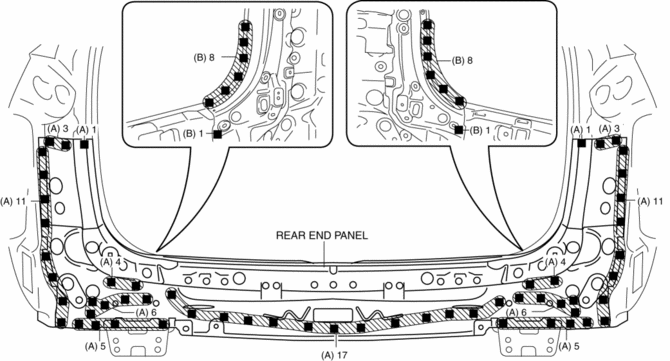
4. Plug weld the 77 locations indicated by (A) shown in the figure.
5. Plug weld the 18 locations indicated by (B) from room side shown in the figure, then install the rear end panel.
 Rear Bumper Removal/Installation
CAUTION:
Affix the protective tape to the position (body side) shown in the figure.
1. Disconnect the negative battery cable..
2. Remove the rear combination light..
3. Remove ...
 Rear End Panel Removal [Panel Replacement]
Symbol Mark
Removal Procedure
1. Drill the 77 locations indicated by (A) shown in the figure.
2. Drill the 18 locations indicated by (B) from room side shown in the figure.
3. Remove th ...
Other materials:
Engine Transaxle Integration Control [Fw6 A EL, Fw6 Ax EL]
Outline
The TCM controls engine output torque and reduces transaxle output shaft
torque fluctuation during auto shifting, and reduces shock occurring from the
vehicle during shifting.
Construction
Operation
During auto shifting, the TCM sends the torque reduction reque ...
C Pillar Trim Removal/Installation
1. Disconnect the negative battery cable..
2. Remove the following parts:
a. Trunk board.
b. Trunk end trim.
c. Rear scuff plate.
d. Trunk side trim.
e. D-pillar trim.
3. Partially peel back the seaming welt.
4. Remove the fastener A.
5. Take the shaded area shown in the figure ...
Resistor [Manual Air Conditioner]
Purpose
The resistor controls the blower motor rotation speed.
Function
The resistor controls the supply voltage to the blower motor according to
the fan switch operation, and adjusts the fan rotation speed (airflow volume).
Construction
The resistor is installed ...
