
Mazda CX-5 Service & Repair Manual: Rear Door Speaker Removal/Installation
Without Bose®
NOTE:
-
If the procedure is performed while holding the front door speaker cone, it could deform the cone causing a malfunction. Therefore, perform the procedure while holding any part other than the cone.
1. Disconnect the negative battery cable..
2. Remove the rear door trim..
3. Disconnect the connector.
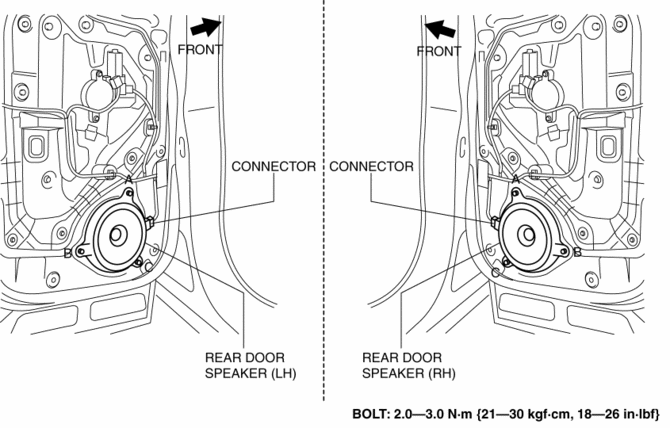
4. Remove the bolts in alphabetical order.
5. Pull the rear door speaker in the direction of the arrow shown in the figure and remove it while detaching the pins.
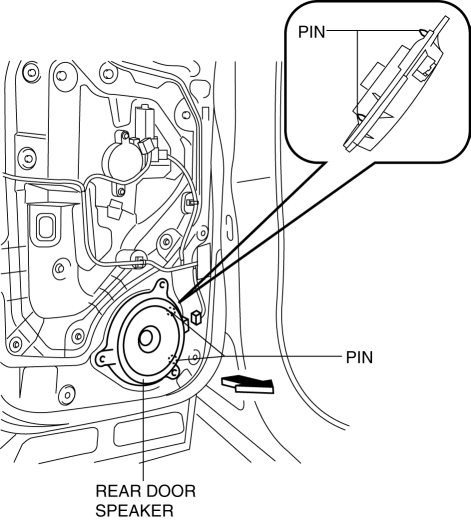
6. Install in the reverse order of removal.
With Bose®
1. Disconnect the negative battery cable..
2. Remove the rear door trim..
3. Disconnect the connector.
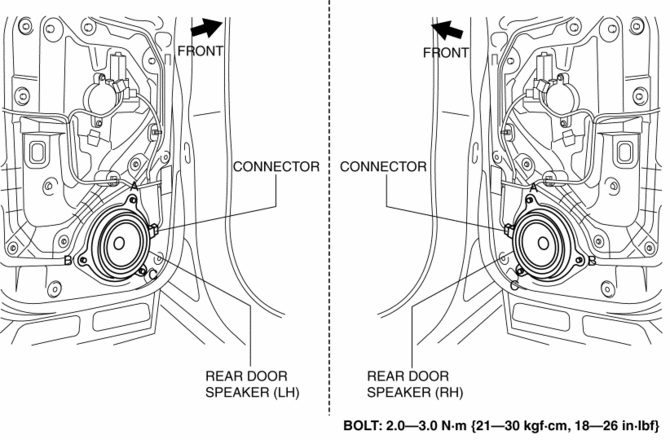
4. Remove the bolts in alphabetical order.
5. Pull the rear door speaker in the direction of the arrow shown in the figure and remove it while detaching the pins.
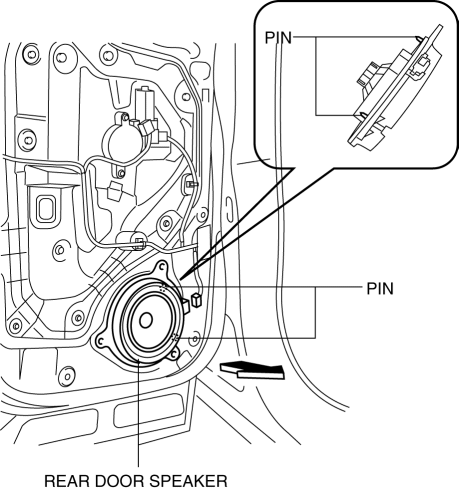
6. Install in the reverse order of removal.
 Rear Door Speaker Inspection
1. Disconnect the negative battery cable..
2. Remove the rear door trim..
3. Disconnect the rear door speaker connector..
4. Verify that the resistance between the rear door speaker terminals is ...
 Rear Mount Camera
Purpose, Function
The rear mount camera shoots the conditions at the rear of the vehicle in
color, and after converting the video signal, it outputs the signal to the audio
unit. (with co ...
Other materials:
Returnless Fuel System
Purpose, Outline
Fuel evaporation in the fuel tank is reduced by adjusting the fuel amount
(fuel pressure) ejected from the fuel pump and preventing fuel warmed in the
engine compartment from returning.
System Diagram
2WD
AWD
Structure
The returnless fuel system ...
Tcs Control
Outline
The TCS control actuates torque reduction through engine control, as well
as using brake control to control traction.
NOTE:
Engine control: Engine output is lowered by fuel cut and ignition timing
control to reduce the traction, preventing driving wheel slip.
...
Liftgate Removal/Installation
WARNING:
Removing the stay damper, liftgate hinge securing bolt, or liftgate without
supporting the liftgate may cause the liftgate to fall off and injure you. When
removing the stay damper, liftgate hinge, or liftgate, always use two persons
to perform the work.
1. Disconnect ...
