
Mazda CX-5 Service & Repair Manual: Rear Accessory Socket Removal/Installation
1. Disconnect the negative battery cable..
2. Insert a tape-wrapped flathead screwdriver into the service hole in the position shown in the figure.
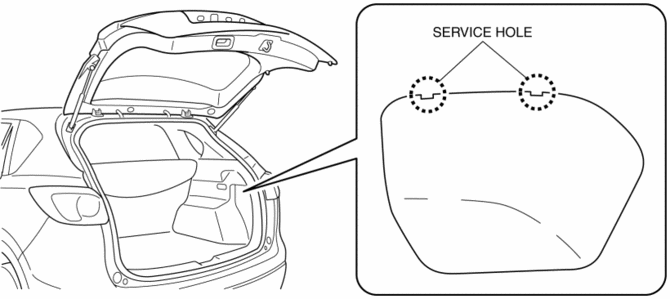
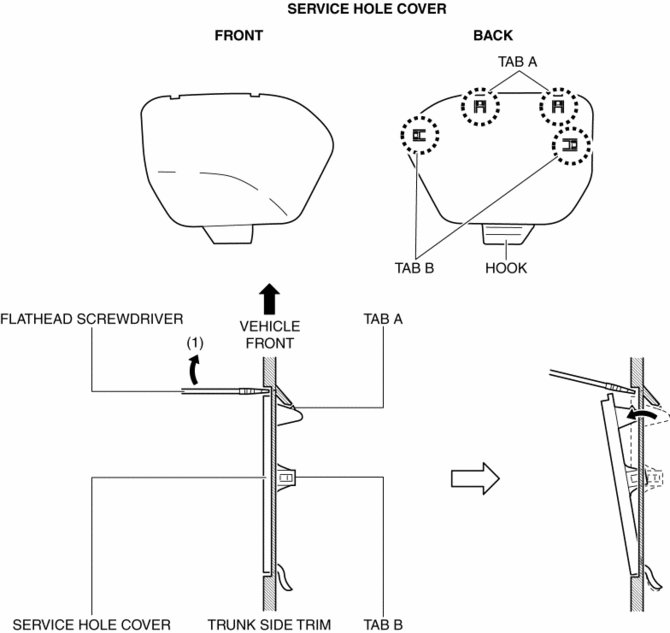
3. Move the flathead screwdriver in the direction of the arrow (1) shown in the figure, pull out the service hole cover, and detach the service hole cover tab and trunk side trim.
4. Pull out the service hole cover in the direction of the arrow (2) shown in the figure and pull out the service hole cover hook from the trunk side trim.
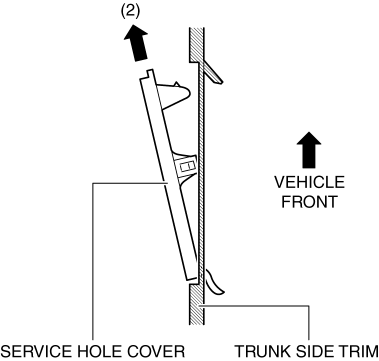
5. Remove the service hole cover.
6. Disconnect the connector.

7. Insert a tape-wrapped flathead screwdriver into the service hole in the position shown in the figure.

8. While pressing the cap tab in the direction of arrow (3) shown in the figure, push out the rear accessory socket in the direction of arrow (4) to detach the cap tab from the socket.
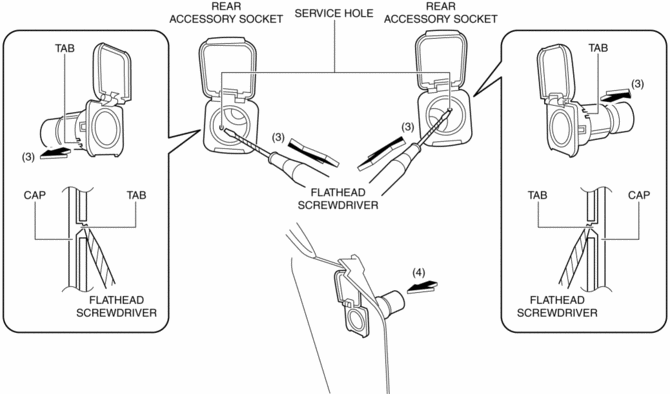
9. Pull the rear accessory socket in the direction of the arrow shown in the figure and remove it.

10. While pressing the cap tab in the direction of the arrow (5) shown in the figure, push out the cap in the direction of the arrow (6) shown in the figure to detach the cap tab from the trunk side trim.
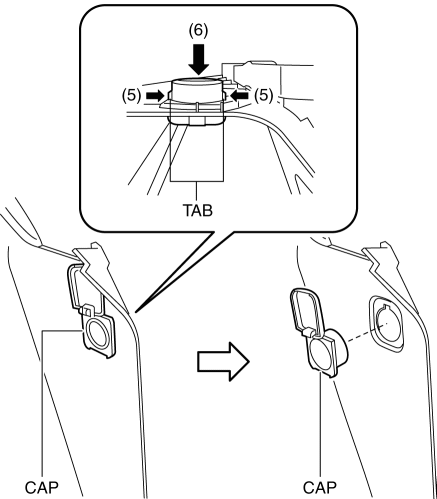
11. Remove the cap.
12. Install in the reverse order of removal.
 Rear Accessory Socket Inspection
1. Remove the rear accessory socket..
2. Connect the tester probe to the position shown in the figure and verify that
there is continuity.
If it cannot be verified, replace the rear ac ...
 Safety Systems
...
Other materials:
Fuel Gauge Sender Unit Removal/Installation [2 Wd]
WARNING:
Always keep sparks and flames away from fuel when servicing the fuel system.
Fuel can be easily ignited which could cause serious injury or death, and damage
to equipment.
Fuel line spills and leakage from the pressurized fuel system are dangerous.
Fuel can ignite a ...
Front Side Frame Removal [Panel Replacement]
Symbol Mark
Removal Procedure
1. Drill the 15 locations indicated by (A) shown in the figure.
2. Drill the 4 locations indicated by (B) shown in the figure.
NOTE:
When drilling the 4 locations indicated by (B) shown in the figure, do not
drill a hole all the way through or there ...
Solar Radiation Sensor Removal/Installation [Full Auto Air Conditioner]
NOTE:
When removing the solar radiation sensor, perform the procedure in the posture
shown in the figure.
1. Disconnect the negative battery cable..
2. Remove the following parts:
a. Front scuff plate (passenger-side).
b. Front side trim (passenger-side).
c. Dashboard ...
