
Mazda CX-5 Service & Repair Manual: Rear ABS Wheel Speed Sensor Removal/Installation
1. Remove the trunk board..
2. Remove the trunk end trim..
3. Remove the rear scuff plate..
4. Remove the trunk side trim..
5. Disconnect the rear ABS wheel-speed sensor connector.
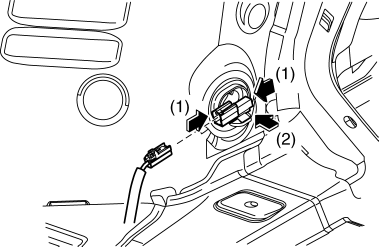
6. Press the rear ABS wheel-speed sensor tabs and press out the sensor toward the outside of the vehicle.
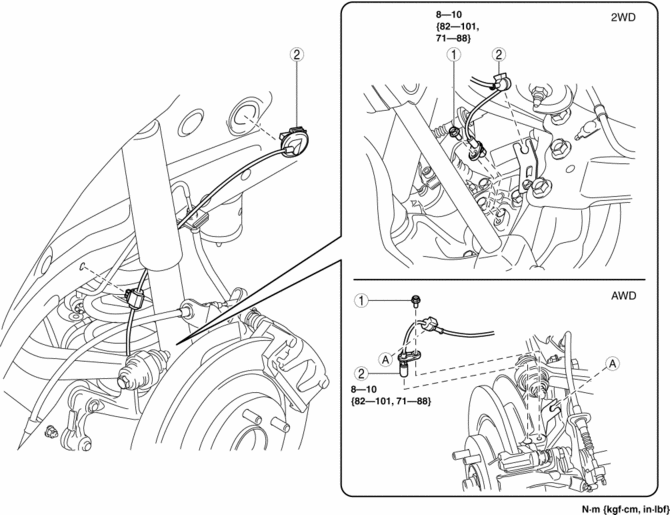
7. Remove in the order indicated in the table.
8. Install in the reverse order of removal.
9. After installation, verify that there is no twisting in the rear ABS wheel-speed sensor.
|
1 |
Bolt |
|
2 |
Rear ABS wheel-speed sensor (See Rear ABS Wheel-speed Sensor Removal Note.) |
Rear ABS Wheel-speed Sensor Removal Note
1. Pull aside the mudguard and remove the rear ABS wheel-speed sensor.
 Rear ABS Wheel Speed Sensor Inspection [Awd]
Installation Visual Inspection
1. Inspect the following items:
If there is any malfunction, replace the applicable part.
a. Excessive play of the ABS wheel-speed sensor
b. Deformation ...

Other materials:
Power Window Subswitch
Purpose
Each door glass except for the driver-side can be opened/closed with occupant
seated in the cabin using the power window subswitch.
Function
Manual switch
The power window subswitch switches the contact point according to the switch
operation and switches the circu ...
Air Bag System Warning Alarm [Two Step Deployment Control System]
Purpose
The air bag system warning alarm notifies the driver that a malfunction occurred
in the air bag system instead of the air bag system warning light.
Function
If a malfunction occurs in the air bag system while the air bag system warning
light cannot illuminate, the a ...
Windshield Wiper Motor And Link Removal/Installation
1. Disconnect the negative battery cable..
2. Remove the following parts:
a. Windshield wiper arm and blade.
b. Cowl grille.
CAUTION:
Always affix protective tape to the windshield end. If the windshield wiper
motor and link contacts the windshield, it could damage the windshield. ...
