
Mazda CX-5 Service & Repair Manual: Push Button Start Removal/Installation
1. Disconnect the negative battery cable..
2. Remove the meter hood..
3. While pressing the push button start tab in the direction of the arrow (1) shown in the figure, push out the push button start in the direction of the arrow (2) shown in the figure to detach the push button start tab from the meter hood.
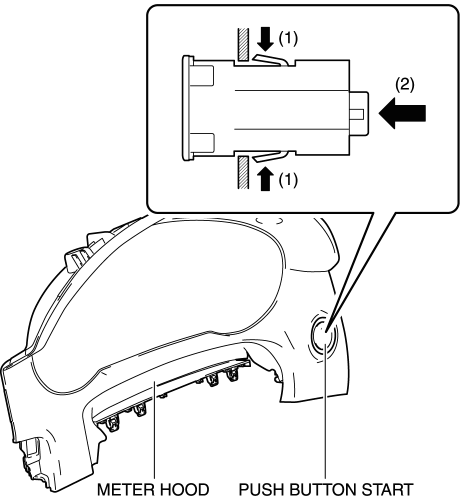
4. Remove the push button start.
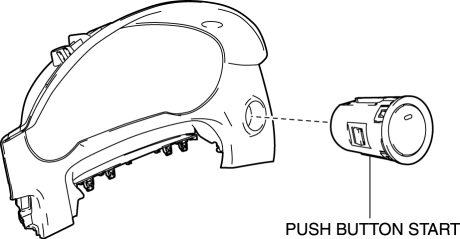
5. Install in the reverse order of removal.
 Push Button Start Inspection
1. Remove the push button start..
2. Verify that the continuity between the push button start terminals is as indicated
in the table.
If the continuity can be verified as indicated ...
 Sae Standards
In accordance with new regulations, SAE (Society of Automotive Engineers)
standard names and abbreviations are now used in this manual. The table below
lists the names and abbreviations th ...
Other materials:
Rear Parking Brake Cable Removal/Installation
1. Remove the front console box..
2. Remove the shift lever knob. (MTX).
3. Remove the shift panel..
4. Remove the upper panel..
5. Remove the rear console..
6. Loosen the adjusting nut.
7. Remove the floor under cover No.2..
8. Remove in the order indicated in the table.
9. Install ...
Front Body Control Module (Fbcm) Configuration (Using As Built Data)
NOTE:
If the configuration is performed using As-Built data, the set value of the
personalization function is reset to the initial value (condition when shipped
from factory). Verify the set value with the customer and perform the personalization
function setting after performing th ...
Brake Pedal Inspection
Pedal Height Inspection
1. Measure the distance from the center of the upper surface of the pedal pad
to the insulator and verify that it is as specified.
If not within the specification, inspect the following items and repair or
replace the applicable part if there is any malfunct ...
