
Mazda CX-5 Service & Repair Manual: Push Button Start Inspection
1. Remove the push button start..
2. Verify that the continuity between the push button start terminals is as indicated in the table.
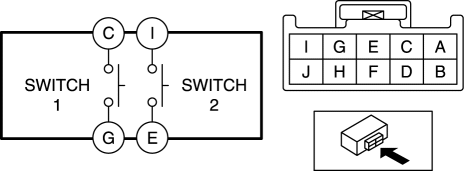
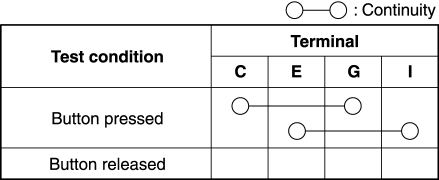
-
If the continuity can be verified as indicated in the table, go to the next step.
-
If not as indicated in the table, replace the push button start..
3. Apply battery positive voltage and connect the ground to the push button start terminals and verify that the LED illuminates as indicated in the table.
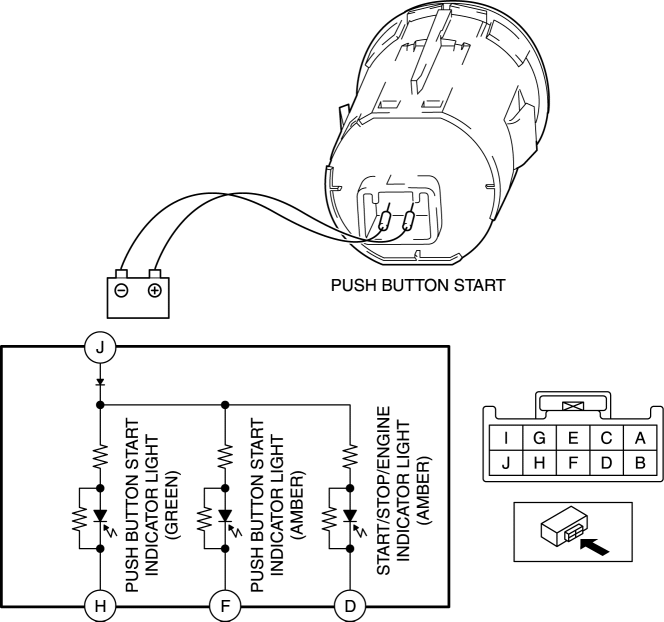
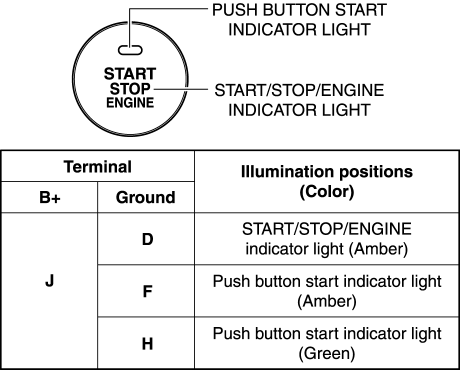
-
If the LED does not illuminate as indicated in the table, replace the push button start..
 Pre Delivery Inspection
Pre?Delivery Inspection Table
Exterior
INSPECT and ADJUST, if necessary, the following items to specification:
?Glass, exterior bright metal and paint for damage
?Wheel lug nuts
?All weathe ...
 Push Button Start Removal/Installation
1. Disconnect the negative battery cable..
2. Remove the meter hood..
3. While pressing the push button start tab in the direction of the arrow (1)
shown in the figure, push out the push button ...
Other materials:
Identification Numbers
Vehicle Information Labels
Vehicle Identification Number
The vehicle identification number legally identifies your vehicle. The number
is on a plate attached to the left top side of the dashboard. This plate can easily
be seen through the windshield.
Motor Vehicle Safety Standard Label
...
Bluetooth® Hands-Free
Making a Call
Phonebook Usage
Make a call by saying the contact name in the downloaded phonebook.
Telephone calls can be made by saying the name of a person whose phone number
has been registered in Bluetooth® Hands-Free in advance. Refer to Import contact
(Download Phonebook).
1. Press the ...
Cooling System
Outline
Passing water resistance is reduced by improvement of the engine coolant
passage shape.
Pump efficiency is improved by changing the water pump impeller to the closed
impeller.
Structural View
Flow Chart
Structure
Consists of the followi ...
