
Mazda CX-5 Service & Repair Manual: Power Supply Switching
Outline
-
By pressing the push button start, switching of the power supply is performed.
Function
-
The start stop unit switches the power supply according to the vehicle conditions such as the selector lever (ATX)/shift lever (MTX) position and the pedal depression/release when the push button start is pressed.
Push button start indicator light
-
Illuminates the push button start indicator light to notify the driver of the power supply status.
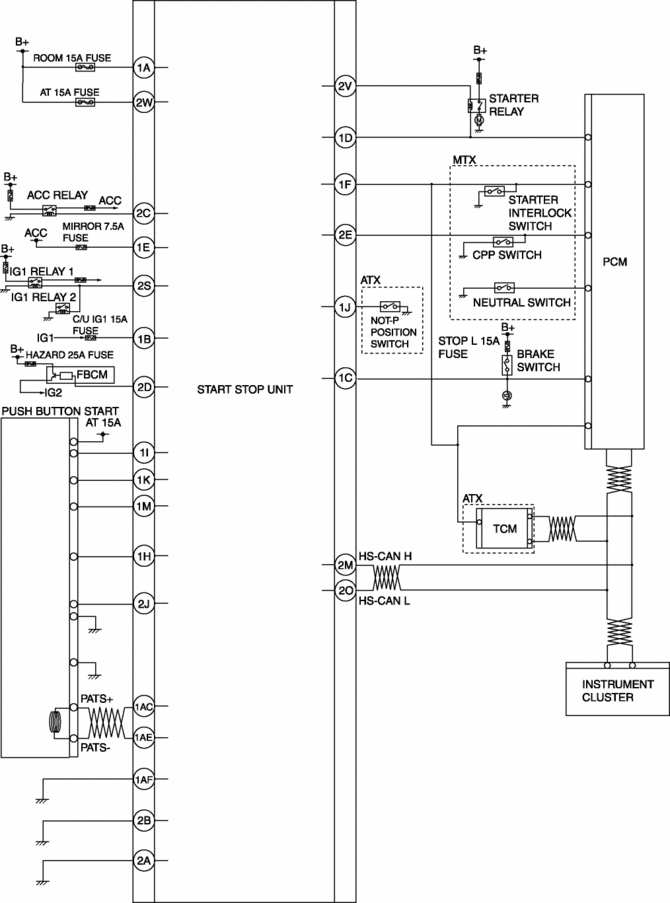
System wiring diagram
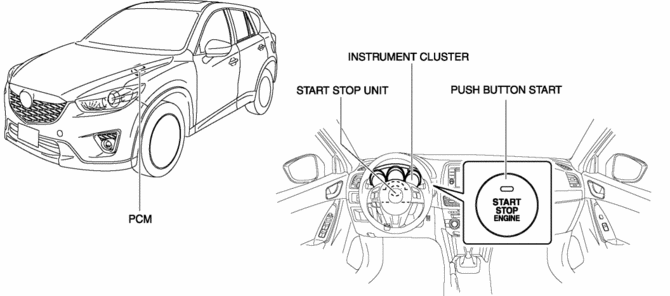
Structural view
Operation
Switches between ignition switch ON (engine on)/ON (engine off)/ACC/ OFF (LOCK).
1. When the push button start is pressed, a push button start switch signal is input to the start stop unit.
2. The power supply switches according to the vehicle conditions such as the selector lever (ATX)/shift lever (MTX) position and the pedal depression/release.
NOTE:
-
Refer to the Push Button Start System Engine Start Permit Function regarding the engine starting conditions.
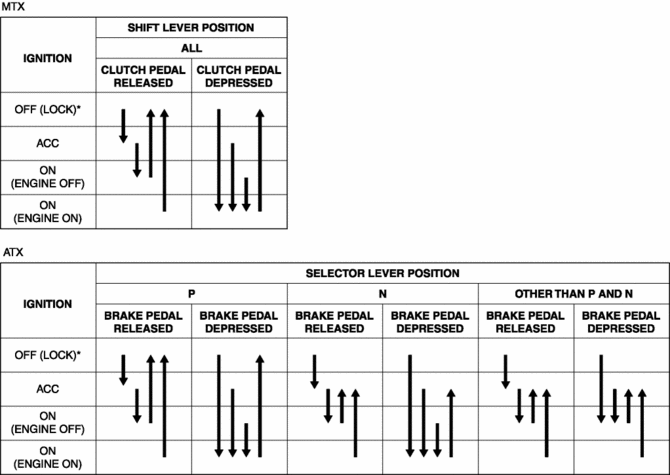
* To switch the ignition to ACC or off (LOCK) from ON (engine on), a vehicle speed of 5 km/h {3 mph} or less is required.
Automatic ignition switch off
-
If the ignition has been switched ON (engine off) or switched to ACC for 60 min or more, the start stop unit automatically switches the ignition off (LOCK).
Engine Emergency Stop
-
If an ignition switch ON signal is input for 3 s or more (ignition switch held pressed), or a push button start ON signal is input 3 times within 1.5 s, the start stop unit switches the ignition to ACC or off (LOCK).
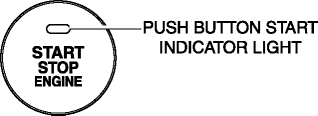
Push button start indicator light
-
Green illumination
-
Illuminates if the conditions necessary for engine-start are met.
-
Green flashing
-
Flashes when the steering lock cannot be released.
-
Amber illumination
-
Illuminates when the steering lock has been released or there is a malfunction in the system.
-
Amber flashing
-
Flashes when a malfunction is detected.
Fail-safe
-
Function not equipped.

 Ignition
...
Other materials:
Coupling Component Calibration Data Writing
1. Connect the M-MDS to the DLC-2.
2. After the vehicle is identified, select the following items from the toolbox
of the M-MDS.
Select “Chassis”.
3. Then, select items from the screen menu in the following order.
Select “4WD/AWD”.
Select “Coupling Calibra ...
Planetary Gear [Fw6 A EL, Fw6 Ax EL]
Purpose/Function
The planetary gear is a mechanism which shifts the drive force from the engine.
The planetary gear consists of multiple gears which rotate individually while
revolving. By controlling the individual rotation and revolving of the gears,
the transaxle performs gear shi ...
Mass Air Flow (MAF) Sensor
Purpose/Function
Detects the intake airflow amount introduced into the cylinder as basic information
for mainly determining the fuel injection amount.
Detects the intake airflow amount introduced into the cylinder and inputs
it to the PCM as an intake airflow amount signal.
...
