
Mazda CX-5 Service & Repair Manual: Power Brake Unit Inspection
NOTE:
-
The following inspection methods are simple inspection methods to judge the function of the power brake unit.
-
If there is any malfunction in the power brake unit, replace the power brake unit as a single unit.
Without Using SST
Operation inspection
1. With the engine stopped, pump the pedal a few times.
2. With the pedal depressed, start the engine.
3. If the pedal moves down slightly immediately after starting the engine, the unit is normal.
Vacuum function inspection
1. Start the engine.
2. Stop the engine after driving the vehicle for 1—2 min
.
3. Depress the pedal with normal force.
4. If the first pedal stroke is long and becomes shorter with subsequent strokes, the unit is normal.
-
If a problem is found, inspect for damage to or improper installation of the check valve and vacuum hose. After repairing, inspect again.
Vacuum loss function inspection
1. Start the engine.
2. Depress the pedal with normal force.
3. With the pedal depressed, stop the engine.
4. Hold the pedal depressed for approx. 30 s
.
5. If the pedal height does not change during this time, the unit is normal.
Using SST
NOTE:
-
When performing the inspection using the SST
, inspect the brake pipe on the left or right front wheel.
-
The following procedure and figures show the inspection for the brake pipe on the left front wheel.
Pre-inspection preparation
1. Remove the clips.
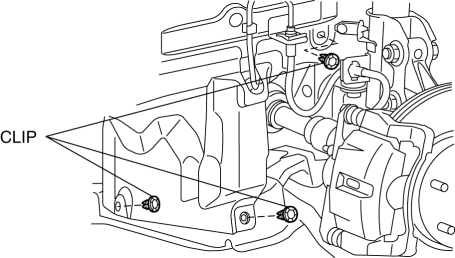
2. Set the splash shield out of the way.
3. Disconnect the brake pipe from the brake hose.
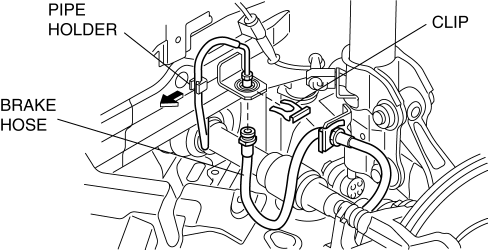
4. Remove the clip.
5. Remove the brake hose from the bracket.
6. Detach the brake pipe from the pipe holder.
7. Install the SST
to the brake pipe as shown in the figure.
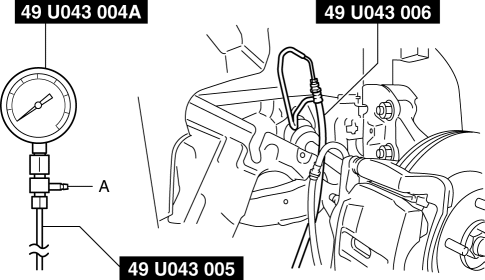
8. Bleed the brake line and the SSTs
of air. Bleed the air form the SSTs
using bleeder screw A.
9. Install the pedal force gauge to the brake pedal.
10. Connect the vacuum gauge to the vacuum line.
Vacuum loss inspection
1. Start the engine.
2. Depress the brake pedal with a force of 200 N {20.4 kgf, 45.0 lbf}
.
3. Stop the engine when the vacuum gauge reading reaches 68 kPa {510 mmHg, 20 inHg}
with the pedal depressed.
4. With the engine off, observe the vacuum gauge for 15 s
.
5. If the gauge has dropped 3.3 kPa {25 mmHg, 1.0 inHg}
or less, the unit is normal.
Lack of hydraulic pressure inspection
1. If the pedal force and fluid pressure correlation is within the specification with the engine stopped and a vacuum amount of 0 kPa {0 mmHg, 0 inHg}
, the system is normal.
Master cylinder fluid pressure
|
Vacuum amount at 0 kPa {0 mmHg, 0 inHg} |
|
|
Pedal force |
Fluid pressure |
|
200 N {20.4 kgf, 45.0 lbt} |
630 kPa {6.42 kgf/cm2, 91.4 psi} or more |
Hydraulic pressure inspection
1. Start the engine. Depress the brake pedal when the vacuum reaches 66.7 kPa {500 mmHg, 19.7 inHg}
.
2. At this time, apply the indicated pedal force and if the fluid pressure is within the specification, the unit is normal.
Master cylinder fluid pressure
|
Vacuum amount at 66.7 kPa {500 mmHg, 19.7 inHg} |
|
|
Pedal force |
Fluid pressure |
|
200 N {20.4 kgf, 45.0 lbt} |
6,900 kPa {70.36 kgf/cm2, 1,001 psi} or more |
After-inspection procedure
1. After the inspection, remove the SSTs
, install the brake hose, clamp, and brake pipe to the original positions, and then bleed the air from the brake line..
 Power Brake Unit
Purpose/Function
A 9.8-inch, single diaphragm type power brake unit has been adopted, achieving
compatibility between high braking performance and excellent brake feeling.
Construction ...
 Power Brake Unit Removal/Installation
CAUTION:
Once the brake switch clearance has automatically been adjusted, it cannot
be adjusted again. Therefore, replace the switch with a new one when replacing
the power brake unit or ...
Other materials:
Headlight High Beam Indicator Light
Purpose
Notifies the user that the headlights (HI) are illuminated.
Function
Illuminates when the headlight (HI) or parking illumination conditions are
met.
Construction
Displayed in the instrument cluster.
Operation
1. When the light switch is operat ...
Floor Insulator Removal/Installation
Driver-side
1. Disconnect the negative battery cable..
2. Remove the following parts:
a. Driver-side front scuff plate.
b. Driver-side front side trim.
c. Decoration panel.
d. Shift lever knob (MTX).
e. Front console box.
f. Shift panel.
g. Upper panel.
h. Rear console.
i. Side ...
Rear Map Light
Purpose
The rear map lights shine light at the center of the vehicle interior.
Function
The rear map lights illuminate when the interior light switch is in the ON
position or the map light switch is turned on.
The rear map lights illuminate according to the lock condit ...
