
Mazda CX-5 Owners Manual: Mirrors
Mirrors
Before driving, adjust the inside and outside mirrors.
Outside Mirrors
WARNING
Be sure to look over your shoulder before changing lanes: Changing lanes without taking into account the actual distance of the vehicle in the convex mirror is dangerous. You could have a serious accident. What you see in the convex mirror is closer than it appears.
Mirror type
Flat type (driver's side)
Flat surface mirror.
Convex type (front passenger side)
The mirror has single curvature on its surface.
Power mirror adjustment
The ignition must be switched to ACC or ON position.
To adjust:
1. Rotate the mirror adjusting switch to the left or right to choose the left or right side mirror.
2. Depress the mirror switch in the appropriate direction.
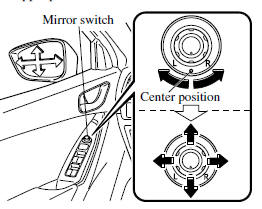
After adjusting the mirror, lock the control by rotating the switch in the center position.
Folding mirror
WARNING
Always return the outside mirrors to the driving position before you start driving:
Driving with the outside mirrors folded in is dangerous. Your rear view will be restricted, and you could have an accident.
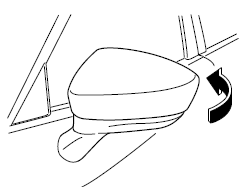
Fold the outside mirror rearward until it is flush with the vehicle.
Rearview Mirror
WARNING
Do not stack cargo or objects higher than the seatbacks:
Cargo stacked higher than the seatbacks is dangerous. It can block your view in the rearview mirror, which might cause you to hit another car when changing lanes.
Rearview mirror adjustment
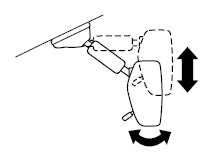
Before driving, adjust the rearview mirror to center on the scene through the rear window.
NOTE
For the manual day/night mirror, perform the adjustment with the day/night lever in the day position.
Reducing glare from headlights
Manual day/night mirror
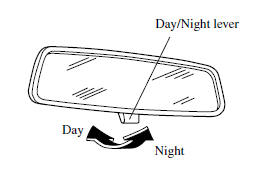
Push the day/night lever forward for day driving. Pull it back to reduce glare of headlights from cars at the rear.
Auto-dimming mirror
The auto-dimming mirror automatically reduces glare of headlights from cars at the rear when the ignition is switched ON.
Press the OFF button ( ) to cancel the automatic dimming function. The indicator light will turn off.
To reactivate the automatic dimming function, press the ON button ( ). The indicator light will illuminate.
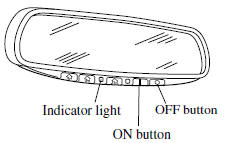
NOTE
• Do not use glass cleaner or suspend objects on or around the light sensor. Otherwise, light sensor sensitivity will be affected and may not operate normally.
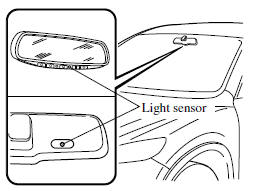
• For information regarding the 3 buttons
( ) on the auto-dimming mirror.
Refer to HomeLink Wireless Control System 3.
• The auto-dimmer function is canceled when the ignition is switched ON and the shift lever/selector lever is in reverse (R).
 Steering Wheel
Steering Wheel
WARNING
Never adjust the steering wheel while the vehicle is moving: Adjusting the steering
wheel while the vehicle is moving is dangerous.
Moving it can very easily cause the driv ...
 Windows
...
Other materials:
Specifications
Specifications
Engine
Electrical System
CAUTION
When cleaning the iridium plugs, do not use a wire brush. The fine particulate
coating on the iridium alloy and platinum tips could be damaged.
Lubricant Quality
NOTE
Refer to Introduction on for owner's responsibility in prot ...
Front Door Latch And Lock Actuator Removal/Installation
1. Perform the front door glass preparation..
2. Disconnect the negative battery cable..
3. Remove the following parts:
a. Inner garnish.
b. Front door trim.
c. Inner handle.
d. Front door glass.
e. Front door module panel.
f. Front door key cylinder.
4. Remove the door lock knob c ...
Underbody Dimensions [Dimensions]
NOTE:
The following figure is a bottom view.
Point symbol
Designation
Hole diameter or bolt or nut size mm {in}
A
Front crossmember installation hole
?24 {0.94}
B
Fro ...
