
Mazda CX-5 Service & Repair Manual: Map Light Inspection
Front Map Light
1. Disconnect the negative battery cable..
2. Remove the front map light..
3. Verify that the continuity between the front map light terminals is as indicated in the table.
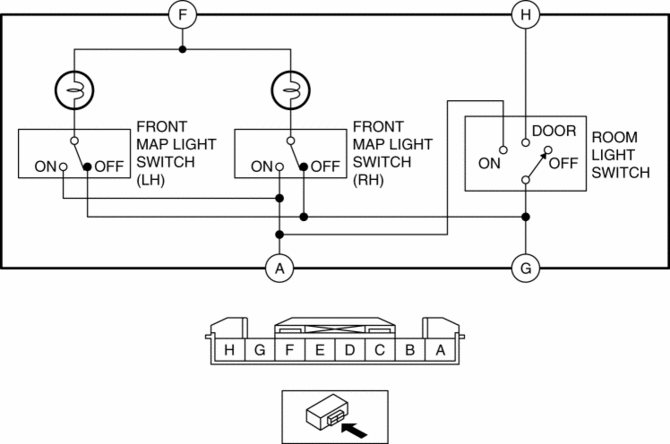
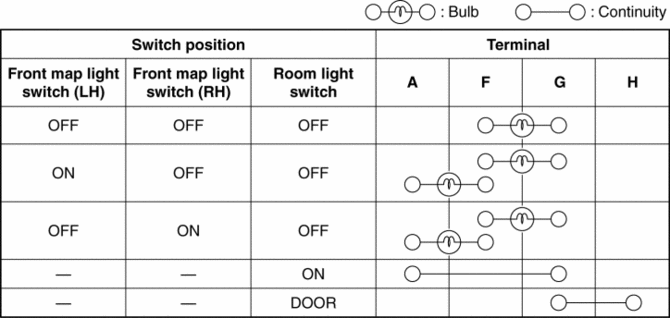
-
If not as indicated in the table, replace the front map light or front map light bulb..
Rear Map Light
1. Disconnect the negative battery cable..
2. Remove the following parts:
a. Sunroof seaming welt (vehicles with sunroof).
b. A-pillar trim.
c. Sunvisor.
d. Front scuff plate.
e. Rear scuff plate.
f. B-pillar lower trim.
g. Adjust anchor cover.
h. Upper anchor installation bolt on the seat belt.
i. B-pillar upper trim.
j. Assist handle.
k. Trunk board.
l. Trunk end trim.
m. Trunk side trim.
n. D-pillar trim.
o. C-pillar trim.
p. Headliner.
q. Rear map light.
3. Verify that the continuity between the rear map light terminals is as indicated in the table.
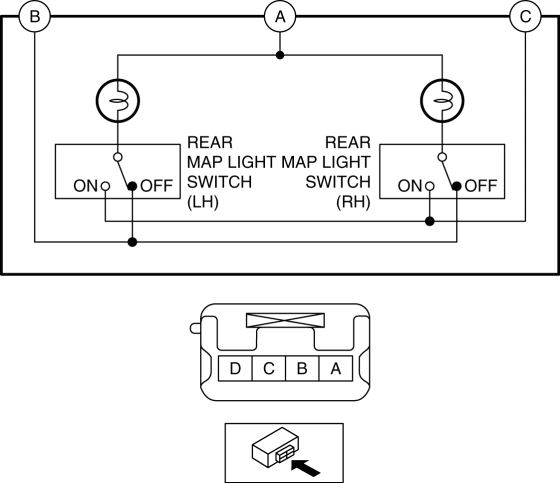
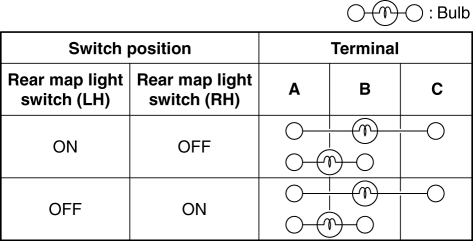
-
If not as indicated in the table, replace the rear map light.
 Map Light Bulb Removal/Installation
Front Map Light
1. Disconnect the negative battery cable..
2. To prevent scratches or damage, affix protective tape to the position shown
in the figure.
CAUTION:
If a flathead screwdriv ...
 Map Light Removal/Installation
Front Map Light
1. Disconnect the negative battery cable..
2. Open the sunglasses holder.
3. Remove the screws from the front map light.
4. Move the front map light in the direction of the ...
Other materials:
Camshaft Position (CMP) Sensor Inspection
Intake CMP Sensor
Visual inspection
CAUTION:
When replacing the CMP sensor, make sure there is no foreign material on
it such as metal shavings. If it is installed with foreign material, the sensor
output signal will malfunction resulting from fluctuation in magnetic flux and
caus ...
Instrument Cluster Configuration (Using Read/Write Function)
NOTE:
When performing configuration, it is necessary to read the vehicle specification
information from the instrument cluster before replacing it. Connect the M-MDS
to the vehicle and perform vehicle identification before removing the instrument
cluster. The vehicle specification i ...
Intermediate Shaft Removal/Installation
WARNING:
The steering column (EPS motor) temperature increases directly after continuous
turning of the steering mechanism which could cause burns if it is touched.
Before performing any servicing, verify that the steering column has cooled
off.
1. Rotate the steering wheel un ...
