
Mazda CX-5 Service & Repair Manual: Lumber Support Motor Inspection
WARNING:
-
Handling a side air bag improperly can accidentally operate (deploy) the air bag, which may seriously injure you. Read the service warnings/cautions in the Workshop Manual before handling the front seat (side air bag integrated)..
1. Disconnect the negative battery cable and wait for 1 min
..
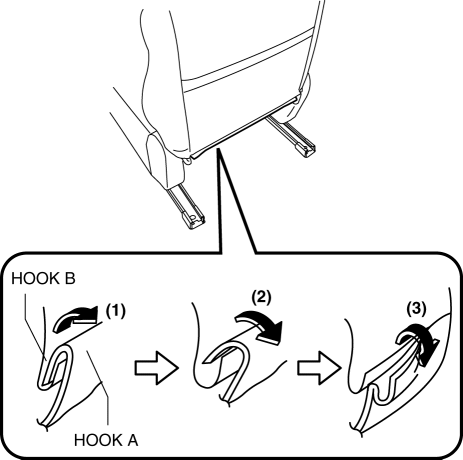
2. Slide hook A in the order of arrows (1), (2), (3) shown in the figure and disconnect them from hook B.
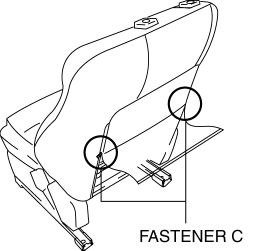
3. Open fasteners C.
4. Disconnect the lumber support motor connector.
5. Apply battery positive voltage to the lumber support motor terminals and inspect the front seat back operation.
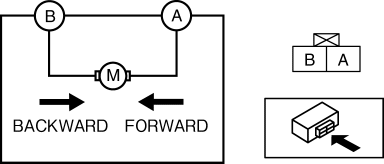
-
If not as specified, replace the lumber support motor..
|
Front seat back operation |
Connection |
|
|
A |
B |
|
|
Forward |
B+ |
GND |
|
Backward |
GND |
B+ |
 Lift Motor Removal/Installation
WARNING:
Handling a side air bag improperly can accidentally operate (deploy) the
air bag, which may seriously injure you. Read the service warnings/cautions
in the Workshop Manual befor ...
 Lumber Support Motor Removal/Installation
WARNING:
Handling a side air bag improperly can accidentally operate (deploy) the
air bag, which may seriously injure you. Read the service warnings/cautions
in the Workshop Manual befor ...
Other materials:
Manual Air Conditioner Control System [Manual Air Conditioner]
Outline
The climate control unit performs the following controls based on the signals
from each switch/dial and the sensor.
A/C compressor control
Defroster control
Block Diagram
Outline of Control System
Manual air conditioner has the follo ...
Intake Air Temperature (Iat) Sensor Inspection
IAT Sensor No.1
Resistance inspection
NOTE:
Because the IAT sensor No.1 is integrated in the MAF sensor, replacing the
IAT sensor No.1 includes replacement of the MAF sensor/IAT sensor No.1.
1. Disconnect the negative battery cable..
2. Disconnect the MAF sensor/IAT sensor No.1 ...
AWD
All-Wheel Drive (AWD) Operation
• AWD provides excellent drivability
on snow-covered and ice-packed roads, sand and mud, as well as on steep slopes and
other slippery surfaces.
• A system malfunction or operation conditions
are indicated by a warning.
Refer to Warning/Indicator Light ...
