
Mazda CX-5 Service & Repair Manual: Lights On Reminder Warning Alarm
Purpose
-
The lights-on reminder warning alarm notifies the driver that the TNS and headlights are not turned off.
Function
-
The instrument cluster receives the following vehicle condition signals via the CAN signal from the start stop unit and rear body control module (RBCM).
-
TNS switch ON signal from start stop unit (TNS and headlights illuminate)
-
Driver's front door latch switch ON signal from rear body control module (RBCM)
-
If the ignition is switched to OFF or ACC when all the above vehicle condition signals are received, the instrument cluster operates the lights-on reminder alarm.
-
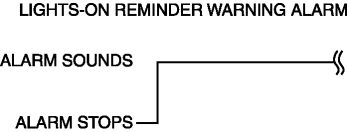
The lights-on reminder warning alarm sound pattern is as shown in the figure.
Construction
-
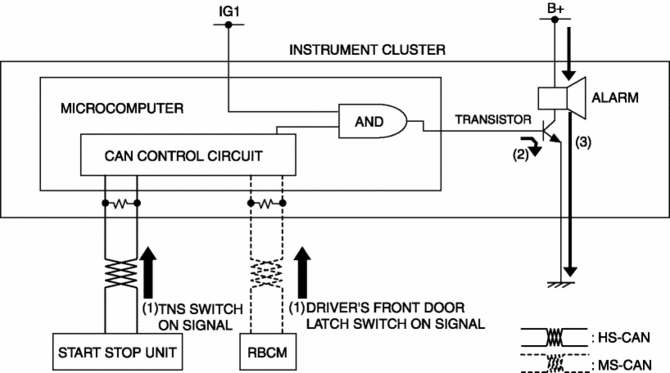
The lights-on reminder warning alarm sounds using the buzzer built into the instrument cluster.
Operation
1. The instrument cluster receives (1) the TNS switch ON signal from the start stop unit and driver's front door latch switch ON signal from the rear body control module (RBCM).
2. When the ignition is switched to OFF or ACC while each signal is received, the instrument cluster turns on (2) the transistor.
3. When the transistor turns on, the ground circuit of the alarm is established and the alarm sounds (3).
Fail-safe
-
Function not equipped.
 Lights On Indicator Light
Purpose
Notifies the user that the TNS or the headlights (LO) are on.
Function
Illuminates when the illumination conditions for the TNS, headlights (LO),
or parking lights are m ...
 Low Engine Coolant Temperature Indicator Light (Blue)/High Engine Coolant Temperature
Warning Light (Red)
Low Engine Coolant Temperature Indicator Light (Blue)/High Engine Coolant Temperature
Warning Light (Red)
Purpose
Low engine coolant temperature indicator light (blue)
The low engine coolant temperature indicator light (blue) notifies the driver
that the engine coolant temperature is low and va ...
Other materials:
Heated Oxygen Sensor (HO2 S)
Purpose/Function
Detects the oxygen concentration (theoretical air/fuel ratio) in the exhaust
gas as basic information for mainly determining the fuel injection amount and
as information for determining the deterioration of catalytic converter.
Detects the oxygen concentration ( ...
Magnetic Clutch Adjustment [Manual Air Conditioner]
1. Measure the clearance around the entire circumference between the pressure
plate and A/C compressor pulley using a thickness gauge.
2. Verify the clearance.
If not within the specification, remove the pressure plate and adjust the
clearance by changing the shim (0.2 mm {0.008 i ...
TCM [Fw6 A EL, Fw6 Ax EL]
Purpose/Function
The TCM detects the vehicle conditions and performs calculations and processing
based on input information from each type of sensor and switch.
Outputs control signals to each solenoid valve so that each type of control
is optimally implemented according to the ...
