
Mazda CX-5 Service & Repair Manual: Light Switch Removal/Installation
NOTE:
-
When removing the light switch, it is necessary to rotate the steering wheel. If the ignition is switched off from ON (engine on) with the driver's door closed, the steering wheel is locked. Therefore, perform the procedure in Steps 1 to 3 so that the steering wheel is not locked.
1. Switch the ignition ON (engine on).
2. Open the driver's door.
3. Switch the ignition to off.
4. Disconnect the negative battery cable..
5. Remove the column cover..
6. Rotate the steering wheel until the service hole in the position shown in the figure is visible.
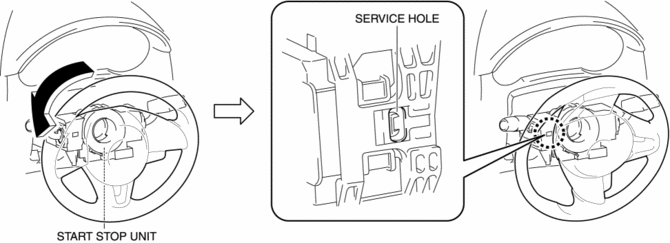
7. Insert a tape-wrapped flathead screwdriver into the service hole in the position shown in the figure.
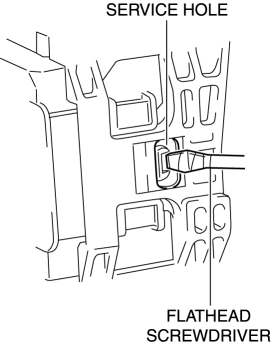
8. While pressing the light switch tab in the direction of the arrow (1) shown in the figure using a flathead screwdriver, pull out the light switch in the direction of the arrow (2) shown in the figure to detach the light switch tab and the start stop unit.
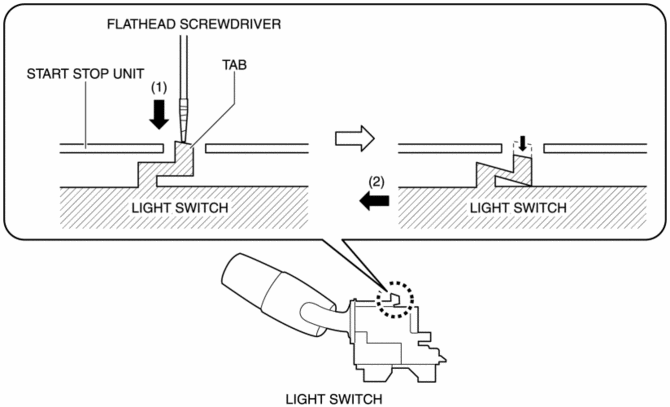
9. Remove the light switch.
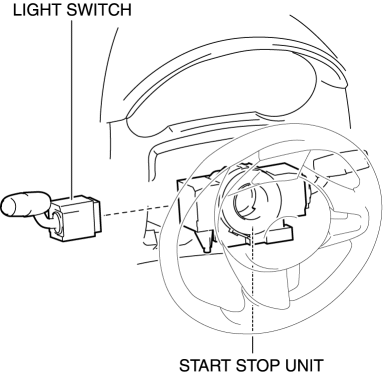
10. Install in the reverse order of removal.
 Light Switch Inspection
Light Switch
1. Disconnect the negative battery cable..
2. Remove the column cover..
3. Remove the light switch..
4. Verify that the continuity between the light switch terminals is as indicate ...
 Exterior
...
Other materials:
Tcs Off Switch Inspection
1. Remove the TCS OFF switch..
2. Verify that the resistance between the TCS OFF switch terminals B and C is
as indicated in the table.
If not as indicated in the table, replace the TCS OFF switch.
TCS OFF switch specification
Terminal
Test con ...
Headlight Auto Leveling System
Outline
Automatically adjusts the headlight optical axis in response to changes in
load and passenger conditions to prevent blinding of oncoming vehicles from
headlight glare and to assure a range of visibility.
The AFS control module performs headlight auto leveling system fail ...
Air Cleaner
Purpose, Function
Prevents engine internal damage caused by penetration of dust or foreign
material.
Construction
The air cleaner is installed in front of the battery.
The air cleaner consists of the air cleaner case, air cleaner cover, and
air cleaner element ...
