
Mazda CX-5 Service & Repair Manual: Liftgate Side Trim Removal/Installation
1. Remove the liftgate upper trim..
2. Remove the fastener A.
3. Take the shaded area shown in the figure, and pull the liftgate side trim in the direction of the arrow (1) while detaching clips B.
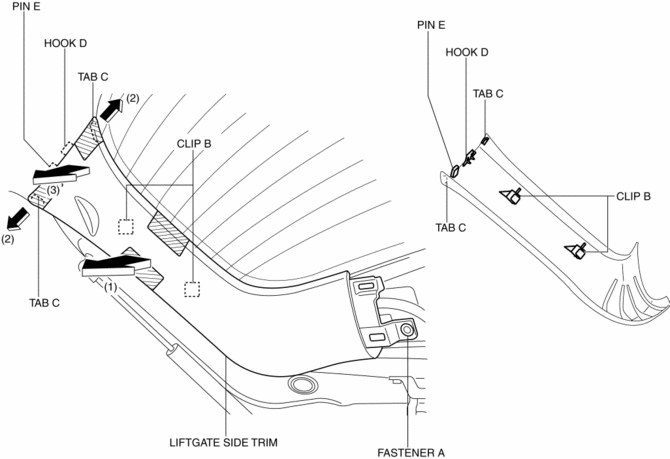
4. Take the shaded area shown in the figure, detach tabs C while pulling the liftgate side trim in the direction of the arrow (2) shown in the figure, then detach the hook D, pin E while pulling in the direction of the arrow (3).
5. Install in the reverse order of removal.
 Liftgate Removal/Installation
WARNING:
Removing the stay damper, liftgate hinge securing bolt, or liftgate without
supporting the liftgate may cause the liftgate to fall off and injure you. When
removing the stay dam ...
 Liftgate Upper Trim Removal/Installation
1. Take the shaded area shown in the figure, detach tab A while pulling the liftgate
upper trim in the direction of the arrow (1) shown in the figure, then detach clips
B, clip C and pin D while p ...
Other materials:
Vanity Mirror Illumination Bulb Removal/Installation
1. Disconnect the negative battery cable..
2. Insert a tape-wrapped flathead screwdriver into the service hole in the position
shown in the figure.
3. Move a flathead screwdriver in the direction of the arrow (1) shown in the
figure and detach the lens tab and sunvisor.
4. Detach a ...
Fuel Injection Control System
Outline
Performs optimum fuel injection according to engine operation conditions.
The PCM determines the engine operation conditions based on the signals from
each input device and drives the fuel injectors at the optimal fuel injection
time (fuel injection amount) and the fuel ...
Climate Control Unit Inspection [Manual Air Conditioner]
1. Remove the climate control unit with the connector connected..
2. Switch the ignition ON (engine off or on).
3. Connect the negative (-) lead of the tester to the body ground.
4. By inserting the positive (+) lead of the tester into the climate control
unit connector, measure the voltage ...
