
Mazda CX-5 Service & Repair Manual: License Plate Light Removal/Installation
1. Disconnect the negative battery cable..
2. Remove the following parts:
a. Liftgate upper trim.
b. Liftgate side trim.
c. Liftgate lower trim.
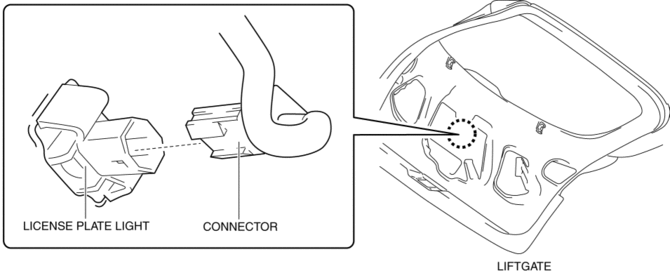
3. Disconnect the connector.
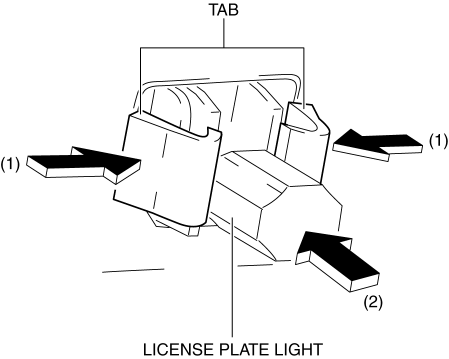
4. While pressing the license plate light tab in the direction of arrow (1) shown in the figure, press the license plate light in the direction of arrow (2) to detach the license plate light tab and liftgate.
CAUTION:
-
If the license plate light is removed from the liftgate, the license plate light may fall off and be damaged. When removing the license plate light from the liftgate, hold the license plate light on lens side with a hand during servicing.
5. Remove the license plate light.
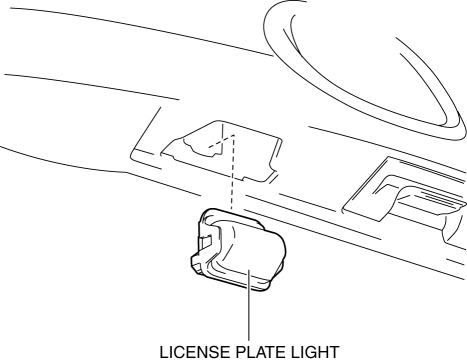
6. Install in the reverse order of removal.
 License Plate Light Bulb Removal/Installation
1. Disconnect the negative battery cable..
2. Insert a tape-wrapped flathead screwdriver into the clearance between the
lens and license plate light shown in the figure.
3. Move the flathead ...
 PID/Data Monitor Inspection [Adaptive Front Lighting System (Afs)]
1. Connect the M-MDS to the DLC-2.
2. After the vehicle is identified, select the following items from the initialization
screen of the M-MDS.
a. Select “DataLogger”.
b. Select “Modulesâ ...
Other materials:
Air Filter
Purpose
The air filter removes pollen and dust in the intake air and purifies air
flowing into the cabin.
Function
The air filter removes pollen and dust using a dust collecting filter.
Construction
The air filter is installed to the blower unit.
It ...
Engine Coolant Temperature (ECT) Sensor Inspection
Resistance Inspection
WARNING:
When the engine is hot, it can badly burn. Turn off the engine and wait until
it is cool before removing the ECT sensor.
ECT Sensor No.1
1. Remove the ECT sensor No.1..
2. Place the ECT sensor No.1 in water with a thermometer, and heat the water
...
Rear ABS Wheel Speed Sensor Inspection [2 Wd]
Installation Visual Inspection
1. Inspect the following items:
If there is any malfunction, replace the applicable part.
a. Excessive play of the ABS wheel-speed sensor
b. Deformation of the ABS wheel-speed sensor
Clearance Inspection
1. Remove the ABS wheel-speed sensor.
2. M ...
