
Mazda CX-5 Service & Repair Manual: High Mount Brake Light Removal/Installation
1. Disconnect the negative battery cable..
2. Remove the liftgate upper trim..
3. Remove the rear spoiler..
4. Disconnect the connector.
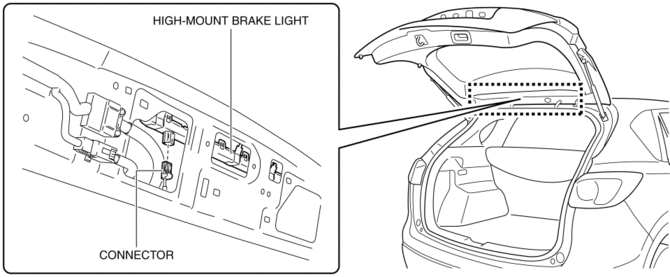
5. While pressing the high-mount brake light tab in the direction of arrow (1) shown in the figure, press the high-mount brake light in the direction of arrow (2) to detach the high-mount brake light and liftgate.
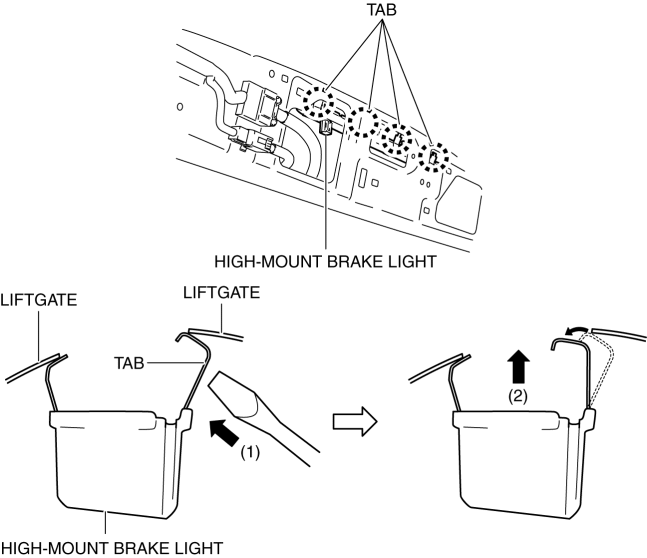
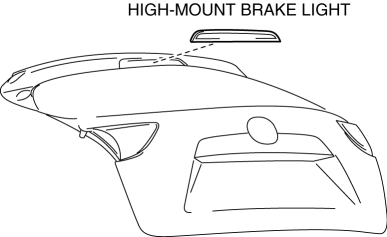
6. Detach all the high-mount brake light tabs and liftgate and remove the high-mount brake light from the liftgate.
CAUTION:
-
If the high-mount brake light is removed from the liftgate, the high-mount brake light may fall off and be damaged. When removing the high-mount brake light from the liftgate, hold the high-mount brake light on the lens side with a hand during servicing.
7. Install in the reverse order of removal.
 High Mount Brake Light
Purpose
The high-mount brake light signals vehicles to the rear that the vehicle
is stopped.
Function
The high-mount brake light illuminates in conjunction with the operation
...
 License Plate Light
Purpose
The license plate lights shine light on the license plate during nighttime
driving.
Function
The license plate lights illuminate in conjunction with the operation of
...
Other materials:
Units
Electric current
A (ampere)
Electric power
W (watt)
Electric resistance
ohm
Electric voltage
V (volt)
Length
mm (millimeter)
in (inch)
...
Refrigerant Pressure Check
NOTE:
Measure the refrigerant pressure after approx.10 min have elapsed
from engine start.
1. Install the manifold gauge..
2. Start the engine and warm it up.
3. Set the fan speed MAX HI.
4. Turn the A/C switch on.
5. Set to RECIRCULATE mode.
6. Set the temperature control ...
PID/Data Monitor Inspection [Rear Body Control Module (Rbcm)]
1. Connect the M-MDS to the DLC-2.
2. After the vehicle is identified, select the following items from the initialization
screen of the M-MDS.
a. Select “DataLogger”.
b. Select “Modules”.
c. Select “R_BCM”.
3. Select the applicable PID from the PID table.
4. Verify the PID ...
