
Mazda CX-5 Owners Manual: Head Restraints
Your vehicle is equipped with head restraints on all outboard seats and the rear center seat. The head restraints are intended to help protect you and the passengers from neck injury.
WARNING
Always drive with the head restraints installed when seats are being used and make sure they are properly adjusted.:
Driving with the head restraints adjusted too low or removed is dangerous. With no support behind your head, your neck could be seriously injured in a collision.
Height adjustment
To raise a head restraint, pull it up to the desired position.
To lower the head restraint, press the stopcatch release, then push the head restraint down.
Adjust the head restraint so that the center is even with the top of the passenger's ears.
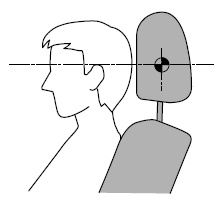
Front outboard seat
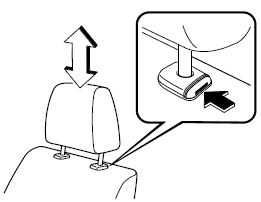
Rear outboard seat
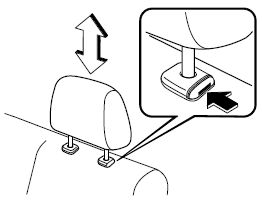
Rear center seat
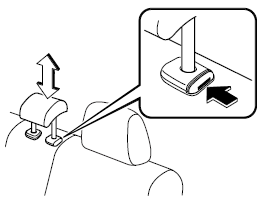
Removal/Installation
To remove the head restraint, pull it up while pressing the stop-catch.
To install the head restraint, insert the uprights into the holes while pressing the stop-catch.
WARNING
Always drive with the head restraints installed when seats are being used and make sure they are properly installed:
Driving with the head restraints not installed is dangerous. With no support behind your head, your neck could be seriously injured in a collision.
 Rear Seat
Split Folding
The seatbacks can be folded down to provide more space in the luggage compartment.
WARNING
Tightly secure cargo in the luggage compartment when it is transported
with the seatbacks ...

Other materials:
Fuel Tank Removal/Installation
WARNING:
Fuel is very flammable liquid. If fuel spills or leaks from the pressurized
fuel system, it will cause serious injury or death and facility breakage. Fuel
can also irritate skin and eyes. To prevent this, always complete the “Fuel
Line Safety Procedure”, while referring ...
Rocking the Vehicle
WARNING
Do not spin the wheels at more than 56 km/h (35 mph), and do not allow anyone
to stand behind a wheel when pushing the vehicle: When the vehicle is stuck, spinning
the wheels at high speed is dangerous. The spinning tire could overheat and explode.
This could cause serious injuries.
...
Body Sealing [Water Proof And Rust Preventive]
Sealant is applied to the parts where the panels meet and to the hemmed parts
of the door panel and hood panel to provide water proofing and rust proofing.
...
