
Mazda CX-5 Service & Repair Manual: Front Over Fender Removal/Installation
1. Remove fastener A.

2. Pull the front over fender lower in the direction of the arrow (1) while removing hook B and pin C.
3. Remove fasteners D.
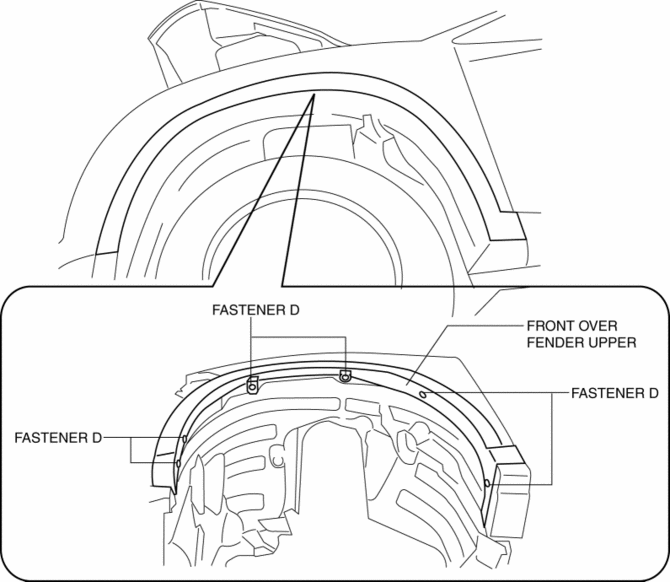
4. Pull the front over fender upper in the direction of the arrow (2) while removing clips E.
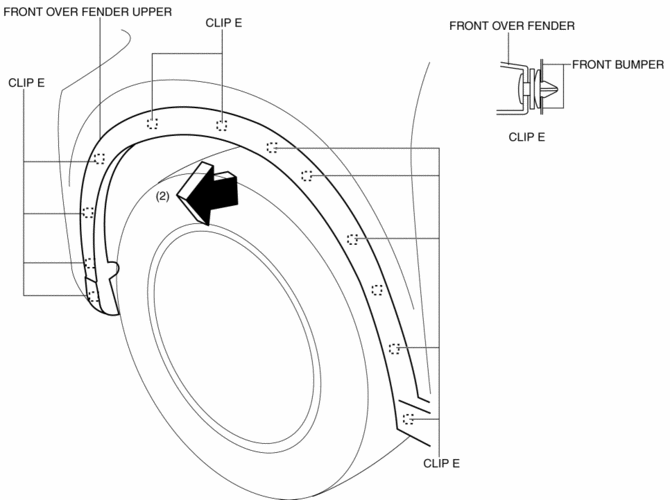
5. Install in the reverse order of removal.
 Front Fender Panel Removal/Installation
1. Disconnect the negative battery cable..
2. Remove the following parts:
a. Front bumper.
b. Front combination light.
c. Front bumper slider.
d. Front over fender.
3. Remove bolts A and f ...
 Front Under Cover No.1 Removal/Installation
1. Remove bolts A.
2. Remove screws B.
3. Remove fasteners C.
4. Remove the front under cover No.1 in the direction of the arrow in the order
of (1), (2) shown in the figure while detachin ...
Other materials:
Emission System
Purpose, Outline
A single-nano catalyst has been adopted for the under-floor, three-way catalyst
to improve emission gas purification efficiency.
Structural View
Engine compartment side
Exhaust system side
2WD
AWD
Fuel tank side
U.S.A. and CANADA (2WD)
U.S.A. a ...
Power Window Motor Inspection
Front driver side
1. Disconnect the negative battery cable..
2. Remove the inner garnish..
3. Remove the front door trim..
4. Disconnect the power window motor connector.
5. Apply battery positive voltage and connect the ground to power window motor
terminals E and F, and then inspect the ...
Limitations to SRS Air Bag
In severe collisions such as those described previously in “SRS Air Bag Deployment
Criteria”, the applicable SRS air bag equipment will deploy. However, in some accidents,
the equipment may not deploy depending on the type of collision and its severity.
Limitations to front/near front colli ...
