
Mazda CX-5 Service & Repair Manual: Front Door Removal/Installation
WARNING:
-
Removing the front door without supporting it could cause the front door to fall and cause serious injury. Always perform the procedure with at least one other person to prevent the front door from falling.
CAUTION:
-
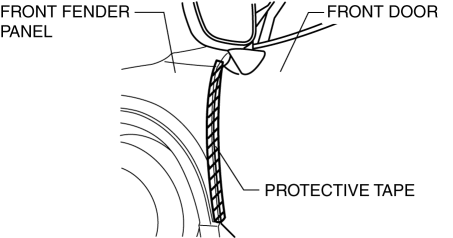
When the front door checker securing bolts are removed, the front door may open until it contacts the front fender panel causing the front door and the front fender panel to be damaged. Before removing the front door, overlap and adhere the protective tape to the position shown in the figure and be careful no to damage the front door and the front fender panel.
1. Disconnect the negative battery cable..
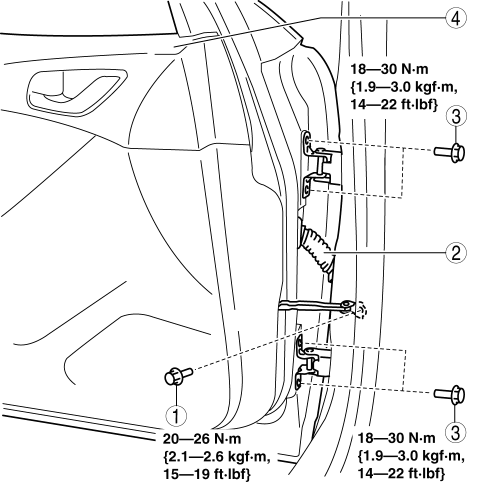
2. Remove in the order shown in the figure.
|
1 |
Bolt A |
|
2 |
Connector (See Connector Removal Note.) |
|
3 |
Bolt B |
|
4 |
Front door |
3. Install in the reverse order of removal.
4. Adjust the front door..
Connector Removal Note
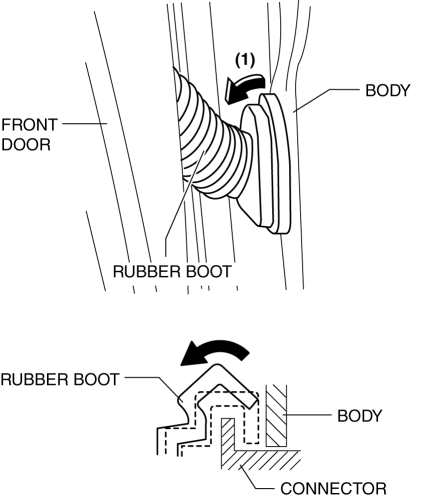
1. Partially peel back the rubber boot in the direction of arrow (1) shown in the figure and remove it from the connector.
2. Using a tape-wrapped flathead screwdriver, press tabs A in the directions of arrows (2) and (3) shown in the figure and remove the upper part of the connector from the body in the direction of arrow (4).
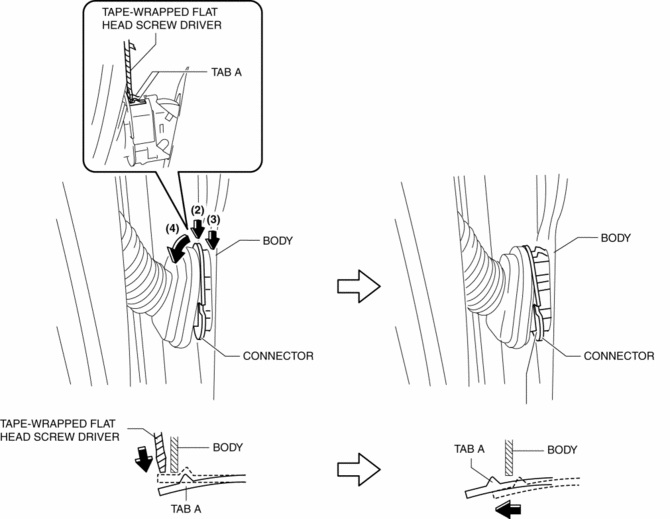
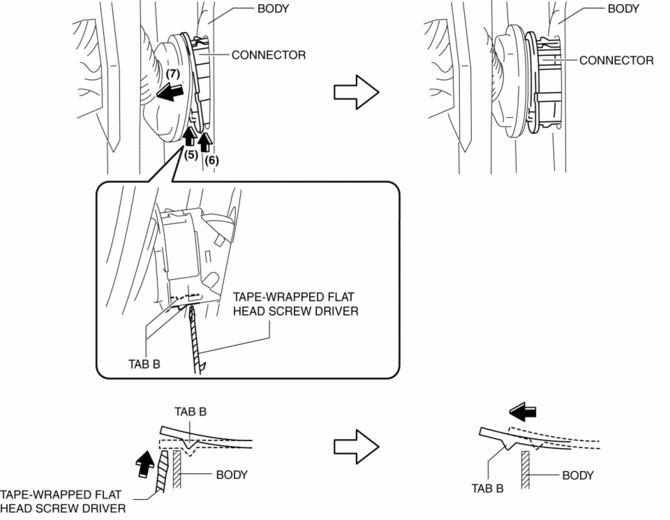
3. Using a tape-wrapped flathead screwdriver, press tabs B in the directions of arrows (5) and (6) shown in the figure and remove the connector from the body in the direction of arrow (7).
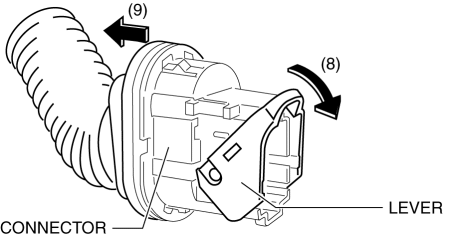
4. Lower the lever in the direction of arrow (8), and disconnect the connector in the direction of arrow (9).
 Front Door Module Panel Removal/Installation
1. Perform the front door glass preparation..
2. Disconnect the negative battery cable..
3. Remove the following parts:
a. Inner garnish.
b. Front door trim.
c. Front door speaker.
d. Fron ...
 Front Outer Handle Removal/Installation
1. Perform the front door glass preparation..
2. Disconnect the negative battery cable..
3. Remove the following parts:
a. Inner garnish.
b. Front door trim.
c. Front door glass.
d. Front ...
Other materials:
Presilencer
Purpose, Function
Reduces the exhaust noise.
Construction
The presilencer is installed to the rear of the TWC.
2WD
AWD
The presilencer consists of the filters, stuffing and wool-stainless.
2WD
AWD
...
Variable Valve Timing Mechanism
Outline
Achieves optimum valve timing according to the driving conditions by the
variable valve timing mechanism changing the phases of the camshaft.
An electric type variable valve timing mechanism on the intake side and a
hydraulic pressure type on the exhaust side has been ad ...
Ambient Temperature Sensor [Full Auto Air Conditioner]
Purpose
The ambient temperature sensor detects the ambient temperature.
Function
The ambient temperature sensor converts the detected temperature to an electric
signal.
Construction
A thermistor-type ambient temperature sensor has been adopted.
The ambient ...
