
Mazda CX-5 Service & Repair Manual: Front Door Garnish Removal/Installation
WARNING:
-
Using a utility knife with bare hands can cause injury. Always wear gloves when using a utility knife.
1. Using a tape-wrapped fastener remover, remove clips A in the direction of arrow (1), (2) shown in the figure.
2. Remove the double-sided adhesive tape in the position shown in the figure using the utility knife, remove the rear door garnish from the body.
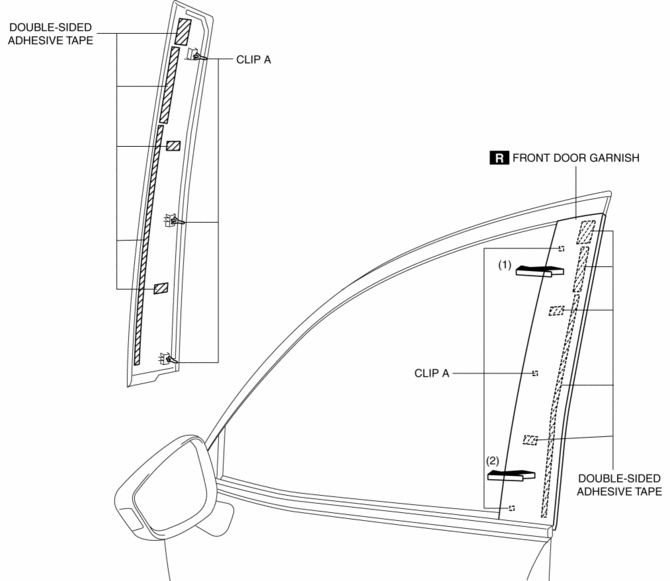
3. Install in the reverse order of removal.
 Front Door Checker Removal/Installation
CAUTION:
When the front door checker securing bolts are removed, the front door may
open until it contacts the front fender panel causing the front door and the
front fender panel to be ...
 Front Door Hinge Removal/Installation
1. Disconnect the negative battery cable..
2. Remove the following parts:
a. Front bumper.
b. Front combination light.
c. Front bumper slider.
d. Front over fender.
e. Front fender panel. ...
Other materials:
Crash Zone Sensor [Standard Deployment Control System]
Purpose
The crash zone sensor detects an impact during a frontal or frontal offset
collision to the vehicle.
Function
The crash zone sensor converts the detected impact to an electrical signal.
Construction
The crash zone sensor is built into the clutch sensor.
...
Climate Control Unit Disassembly/Assembly [Manual Air Conditioner]
1. Disassemble in the order indicated in the figure.
1
Dial
2
Airflow mode wire
(See Wire Removal Note.)
(See Wire Installation Note.)
3
Air mix wire
(See Wire Removal Note.)
(See Wire Installation Note ...
Back Up Light Switch Inspection
1. Disconnect the negative battery cable..
2. Remove the front under cover No.2..
3. Remove the back-up light switch..
4. Verify that the continuity between the back-up light switch terminals is as
indicated in the table.
If not as indicated in the table, replace the back-up ...
