
Mazda CX-5 Service & Repair Manual: Front Console Box Removal/Installation
NOTE:
-
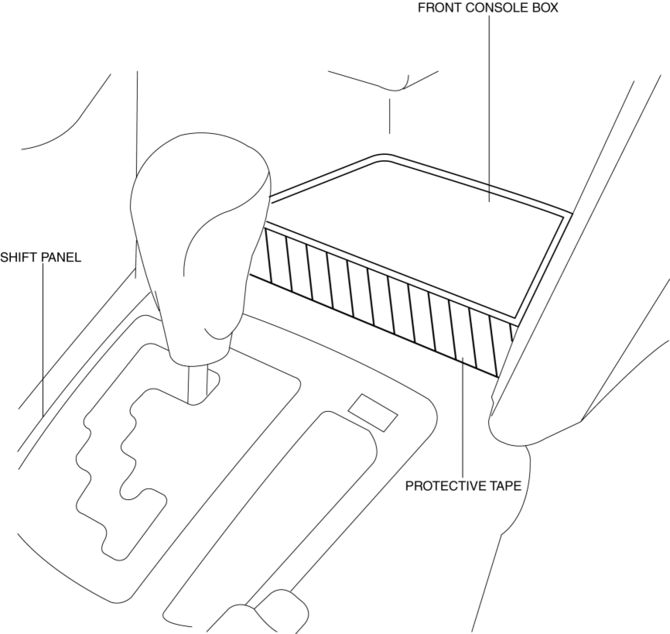
Affix protective tape to the position shown in the figure.
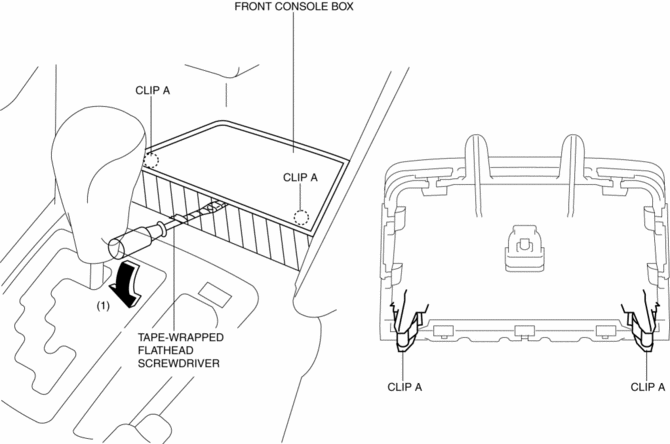
1. Insert a tape-wrapped flathead screwdriver in the position indicated by the arrow in the figure and detach clips A.
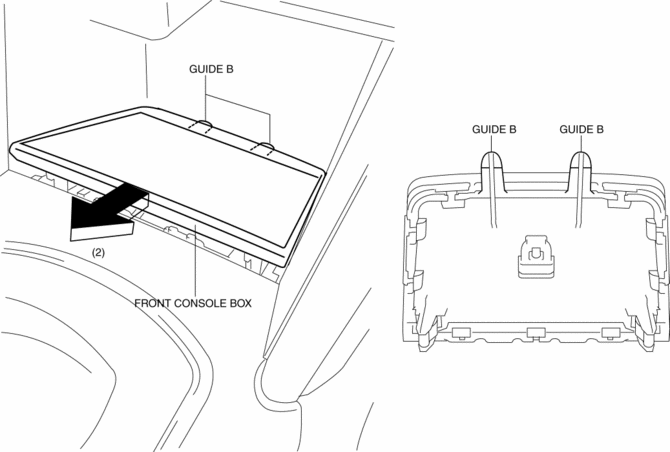
2. Pull the front console box in the direction of the arrow (2) and remove it while detaching the guides B.
NOTE:
-
When the occur to gap between the front console box and shift panel, remove the shift panel then assemble to the front console box. after install the front console box and shift panel as single unit.
3. Install in the reverse order of removal.
 Assist Handle Removal/Installation
Removal
1. Insert a tape-wrapped flathead screwdriver into the service hole and remove
the assist handle covers.
2. Remove the assist handle in the direction of the arrow (1) and (2), while
...
 Front Console Removal/Installation
CAUTION:
Affix protective tape to the position shown in the figure.
1. Disconnect the negative battery cable..
2. Remove the following parts:
a. Decoration panel.
b. Shift l ...
Other materials:
Front Seat Removal/Installation
WARNING:
Handling a side air bag improperly can accidentally operate (deploy) the
air bag, which may seriously injure you. Read the service warnings/cautions
in the Workshop Manual before handling the front seat (side air bag integrated)..
If the sliding mechanisms on both side ...
Rear ABS Wheel Speed Sensor Removal/Installation
1. Remove the trunk board..
2. Remove the trunk end trim..
3. Remove the rear scuff plate..
4. Remove the trunk side trim..
5. Disconnect the rear ABS wheel-speed sensor connector.
6. Press the rear ABS wheel-speed sensor tabs and press out the sensor toward
the outside of the vehicl ...
Rear Drive Shaft Removal/Installation
CAUTION:
Performing the following procedures without first removing the ABS wheel?speed
sensor may possibly cause an open circuit in the harness if it is pulled by
mistake. Before performing the following procedures, remove the ABS wheel?speed
sensor (wheel side) and fix it to an ap ...
